


Overview
Privacy-First Screen Recording Studio. No Sign Up, No Payment, No Cloud.
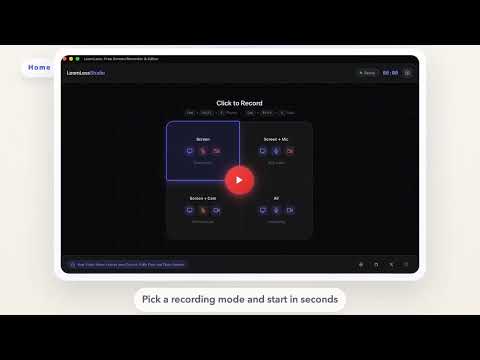
🎬 LoomLess - Privacy-First Screen Recording Studio Record instantly. Control recordings from anywhere. Edit locally. YOUR VIDEO NEVER LEAVES YOUR DEVICE. ━━━━━━━━━━━━━━━━━━━━━━━━━━━━━━━━━━━━━━━━━━━━━━━━ ✨ WHY LOOMLESS? Most screen recorders push sign-ups, subscriptions, cloud uploads, and unnecessary friction. LoomLess is built differently. ✅ 100% FREE - No premium tiers, no hidden costs ✅ 100% PRIVATE - Your recordings stay on your device ✅ 100% LOCAL - Recording and editing happen locally ✅ NO ACCOUNT REQUIRED - Start instantly ✅ OPEN SOURCE - Built in the open WEBSITE: https://loomless.fun SOURCE CODE: https://github.com/moayaan1911/loomless ━━━━━━━━━━━━━━━━━━━━━━━━━━━━━━━━━━━━━━━━━━━━━━━━ 🆕 NEW IN V5 • Refreshed Recorder UI - Cleaner, more focused recording experience • New Editor UI - Mac-style editing flow now matched in Chrome • Floating Recording Controls - Pause, resume, and stop without returning to the recorder tab • Cross-Page Controls - Recording controls stay available across browser pages • Better Camera Overlay - Improved face-cam behavior while recording • General Polish - Faster, smoother, more consistent workflow ━━━━━━━━━━━━━━━━━━━━━━━━━━━━━━━━━━━━━━━━━━━━━━━━ 🎥 RECORDING FEATURES • One-Click Recording - Start instantly from the popup • Flexible Capture - Record your screen, browser tab, or app window • System Audio - Capture tab or screen audio when supported by Chrome • Microphone Support - Record narration while presenting • Multiple Modes - Screen, Screen + Mic, Screen + Cam, or Screen + Cam + Mic • High Quality - Sharp recording at native resolution • Lightweight - Minimal friction, minimal overhead ━━━━━━━━━━━━━━━━━━━━━━━━━━━━━━━━━━━━━━━━━━━━━━━━ 📷 SMART CAMERA OVERLAY • Camera Bubble - Show your webcam as a draggable overlay • Drag to Position - Place it where it feels right • Floating While Recording - Keep your face-cam visible across pages • Better Recording Flow - Pause, resume, and stop from floating controls • Works with Recording Modes - Smoothly fits screen, mic, cam, and combo flows ━━━━━━━━━━━━━━━━━━━━━━━━━━━━━━━━━━━━━━━━━━━━━━━━ 🎞️ BUILT-IN VIDEO EDITOR • Trim & Cut - Remove unwanted parts • Free Crop - Focus on the exact part of the screen you need • Speed Control - Adjust playback speed • Live Preview - Review edits before download • MP4 Export - Clean local export with no upload step • Local Processing - Editing stays on your device ━━━━━━━━━━━━━━━━━━━━━━━━━━━━━━━━━━━━━━━━━━━━━━━━ 🔒 PRIVACY PROMISE • NO account required - Use it instantly • NO cloud uploads - Videos stay on your device • NO tracking of your recordings • NO watermarks • NO locked core features ━━━━━━━━━━━━━━━━━━━━━━━━━━━━━━━━━━━━━━━━━━━━━━━━ 💡 PERFECT FOR 👨💻 Developers - Bug reports, demos, walkthroughs 👨🏫 Educators - Tutorials, lessons, explainers 👨💼 Professionals - Presentations, async updates, feedback 🎮 Creators - Content capture and quick edits ━━━━━━━━━━━━━━━━━━━━━━━━━━━━━━━━━━━━━━━━━━━━━━━━ 🚀 HOW TO USE 1. Click the LoomLess icon in your toolbar 2. Choose your recording mode 3. Select your screen, tab, or window 4. Record with mic and camera if needed 5. Use floating controls to pause, resume, or stop 6. Edit and export locally ━━━━━━━━━━━━━━━━━━━━━━━━━━━━━━━━━━━━━━━━━━━━━━━━ 🛡️ YOUR PRIVACY MATTERS LoomLess is built for people who want a free screen recorder without account walls, forced uploads, or privacy tradeoffs. Your recordings are processed locally and saved directly to your device. We do not upload your videos, and we do not force cloud storage. ━━━━━━━━━━━━━━━━━━━━━━━━━━━━━━━━━━━━━━━━━━━━━━━━ ⭐ If you like LoomLess, please leave a review. It helps more people discover a privacy-first alternative. Built by Mohammad Ayaan Siddiqui Website: https://loomless.fun Support: https://moayaan.com/donate
5 out of 510 ratings
Details
- Version5.0.0
- UpdatedApril 20, 2026
- Size3.04MiB
- LanguagesEnglish
- DeveloperWebsite
Email
ayaangames@gmail.com - Non-traderThis developer has not identified itself as a trader. For consumers in the European Union, please note that consumer rights do not apply to contracts between you and this developer.
Privacy

This developer declares that your data is
- Not being sold to third parties, outside of the approved use cases
- Not being used or transferred for purposes that are unrelated to the item's core functionality
- Not being used or transferred to determine creditworthiness or for lending purposes
Support
For help with questions, suggestions, or problems, visit the developer's support site