


總覽
Boosting Looker Studio (formerly Google Data Studio) user interface & features to improve your productivity & reports performance
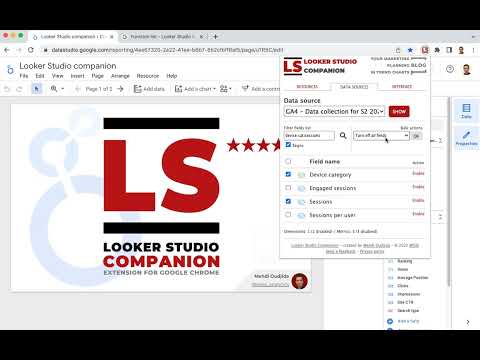
Looker Studio companion is a free extension for Google Chrome browser. It is created to help users building reports and dashboards inside what is formerly known as Google Data Studio. This plugin boosts Looker Studio user interface and features to improve your productivity & reports performance. For this first version, LS companion includes the following features. * Resources The first tab proposes resources links we frequently need when we work on Looker Studio: - Functions reference to build calculated fields - Regex checker to test regular expressions for our chart filters or formula functions - Date formats reference - Unicode characters - Icon library - …but also, as secondary resources… - Looker Studio help - Measure Slack channel dedicated to Looker Studio - LS bug trackers - Looker Studio release notes - Google Cloud Services Status * Data sources : Fields management A good Looker Studio data source is a data source listing only relevant fields for your report or because of your measurement scope. The second tab allows to load your data source fields, filter them, disable/enable/rename through bulk actions: - Dropdown menu to select one of your report data sources - Button to show the related fields - Form field to filter the list by field name (with or without regular expression) - Bulk actions to disable or enable selected or all fields - A form to update names and descriptions by import - Fields list for selection or unitary activation/deactivation - Footer with a count summary of dimensions and metrics * Settings 4 options are available in this tab: - Widen the chart formula field with you need more space to write your calculated field - Display field names in style tab for table charts - (new v.0.8) Expandable sections in style tab - Obfuscations options - Obfuscate text content of all Looker Studio interface - Mix text values of your charts - Mix numeric values of your charts
5 分 (滿分 5 分)5 個評分
詳細資料
隱私權

「Looker Studio Companion」已揭露下列關於收集及使用資料的資訊。 如需更多詳細資訊,請參閱開發人員的《privacy policy》。
Looker Studio Companion 會處理下列資料:
這位開發者就你的資料做出下列聲明:
- 除經核准的用途外,不會將你的資料販售給第三方
- 不會基於與商品核心功能無關的目的,使用或轉移資料
- 不會為了確認信用度或基於貸款目的,使用或轉移資料
支援
如有疑問或建議,請前往開發人員的支援網站