


개요
Boosting Looker Studio (formerly Google Data Studio) user interface & features to improve your productivity & reports performance
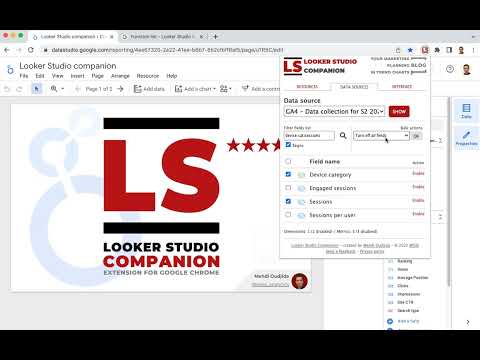
Looker Studio companion is a free extension for Google Chrome browser. It is created to help users building reports and dashboards inside what is formerly known as Google Data Studio. This plugin boosts Looker Studio user interface and features to improve your productivity & reports performance. For this first version, LS companion includes the following features. * Resources The first tab proposes resources links we frequently need when we work on Looker Studio: - Functions reference to build calculated fields - Regex checker to test regular expressions for our chart filters or formula functions - Date formats reference - Unicode characters - Icon library - …but also, as secondary resources… - Looker Studio help - Measure Slack channel dedicated to Looker Studio - LS bug trackers - Looker Studio release notes - Google Cloud Services Status * Data sources : Fields management A good Looker Studio data source is a data source listing only relevant fields for your report or because of your measurement scope. The second tab allows to load your data source fields, filter them, disable/enable/rename through bulk actions: - Dropdown menu to select one of your report data sources - Button to show the related fields - Form field to filter the list by field name (with or without regular expression) - Bulk actions to disable or enable selected or all fields - A form to update names and descriptions by import - Fields list for selection or unitary activation/deactivation - Footer with a count summary of dimensions and metrics * Settings 4 options are available in this tab: - Widen the chart formula field with you need more space to write your calculated field - Display field names in style tab for table charts - (new v.0.8) Expandable sections in style tab - Obfuscations options - Obfuscate text content of all Looker Studio interface - Mix text values of your charts - Mix numeric values of your charts
5점 만점에 5점평점 5개
세부정보
개인정보 보호
Looker Studio Companion에서 데이터 수집 및 사용과 관련하여 다음 정보를 공개했습니다. 더 자세한 정보는 개발자의 privacy policy을 참고하세요.
Looker Studio Companion 항목은 다음을 처리합니다.
개발자가 사용자 데이터에 관해 다음과 같이 선언했습니다
- 승인된 사용 사례를 제외하고 서드 파티에 판매하지 않음
- 항목의 핵심 기능과 관련 없는 목적으로 사용하거나 전송하지 않음
- 신용도 판단 또는 대출 목적으로 사용하거나 전송하지 않음
지원
질문, 제안 또는 문제와 관련하여 도움이 필요하시면 개발자의 지원 사이트를 방문하세요.