

Lock In
2 ratings
)
Overview
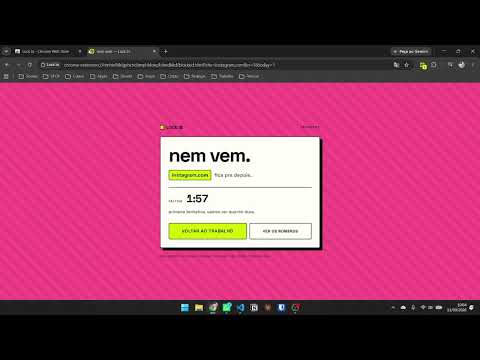
Locks the sites that derail you for as long as you choose - and counts every time you try to sneak back.
Pick the sites that derail you. Pick how long. Lock In shuts them for exactly that long - and counts every time you tried to sneak back. That count is the point. Most blockers tell you no and move on. This one keeps the receipt, so at the end of a session you know whether you sat down and worked or reached for the same tab nine times in forty minutes. — Set a timer from five minutes to a few hours, pause it, or stop early — Every blocked attempt is counted per site, and the block page tells you the number to your face — A summary screen with your sessions, your daily totals, and where the impulse actually goes — English, Português and Español, switchable from the popup No account. No sign-up. No servers, no analytics, no telemetry - the extension makes no network requests whatsoever, and it asks for no permission to read the pages you visit. Your list and your statistics stay on your machine. Free and open source: github.com/bernardomcma/lockin-chrome-extension
5 out of 52 ratings
Details
- Version1.0.4
- UpdatedSeptember 17, 2026
- Offered bybernardomcma
- Size92.39KiB
- Languages3 languages
- Developer
Email
contact@bernardomcma.dev - Non-traderThis developer has not identified itself as a trader. For consumers in the European Union, please note that consumer rights do not apply to contracts between you and this developer.
Privacy

This developer declares that your data is
- Not being sold to third parties, outside of the approved use cases
- Not being used or transferred for purposes that are unrelated to the item's core functionality
- Not being used or transferred to determine creditworthiness or for lending purposes
Support
For help with questions, suggestions, or problems, visit the developer's support site