


Overview
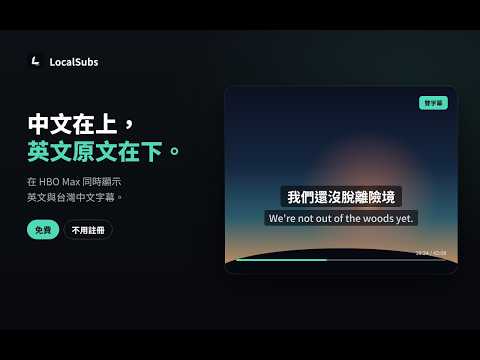
English and Traditional Chinese dual subtitles for YouTube and HBO Max, translated locally on Mac and Windows.
LocalSubs 讓你在 YouTube 和 HBO Max 同時看到英文原文和台灣繁中字幕。中文在上、英文在下,兩行同時出現,不用在兩種字幕之間切換。 支援 macOS 和 Windows 上的 Chrome、Edge 與其他 Chromium 瀏覽器。 ■ 為什麼需要雙字幕 串流平台大多一次只能開一種字幕。只開英文,聽不懂的地方就跟不上劇情;只開中文,又少了接觸原文的機會。LocalSubs 把兩種字幕放在一起:英文照原句保留,台灣繁中翻譯補上沒聽懂的地方。 翻譯用的是針對台灣用語調整過的模型,「影片」不會變成「視頻」,「軟體」不會變成「軟件」,口語也會翻成台灣人平常的說法。在我們對決評測裡每100 句影視字幕,商用翻譯模型 DeepL 只比 LocalSubs 多贏 6 句。 ■ 支援的平台 ・YouTube:一般影片和 Shorts,只要有英文字幕就能用,包括 YouTube 自動產生的字幕。自動字幕原本是幾個字幾個字滾動出現,LocalSubs 會先重新斷成完整的句子再翻譯,讀起來不會一句話被切成好幾段。 ・HBO Max:開啟英文字幕即可。 更多平台會陸續加入。 ■ 怎麼用 1. 安裝擴充功能。 2. 打開設定頁,下載翻譯模型。第一次需要幾分鐘,之後就不用再下載。 3. 打開 YouTube 或 HBO Max,開英文字幕、按播放,中文就會出現在英文上面。 ■ 功能 ・中英雙字幕同時出現,翻譯好之後一起顯示,不會先跳英文再補中文 ・播放器裡有 LocalSubs 小面板,可以直接開關翻譯、調字幕大小和背景透明度,全螢幕也能用 ・字幕可以拖曳到你習慣的位置 ・兩種翻譯模式:流暢模式反應快、適合大多數電腦;精準模式翻得更好,適合效能比較好的電腦 ・翻譯會參考前後幾句對白,代名詞和語氣比較不會翻錯 ・不用註冊帳號,裝好就能用 ■ 適合誰 ・想看美劇、YouTube 學英文,又不想因為聽不懂而跟不上的人 ・英文不錯,但偶爾想確認某句台詞意思的人 ・和家人朋友一起看,有人習慣看中文、有人習慣看英文 ■ 常見問題 Q:我的電腦跑得動嗎? 近幾年的 Mac 和大部分 Windows 筆電都可以。如果瀏覽器不支援,設定頁會提示你改裝桌面元件,沒有獨立顯示卡也能用 CPU 翻譯。 Q:影片沒有英文字幕可以用嗎? 不行。LocalSubs 是翻譯影片本身的英文字幕,影片要先有英文字幕(YouTube 的自動字幕也可以)。 Q:要付費或註冊嗎? 不用。LocalSubs 是開源的研究專案,沒有付費版,也沒有廣告。 Q:翻譯在哪裡做? 在你自己的電腦上。字幕文字不會傳送到外部的翻譯服務。 Q:支援哪些瀏覽器? macOS 和 Windows 上的 Chrome、Microsoft Edge,以及其他 Chromium 瀏覽器。 ■ 開源 程式碼、翻譯模型和技術報告都公開: https://github.com/aiden1020/localsubs 官網:https://localsubs.aidenw.me LocalSubs shows English and Traditional Chinese (Taiwan) dual subtitles on YouTube and HBO Max. Turn on English captions and press play: a Chinese line appears above the English one. It works with YouTube videos and Shorts, including auto-generated captions, which LocalSubs re-segments into full sentences before translating. Translation runs on your own computer with a model tuned for Taiwanese usage. No account needed. Open source.
0 out of 5No ratings
Details
- Version0.7.1
- UpdatedOctober 30, 2026
- Size4.03MiB
- Languages中文(台灣)
- DeveloperWebsite
Email
tsztowong@gmail.com - Non-traderThis developer has not identified itself as a trader. For consumers in the European Union, please note that consumer rights do not apply to contracts between you and this developer.
Privacy

This developer declares that your data is
- Not being sold to third parties, outside of the approved use cases
- Not being used or transferred for purposes that are unrelated to the item's core functionality
- Not being used or transferred to determine creditworthiness or for lending purposes