Item logo image for LocalPDF - Private PDF Companion

LocalPDF - Private PDF Companion

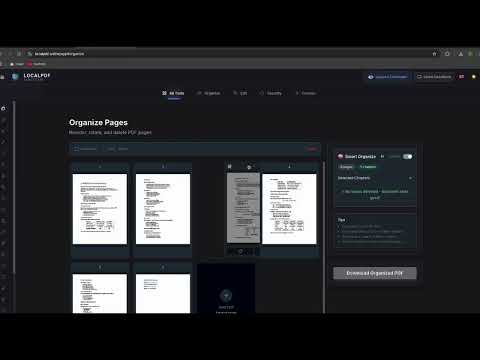
Item media 3 (screenshot) for LocalPDF - Private PDF Companion
Item video thumbnail
Item media 2 (screenshot) for LocalPDF - Private PDF Companion
Item media 3 (screenshot) for LocalPDF - Private PDF Companion
Item video thumbnail
Item media 2 (screenshot) for LocalPDF - Private PDF Companion
Item media 3 (screenshot) for LocalPDF - Private PDF Companion

Overview

Privacy-first PDF tools directly in your browser.

Privacy-First PDF Tools: Merge, Split, Compress, and Secure — All 100% Local. LocalPDF is the ultimate browser companion for anyone working with PDF documents. Whether you need to merge reports, compress invoices, or protect sensitive data, LocalPDF does it all directly in your browser without ever uploading your files to the cloud. WHY USE LocalPDF? Most online PDF tools require you to upload your documents to their servers. LocalPDF changes that. By using advanced client-side technology, all processing happens on your machine. Your sensitive data stays private, secure, and never leaves your computer. CORE FEATURES: • Merge & Split: Combine multiple PDFs into one or extract specific pages instantly. • Smart Compression: Reduce file sizes for easier sharing without losing essential quality. • Security & Privacy: Add password protection to your PDFs or remove restrictions from your own files. • Image to PDF: Convert JPG, PNG, and other images into professional PDF documents. • Organize Pages: Rotate, reorder, or delete pages with a simple, intuitive interface. • Local OCR: Generate searchable text within your PDFs using local processing. TOP ADVANTAGES: Total Privacy: No cloud uploads. Perfect for legal, financial, and personal documents. Lightning Fast: No waiting for uploads or downloads. Processing is near-instant. Works Offline: Since everything is local, you can manage your PDFs even without an internet connection. Seamless Integration: Access tools via a clean overlay or right-click any PDF link to start processing immediately. Experience the speed and security of local PDF processing today. Your files, your privacy, your control.

Details

  • Version
    2.0.1
  • Updated
    February 2, 2026
  • Size
    73.84KiB
  • Languages
    English
  • Developer
    "UL-COIN"
    Teiku iela 7 Jāņupe, Olaines pagasts, Olaines novads LV-2127 LV
    Website
    Email
    localpdfpro@gmail.com
  • Non-trader
    This developer has not identified itself as a trader. For consumers in the European Union, please note that consumer rights do not apply to contracts between you and this developer.

Privacy

The developer has disclosed that it will not collect or use your data. To learn more, see the developer’s privacy policy.

This developer declares that your data is

  • Not being sold to third parties, outside of the approved use cases
  • Not being used or transferred for purposes that are unrelated to the item's core functionality
  • Not being used or transferred to determine creditworthiness or for lending purposes

Related

SmallPDF Free Chrome Extension

3.7

With SmallPDF Free you can easily manage PDFs and images from your browser.

Image to PDF Converter : Save as Pdf

4.9

Save the current web page as a PDF file.

Web to PDF

4.8

Use Web to PDF converter to save a web page as a pdf and download it instantly. Perfect for offline reading and sharing.

OfflinePage: Your Privacy-first PDF Editor

4.0

Privacy-focused offline PDF editor and viewer that keeps your documents safe and secure

Download All PDFs

3.3

Download all PDF files from any website.

PDF Filler

3.9

Streamline document editing with PDF Filler, a Chrome Extension to effortlessly fill out PDF and fill in PDF forms online.

PDF Divider

1.0

Split PDF files into individual pages. Easy PDF page extraction tool. Download separated pages in ZIP format. Works offline.

PDFgear: PDF Read, Edit & Convert

5.0

Web extension helps you quickly open the PDFgear online tools.

Online PDF Signature

5.0

Sign directly on PDFs and adjust the size and thickness of your signature brush. All operations are local, ensuring your privacy.

Foxit PDF Editor Cloud: Edit and Convert

3.0

Improve your productivity and simplify online PDF processing with Foxit's Chrome extension.

Merge PDF

3.5

Merge PDF Files Online

Webpage to PDF by cloudHQ

5.0

Convert web pages and web articles to PDF documents.

SmallPDF Free Chrome Extension

3.7

With SmallPDF Free you can easily manage PDFs and images from your browser.

Image to PDF Converter : Save as Pdf

4.9

Save the current web page as a PDF file.

Web to PDF

4.8

Use Web to PDF converter to save a web page as a pdf and download it instantly. Perfect for offline reading and sharing.

OfflinePage: Your Privacy-first PDF Editor

4.0

Privacy-focused offline PDF editor and viewer that keeps your documents safe and secure

Download All PDFs

3.3

Download all PDF files from any website.

PDF Filler

3.9

Streamline document editing with PDF Filler, a Chrome Extension to effortlessly fill out PDF and fill in PDF forms online.

PDF Divider

1.0

Split PDF files into individual pages. Easy PDF page extraction tool. Download separated pages in ZIP format. Works offline.

PDFgear: PDF Read, Edit & Convert

5.0

Web extension helps you quickly open the PDFgear online tools.

Google apps