

Local Tab

Overview
Your personal new tab dashboard powered by your real bookmarks
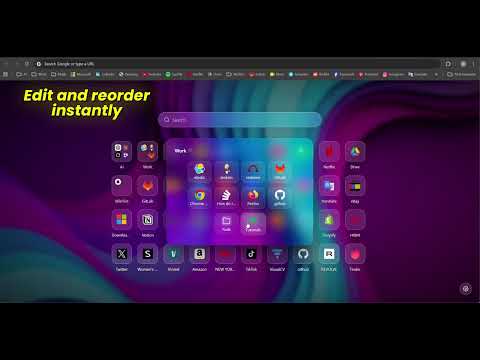
Local Tab replaces the default new tab page with a spacious, elegant layout inspired by glassmorphism: soft transparency, subtle blur, and layered depth. Your bookmarks bar becomes a clean, customizable grid that feels modern and effortless to use. Key Features Real bookmark integration — Local Tab automatically reads your browser’s bookmarks bar and displays it as a structured, visually clean grid. Editable grid — rename, remove or reorder bookmarks directly in the interface using intuitive drag‑and‑drop controls. Keyboard shortcut launcher — open your bookmark grid on any website using a configurable shortcut (Ctrl+Shift+Z by default). Instant navigation without leaving the page. Glassmorphic design — a refined aesthetic with soft transparency, depth, and blur effects that make your new tab feel light, modern, and premium. Custom backgrounds — personalize your new tab with an image, browser color, vignette, blur, or transparency to match your style. More space, same bookmarks — hide your browser’s bookmarks bar and keep full access to everything through Local Tab. A cleaner, more spacious browsing experience. Minimalist interface — no widgets, no ads, no distractions. Just your bookmarks, beautifully organized.
0 out of 5No ratings
Details
- Version4.1.0
- UpdatedJune 11, 2026
- Offered bynovalabsdevelopment
- Size52.79KiB
- LanguagesEnglish
- Developer
Email
novalabsdevelopment@gmail.com - Non-traderThis developer has not identified itself as a trader. For consumers in the European Union, please note that consumer rights do not apply to contracts between you and this developer.
Privacy

This developer declares that your data is
- Not being sold to third parties, outside of the approved use cases
- Not being used or transferred for purposes that are unrelated to the item's core functionality
- Not being used or transferred to determine creditworthiness or for lending purposes