

Local PDF Tools: Merge, Compress, Redact

Overview
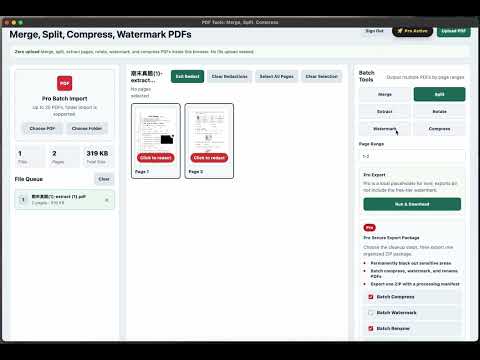
Merge, split, compress, watermark, redact, and batch-clean PDFs locally. Export secure PDF packages without uploading files.
Local PDF Tools: Merge, Compress, Redact Handle everyday PDF cleanup directly in your browser without uploading files. This extension helps you merge PDFs, split pages, extract selected pages, rotate documents, add watermarks, compress files, redact sensitive information, and prepare PDFs before sharing. Use it when you need to: - Combine multiple PDFs into one file - Split a large PDF into smaller documents - Extract only the pages you need - Rotate scanned or sideways pages - Add a text watermark before sending - Compress PDFs for email or upload - Black out private details like names, IDs, prices, addresses, or account numbers - Batch-clean multiple PDFs and export them as one secure package Your files stay on your device. All processing happens locally in the browser, so you do not need to upload contracts, invoices, reports, resumes, or private documents to random online PDF websites. Free users: can handle basic single-PDF tasks. Pro users: unlock batch processing, folder import, no file size limit, no footer mark, batch rename, metadata cleanup, sensitive information redaction, and one-click secure ZIP export. The result is simple: cleaner, smaller, safer PDFs that are ready to send.
5 out of 51 rating
Details
- Version0.0.7
- UpdatedSeptember 5, 2026
- Size840KiB
- Languages2 languages
- Developer
- Non-traderThis developer has not identified itself as a trader. For consumers in the European Union, please note that consumer rights do not apply to contracts between you and this developer.
Privacy

This developer declares that your data is
- Not being sold to third parties, outside of the approved use cases
- Not being used or transferred for purposes that are unrelated to the item's core functionality
- Not being used or transferred to determine creditworthiness or for lending purposes
Support
For help with questions, suggestions, or problems, please open this page on your desktop browser