


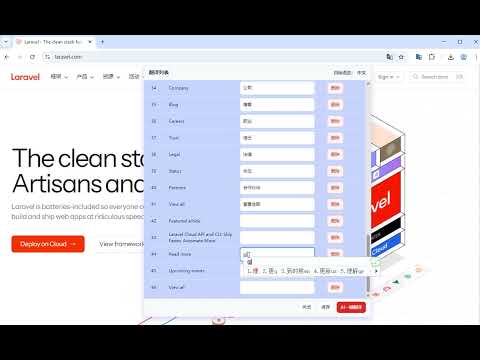
Overview
Click to translate and save webpage text. Auto reuse saved translations when the same content appears again.
# ✨ Why Use Local Layer When browsing foreign-language websites, people often need to repeatedly translate the same kinds of content, such as: * Terms in technical documentation * Common error messages * API descriptions * Repeated expressions in tutorials With traditional methods, this work is repeated over and over. Local Layer makes each piece of content need to be translated only once. **Translate once, then reuse automatically.** --- # 🚀 Core Features ## Click to Translate After enabling translation mode, just click text on any webpage to view the translation directly—no copy-paste and no leaving the current page. --- ## Translate Once, Reuse Forever Translations are saved. When the same text appears again, the system automatically uses the existing translation. --- ## Automatically Build a Personal Translation Library Every translation becomes part of your personal translation library. Over time, more and more content can be reused automatically. --- ## Floating Translation Display Translations are displayed in a floating overlay on the webpage. It doesn’t interrupt your reading flow and doesn’t alter the original page content. --- ## Import and Export Translation Data Local Layer supports exporting saved translations **as files**, so you can back them up or move them to another device. It also supports **importing translation data**, so you can quickly restore your previous translation records. --- ## Translation Library Sharing Users can export and share their translation results with others. By importing shared data, others can directly reuse existing translations and avoid duplicate translation work. This allows translations to be accumulated not only individually, but also shared across teams or communities. --- ## Works on Any Website Local Layer works on most websites, including: * Technical documentation * Developer communities * Online tutorials * Blog posts * Software admin dashboards Wherever you read foreign-language content, you can use it directly. --- # 🖱 How to Use 1. Open the extension and enable translation mode 2. Click the text you want to translate on the webpage 3. View the translation result 4. Save the translation 5. When the same text appears again, it is reused automatically --- # 📈 Results Over Time After using Local Layer for a while, you’ll notice: * More and more content no longer needs to be translated again * Your reading speed on foreign-language websites improves significantly * Common terms and phrases are translated automatically The more you translate, the more useful the system becomes. --- # 🌍 Vision Local Layer’s goal is to make web reading more efficient by helping users build their own translation knowledge base during normal browsing. Ultimately: **Translate once, reuse forever.**
0 out of 5No ratings
Details
- Version1.0.1
- UpdatedMarch 20, 2026
- Size666KiB
- Languages15 languages
- DeveloperWebsite
Email
lihouguanggreat@gmail.com - Non-traderThis developer has not identified itself as a trader. For consumers in the European Union, please note that consumer rights do not apply to contracts between you and this developer.
Privacy

This developer declares that your data is
- Not being sold to third parties, outside of the approved use cases
- Not being used or transferred for purposes that are unrelated to the item's core functionality
- Not being used or transferred to determine creditworthiness or for lending purposes