

LoadSnap — One-Click Broker Emails from Your Load Board
2 ratings
)
Overview
Send broker emails in one click from DAT, Truckstop and LoadLink. Save loads, call contacts, and keep a record of every send.
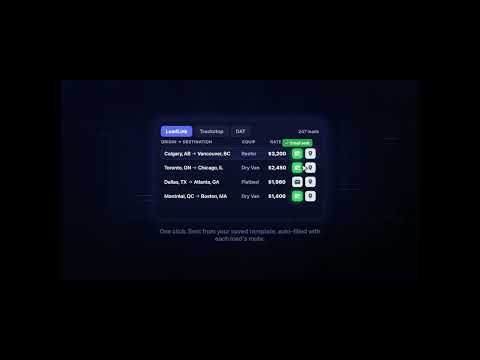
You found the load at 7:04. By the time you've retyped the lane, the equipment and your MC number into an email, someone else has replied. LoadSnap puts the email on the row. Hover any posting on DAT, Truckstop or LoadLink and send a complete, personalised broker email in one click — origin, destination, rate, equipment, reference number and your signature already filled in. No copying. No retyping. No switching tabs. ⚡ WHAT YOU CAN DO FROM THE ROW 📩 Email in one click — your template, load details already merged in 🔖 Save the load — bookmark it before the broker pulls the posting 📞 Call the broker — the number read straight off the posting 🗺 Map the lane — open origin to destination in Google Maps 📋 Copy — grab a phone number or address without retyping it 🚛 WORKS WHERE YOU ALREADY WORK • DAT • Truckstop • LoadLink — both the classic board and the new web board 📂 YOUR OWN RECORD OF EVERY LOAD A posting disappears the moment the broker covers it, and takes the rate, the reference number and the contact with it. LoadSnap keeps your copy. Every load you save or email is recorded at app.loadsnap.io with the board row exactly as it looked when you acted on it — Saved, Sent and Failed, filterable by board. The Failed tab is the one to watch. If your mailbox disconnects, a send can fail after you've clicked. LoadSnap shows you which brokers never heard from you, instead of leaving you wondering why nobody replied. ✨ AI EMAIL ASSISTANT Rewrite and polish any load email before it goes out. Rich text editor, links, formatting, and your professional signature on every send. 🛠 HOW IT WORKS 1. Add LoadSnap to Chrome 2. Sign in — no credit card 3. Set up your email template once 4. Open DAT, Truckstop or LoadLink and start sending 📋 WHAT YOU NEED LoadSnap works on top of your existing load board account. You'll need access to DAT, Truckstop or LoadLink for the extension 💳 PRICING Free for 30 days, no credit card. $9.99/month after that. 📞 SUPPORT support@loadsnap.io
5 out of 52 ratings
Details
- Version1.6.2
- UpdatedSeptember 18, 2026
- Size11.21MiB
- LanguagesEnglish
- Developer
Email
loadsnap.io@gmail.com - Non-traderThis developer has not identified itself as a trader. For consumers in the European Union, please note that consumer rights do not apply to contracts between you and this developer.
Privacy

LoadSnap — One-Click Broker Emails from Your Load Board has disclosed the following information regarding the collection and usage of your data. More detailed information can be found in the developer's privacy policy.
LoadSnap — One-Click Broker Emails from Your Load Board handles the following:
This developer declares that your data is
- Not being sold to third parties, outside of the approved use cases
- Not being used or transferred for purposes that are unrelated to the item's core functionality
- Not being used or transferred to determine creditworthiness or for lending purposes
Support
For help with questions, suggestions, or problems, visit the developer's support site