

voiceappear: Smart Speech to Text Dictation & Voice Typing

Overview
Voice typing on any website. Hold a shortcut, speak, and your words appear as clean, ready-to-send text.
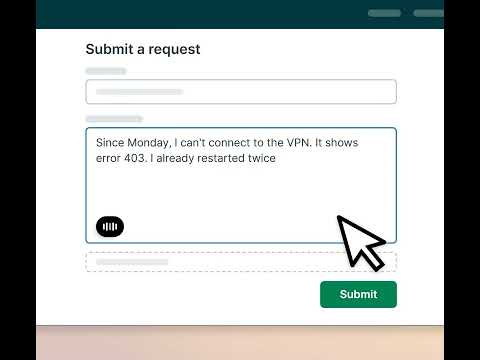
voiceappear is a voice typing extension for Chrome. Hold a keyboard shortcut, speak, and your words appear as clean, typed text in the field you're focused on. Fast speech to text dictation on any website. CLEAN TEXT, NOT A RAW TRANSCRIPT VoiceAppear types what you actually meant to write. Its AI only fixes the small things you would have fixed yourself: stutters, filler words, mid-sentence corrections, and missing punctuation. Nothing gets rewritten. No buttons to click and no tab to switch to: dictation starts the instant you press the shortcut, and your text is typed right at your cursor. A live waveform shows whenever VoiceAppear is listening, so the mic is never on without you seeing it. HOW IT WORKS 1. Click into any text field on any website. 2. Hold Ctrl+Alt (Control+Command on Mac) and speak. 3. Release when you're done. Your words appear as text, ready to send. Prefer talking without holding keys? While holding the shortcut, tap Space to switch to hands-free dictation, and end it when you're done. WORKS EVERYWHERE YOU TYPE Write emails, documents, chat messages, support replies, comments, and AI prompts. VoiceAppear types into the focused text field on any website, including Gmail, Google Docs, ChatGPT, Claude, and LinkedIn. No copy-paste, no app switching. SPEAKS YOUR LANGUAGE Dictate in English or in your browser's language. VoiceAppear detects your language automatically, and it runs on the same engine as our desktop app, which supports 90+ languages. ALSO ON YOUR DESKTOP VoiceAppear is also a dictation app for Windows and Mac that types wherever your cursor is, in any app, not just the browser. Get it at voiceappear.de. GET STARTED 1. Add VoiceAppear to Chrome. 2. Follow the short guided setup. 3. Hold the shortcut and talk. Watch your words appear. Questions or ideas? help@voiceappear.de
5 out of 521 ratings
Details
- Version1.0.8
- UpdatedSeptember 14, 2026
- Size828KiB
- LanguagesEnglish
- DeveloperFalk AlthausWebsite
Füssener Str. 62 Kempten (Allgäu) 87437 DEEmail
help@voiceappear.dePhone
+49 1511 2951714 - TraderThis developer has identified itself as a trader per the definition from the European Union and committed to only offer products or services that comply with EU laws.
Privacy

voiceappear: Smart Speech to Text Dictation & Voice Typing has disclosed the following information regarding the collection and usage of your data. More detailed information can be found in the developer's privacy policy.
voiceappear: Smart Speech to Text Dictation & Voice Typing handles the following:
This developer declares that your data is
- Not being sold to third parties, outside of the approved use cases
- Not being used or transferred for purposes that are unrelated to the item's core functionality
- Not being used or transferred to determine creditworthiness or for lending purposes
Support
For help with questions, suggestions, or problems, visit the developer's support site