


Overview
Take screenshots of the visible area, full page, selected region, or specific element. Save as PNG, JPG, or PDF.
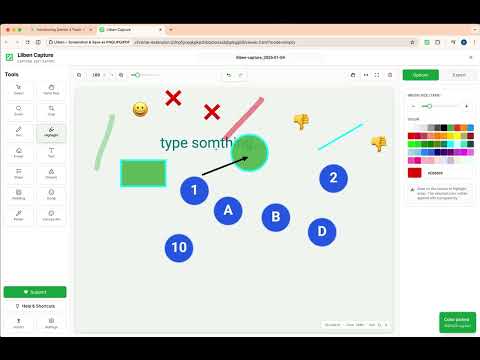
Lliben — Screen Capture & Full Page Screenshot (Privacy-First) Lliben is a fast, clean Chrome screenshot extension for screen capture, full page screenshot, and scrolling screenshot. Capture what you need, edit it, and export it with a simple workflow and privacy-first design. Capture. Edit. Export. WHY CHOOSE LLIBEN • No account / no login: install and start capturing instantly. • No watermark: your screenshots stay yours. • Local processing: captures are processed on your device. • Lightweight UI: no bloated panels or confusing steps. CAPTURE MODES (4) • Visible area: instant capture of what’s on your screen right now. • Full page screenshot (scrolling): reliable full-page capture for long and dynamic pages. • Selected area: click and drag to capture an exact region (charts, receipts, paragraphs). • Element picker: hover and click to capture a specific element without manual cropping. EDITOR (POST-CAPTURE) After capture, Lliben opens Lliben Capture where you can: • Crop and adjust composition • Add text, shapes, and highlights • Add numbered steps (1, 2, 3…) for tutorials and guides • Pixelate / hide sensitive information • Add padding (white or transparent) EXPORT FORMATS • PNG: best for sharp UI and transparency • JPG: smaller file size • PDF: great for sharing and printing • PDF sizes: A4, Letter, and Custom (print-friendly pagination) ADVANCED TOOLS • Delay timer: capture dropdown menus, tooltips, and hover states. • Smart scrolling controls: adjust scroll speed/delay for lazy-loaded pages. • Quick actions: copy, export, or print in one click. PRIVACY & SAFETY • No watermark and no forced accounts. • Lliben respects browser security rules (Chrome internal pages like chrome:// and the Chrome Web Store can’t be captured by extensions). GOOD FOR • Documentation and SOPs (with numbered steps) • Tutorials, guides, and bug reports • Saving webpages as PDF (A4) • Designers and creators (padding + transparent exports) SUPPORT / FEEDBACK Lliben is an independent project. If something doesn’t work on a specific site, or you want a feature, please use the Support/Feedback options. I read everything and improve Lliben continuously.
5 out of 54 ratings
Details
- Version2.0.4
- UpdatedAugust 14, 2026
- Size1.03MiB
- Languages8 languages
- DeveloperWebsite
Email
contact@lliben.com - Non-traderThis developer has not identified itself as a trader. For consumers in the European Union, please note that consumer rights do not apply to contracts between you and this developer.
Privacy

This developer declares that your data is
- Not being sold to third parties, outside of the approved use cases
- Not being used or transferred for purposes that are unrelated to the item's core functionality
- Not being used or transferred to determine creditworthiness or for lending purposes
Support
For help with questions, suggestions, or problems, please open this page on your desktop browser