

Darshan Autofill

Overview
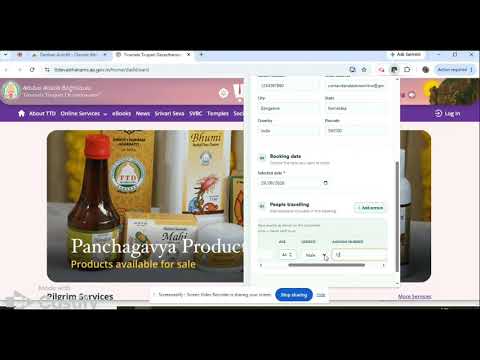
One-click autofill for TTD Darshan booking. Save details once, reuse every time. Shortcut keys for autofills and open popup.
Darshan Autofill – Features & Pricing Stop losing your TTD darshan slot to a slow form. Darshan Autofill fills your mobile number, Aadhar ID and every traveler's details on the TTD booking page the instant tickets open — so you spend those seconds clicking submit, not typing. 🚀 Free Features Mobile number autofill for faster login. 🔐 Pro Features – License Required A valid license is required for autofill support for: Special Entry Darshan Ammavari Temple bookings All Arjitha Seva bookings Srivani Trust donations ⌨️ Keyboard Shortcuts Alt + Shift + Y — Autofill login and pilgrim details Alt + Shift + U — Open Darshan Autofill popup ✨ What's New? Srivani Trust donation autofill support is now available! 💰 Affordable Pricing Pro features start at just ₹99. 🔒 Your Privacy Matters Your saved details stay on your device, helping keep your personal information secure. 📩 Need a Trial License? Contact our support email to request a trial license key. Make your TTD booking experience faster and easier with Darshan Autofill! 🙏 Release note 1.4.2 Fixed Arjitha Seva and Special Entry Gender and Id Type fill issue. Release note 1.4.3 Fixed Female gender fill issue. Updated shortcut keys. Release note 1.4.4 1) Added autofill support for Srivani Donation booking 2) New Tab form fields added for login email and password 3) Shortcut key fill of Srivani donation amount, checkboxes and pilgrim details
5 out of 51 rating
Details
- Version1.4.4
- UpdatedOctober 31, 2026
- FeaturesOffers in-app purchases
- Size71.09KiB
- LanguagesEnglish
- DeveloperWebsite
Email
contactkeralastoreonline@gmail.com - Non-traderThis developer has not identified itself as a trader. For consumers in the European Union, please note that consumer rights do not apply to contracts between you and this developer.
Privacy

This developer declares that your data is
- Not being sold to third parties, outside of the approved use cases
- Not being used or transferred for purposes that are unrelated to the item's core functionality
- Not being used or transferred to determine creditworthiness or for lending purposes
Support
For help with questions, suggestions, or problems, please open this page on your desktop browser