

LiveVerify
Overview
Verify selected text against issuer endpoints using SHA-256 hashing
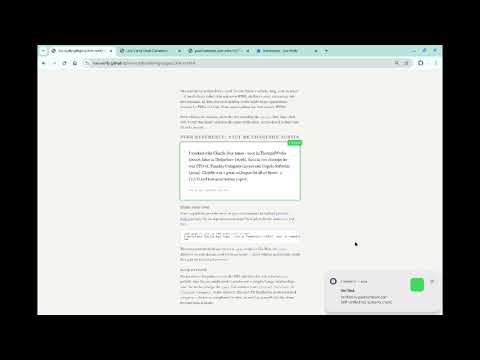
Live VerifyLiveVerify — Verify claims on web pages against issuer endpoints Select text on any web page, right-click "Verify this claim," and instantly check whether the issuer's own domain confirms it is authentic. No accounts, no server, no tracking. Everything runs locally in your browser. WHAT IT DOES LiveVerify lets you verify text claims — certificates, receipts, licenses, authorizations, credentials, disclosures — by computing a SHA-256 hash and checking it against the issuer's verification endpoint. The pipeline is simple: 1. You select text on a web page (or the extension auto-detects marked regions) 2. The extension normalizes the text and computes a SHA-256 hash 3. It sends a single HTTPS GET request to the issuer's domain with the hash in the URL path 4. The issuer responds: verified, revoked, expired, or 404 (not found) 5. You see the result: green for verified, red for failed, with the issuer's domain always visible No document content is ever sent to the issuer — only the hash. The hash is a one-way cryptographic function; it is mathematically infeasible to reconstruct the original text from it. HOW TO USE Right-click method: - Select text on a page that includes a "verify:" line - Right-click and choose "Verify this claim" - The result appears as a notification and in the popup Keyboard shortcut: - Select text, press Ctrl+Shift+V (Mac: Cmd+Shift+V) Auto-detect: - Pages can mark verifiable regions using HTML data attributes - If you enable auto-scan in settings, the extension finds and verifies these automatically - Auto-scan is off by default WHAT YOU SEE When verification succeeds, the extension shows: - The issuer's domain (e.g., verified by police.uk, fca.org.uk, nvidia.com) - The authority chain — who vouches for the issuer's authority to make this claim - The verification status (verified, revoked, expired, etc.) When verification fails: - 404 means the issuer never published this claim to verify it - The issuer domain is still visible so you can see who was asked AUTHORITY CHAINS LiveVerify doesn't just tell you "verified" — it shows you by whom and under what authority. An authority chain might look like: verified by northbridgemarkets.co.uk — Broker-issued withdrawal confirmations authorized by fca.org.uk — Regulates UK investment firms authorized by gov.uk — UK government root namespace This lets you judge not just whether a claim verified, but whether the issuer is credible for the type of claim being made. USE CASES LiveVerify Browser Extension works for any text claim where the issuer publishes verification hashes: - Professional credentials (medical licenses, bar admissions, engineering certifications) - Financial documents (bank statements, insurance certificates, payment receipts) - Employment and HR (proof of employment, reference letters, contractor authorizations) - Education (university degrees, professional certifications, training completion) - Consumer protection (reseller authorizations, insurance panel membership, franchise verification) - Legal documents (notarized documents, court orders, power of attorney) - Property (title deeds, ownership proofs) The extension does not require issuers to use any particular platform or service. Any organization can publish verification hashes on their own domain. The protocol is open and documented - GitHub-pages is a viable boostrapping choice. PRIVACY LiveVerify collects no data. There is no LiveVerify server — the extension runs entirely in your browser. When you verify a claim: - Selected text is processed locally and discarded after hashing - The only network request is a GET to the issuer's domain with the hash in the URL path - No personal data, page content, browsing history, or device identifiers are sent - The issuer's server may log the request (IP address, timestamp) — that is the issuer's privacy practice, not ours Settings (intrusiveness level, auto-scan preference) are stored locally in chrome.storage. No verification results are persisted. Full privacy policy: https://live-verify.github.io/live-verify/chrome-extension/privacy-policy.html PERMISSIONS AND WHY - contextMenus: Adds "Verify this claim" to the right-click menu - activeTab: Reads your text selection when you trigger verification - storage: Saves your settings locally - notifications: Shows verification results as browser notifications - scripting: Runs the content script that detects verifiable-text markers on pages - https://*/* (host permission): Fetches verification endpoints on any HTTPS domain — issuers can be any domain, so a fixed list is not possible OPEN SOURCE LiveVerify is fully open source under the Apache 2.0 license. The code is readable and unminified — the JavaScript that runs in your browser is the same code in the repository. No bundler, no obfuscation. Source code: https://github.com/live-verify/live-verify Issues: https://github.com/live-verify/live-verify/issues TECHNICAL DETAILS Text normalization: - Unicode character normalization (curly quotes to straight, em dashes to hyphens, etc.) - Line-by-line whitespace normalization (trim, collapse spaces, remove blank lines) - Document-specific rules from the issuer's verification-meta.json (optional) Hashing: - SHA-256 via the Web Crypto API (built into the browser) - Input encoding: UTF-8 - Output: lowercase hex Verification URL: - The "verify:" prefix in the claim text is converted to "https://" - The hash is appended to form the full URL - Example: verify:example.com/c becomes https://example.com/c/{hash} Response format: - HTTP 200 with {"status":"verified"} = claim is authentic - HTTP 404 = claim was never published by this issuer - Other status values: revoked, expired, suspended, etc. WHAT LIVE-VERIFY IS NOT - Not a fact-checker. It verifies that the issuer published this exact claim. It does not verify whether the claim is true. - Not a replacement for due diligence. A verified claim from an untrustworthy issuer is still untrustworthy. Check the authority chain. - Not tamper-proof evidence. A screenshot of a verification result proves nothing — the in-page display can be manipulated by page JavaScript. The verification itself (hash match against the issuer's endpoint) is the evidence, not the visual display.
0 out of 5No ratings
Details
- Version1.0.0
- UpdatedMarch 30, 2026
- Offered bypaul hammant
- Size95.55KiB
- LanguagesEnglish
- Developer
Email
paul@hammant.org - Non-traderThis developer has not identified itself as a trader. For consumers in the European Union, please note that consumer rights do not apply to contracts between you and this developer.
Privacy

This developer declares that your data is
- Not being sold to third parties, outside of the approved use cases
- Not being used or transferred for purposes that are unrelated to the item's core functionality
- Not being used or transferred to determine creditworthiness or for lending purposes