

Livestream Chat Text to Speech (TTS) — Reads Chat Aloud by Beim Goods

Overview
Privacy first livestream tool. Converts chat messages to audio in real time.
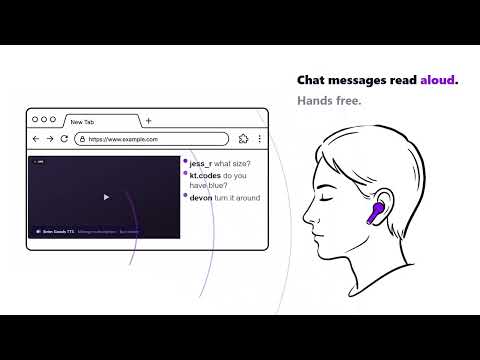
Livestream Chat TTS reads chats for gaming, live selling, and online meetings. It reads incoming chats aloud, so 1) streamers can focus on gaming, 2) live sellers can address buyers questions hands free, and 3) meeting presenters can hear audience questions in real time. It boosts engagement and is a livestream helper. **Who Is This For**: built for streamers, live sellers, online meeting hosts, and anyone who can't watch chat and do their job at the same time. **Getting Started**: - Install the Livestream Chat TTS - Visit a supported livestream platform - ‘Beim Goods TTS’ banner appears on the lower left corner of the browser. - If users need platform specific installation help, please visit our blog: https://beimgoods.com/blog/ **Supported Platforms**: - TTS works for both streamers/sellers/presenters as well as viewers/buyers/audience. - We selected a handful of the most popular platforms from each category. A full list of supported platforms is listed on our website. - If users have specific platform support requests, please email us. We are happy to add them to our product development roadmap. **Supported Operating Systems**: Livestream Chat TTS works on any OS with a Chromium browser, such as Google Chrome and Microsoft Edge. **Why Use Beim Goods Livestream Chat TTS**: - Privacy first design, no chat data monitoring, no IP tracking, no need to access your Google Drive. We utilize the browser's existing speech synthesis, so user data is private. No analytics. We use a random UUID and Stripe Object ID to check licenses to protect user data. - This TTS is lightweight, so it does not compete for CPU cycles. - It is simple to set up. It does not need OBS, it is not a separate software, no complex setup. Users just install the extension, voilà, it just works. - It also has a simple built-in toggle switch, so users can turn TTS on/off any time. - Users can try Livestream Chat TTS for 30 days, without having to sign up. All the features are available during free trial, so users can fully experience the TTS before committing. - After the 30 day trial period, it is only $1/month. And users can cancel anytime. **Important User Notes**: - For eBay Live and YouTube Live users, the ‘Beim Goods TTS’ banner and toggle switch are located inside the chat box. - For Zoom users, please use the browser version of the online meeting for our TTS to work. - Since this is a browser extension, TTS would only work on a computer browser, and not a phone browser. - Please set up earbuds or headsets to prevent TTS audio feedback via the computer’s mic. **New Features**: 1.3.7. added TTS toggle switch. So users can turn TTS on/off without disabling the extension or uninstalling it. **Privacy Policy**: https://beimgoods.com/Beim_Goods_Accessibility_TTS_Tool_phase1_Privacy_Policy.pdf **FAQ**: https://beimgoods.com/faq/ %%%%%%%%%%%%%%%%% Español %%%%%%%%%%%%%%%%% Livestream Chat TTS lee los chats en voz alta para gaming, ventas en vivo y reuniones en línea. Lee los mensajes entrantes del chat en voz alta, para que 1) los streamers puedan concentrarse en el juego, 2) los vendedores en vivo puedan responder las preguntas de los compradores con las manos libres, y 3) los presentadores de reuniones puedan escuchar las preguntas de la audiencia en tiempo real. Mejora la interacción y es un asistente para transmisiones en vivo. ¿Para quién es?: Diseñado para streamers, vendedores en vivo, presentadores de reuniones en línea y cualquier persona que no pueda leer el chat y hacer su trabajo al mismo tiempo. Cómo empezar: Instala Livestream Chat TTS Visita una plataforma de transmisión en vivo compatible El banner de 'Beim Goods TTS' aparecerá en la esquina inferior izquierda del navegador. Si necesitas ayuda con la instalación en una plataforma específica, visita nuestro blog: https://beimgoods.com/blog/ Plataformas compatibles: TTS funciona tanto para streamers/vendedores/presentadores como para espectadores/compradores/audiencia. Hemos seleccionado algunas de las plataformas más populares de cada categoría. La lista completa de plataformas compatibles está en nuestro sitio web. Si tienes una solicitud de compatibilidad con una plataforma específica, envíanos un correo electrónico. Estaremos encantados de agregarla a nuestra hoja de ruta de desarrollo. Sistemas operativos compatibles: Livestream Chat TTS funciona en cualquier sistema operativo con un navegador Chromium, como Google Chrome y Microsoft Edge. ¿Por qué usar Beim Goods Livestream Chat TTS?: Diseño con privacidad ante todo: sin monitoreo de datos del chat, sin rastreo de IP, sin necesidad de acceder a tu Google Drive. Utilizamos la síntesis de voz integrada en el navegador, por lo que los datos del usuario son privados. Sin analíticas. Usamos un UUID aleatorio y un ID de objeto de Stripe para verificar licencias y proteger los datos del usuario. Este TTS es liviano, por lo que no compite por ciclos de CPU. Es fácil de configurar. No necesita OBS, no es un software separado, no requiere una configuración compleja. Solo instala la extensión y listo, funciona de inmediato. También tiene un interruptor de activación/desactivación integrado, para que puedas encender o apagar el TTS en cualquier momento. Puedes probar Livestream Chat TTS durante 30 días, sin necesidad de registrarte. Todas las funciones están disponibles durante la prueba gratuita, para que puedas experimentar el TTS por completo antes de comprometerte. Después del período de prueba de 30 días, cuesta solo $1 al mes. Y puedes cancelar en cualquier momento. Notas importantes para el usuario: Para los usuarios de eBay Live y YouTube Live, el banner y el interruptor de 'Beim Goods TTS' se encuentran dentro del cuadro del chat. Para los usuarios de Zoom, utiliza la versión del navegador de la reunión en línea para que nuestro TTS funcione. Como se trata de una extensión de navegador, el TTS solo funciona en un navegador de computadora, no en un navegador de teléfono. Configura auriculares o audífonos para evitar la retroalimentación de audio del TTS a través del micrófono de la computadora. Nuevas funciones: La versión 1.3.7 agregó el interruptor de activación/desactivación de TTS. Así los usuarios pueden encender o apagar el TTS sin deshabilitar la extensión ni desinstalarla. Política de privacidad: https://beimgoods.com/Beim_Goods_Accessibility_TTS_Tool_phase1_Privacy_Policy.pdf Preguntas frecuentes: https://beimgoods.com/faq/ %%%%%%%%%%%%%%%%% Français %%%%%%%%%%%%%%%%% Livestream Chat TTS lit les messages du chat à voix haute pour le gaming, les ventes en direct et les réunions en ligne. Il lit les messages entrants du chat à voix haute, afin que 1) les streamers puissent se concentrer sur le jeu, 2) les vendeurs en direct puissent répondre aux questions des acheteurs les mains libres, et 3) les présentateurs de réunions puissent entendre les questions de l'audience en temps réel. Il améliore l'engagement et sert d'assistant pour les diffusions en direct. À qui s'adresse cet outil ? : Conçu pour les streamers, les vendeurs en direct, les présentateurs de réunions en ligne et toute personne qui ne peut pas lire le chat et faire son travail en même temps. Pour commencer : Installez Livestream Chat TTS Rendez-vous sur une plateforme de diffusion en direct compatible Le bandeau 'Beim Goods TTS' apparaît dans le coin inférieur gauche du navigateur. Si vous avez besoin d'aide pour l'installation sur une plateforme spécifique, veuillez visiter notre blog : https://beimgoods.com/blog/ Plateformes compatibles : Le TTS fonctionne aussi bien pour les streamers/vendeurs/présentateurs que pour les spectateurs/acheteurs/audience. Nous avons sélectionné quelques-unes des plateformes les plus populaires de chaque catégorie. La liste complète des plateformes compatibles est disponible sur notre site web. Si vous souhaitez le support d'une plateforme spécifique, envoyez-nous un e-mail. Nous serons ravis de l'ajouter à notre feuille de route de développement. Systèmes d'exploitation compatibles : Livestream Chat TTS fonctionne sur tout système d'exploitation disposant d'un navigateur Chromium, comme Google Chrome et Microsoft Edge. Pourquoi utiliser Beim Goods Livestream Chat TTS ? : Conception axée sur la confidentialité : aucune surveillance des données du chat, aucun suivi d'adresse IP, aucun besoin d'accéder à votre Google Drive. Nous utilisons la synthèse vocale intégrée au navigateur, vos données restent donc privées. Aucune collecte analytique. Nous utilisons un UUID aléatoire et un identifiant d'objet Stripe pour vérifier les licences et protéger les données des utilisateurs. Ce TTS est léger, il ne consomme pas de cycles CPU. Il est simple à configurer. Pas besoin d'OBS, ce n'est pas un logiciel séparé, pas de configuration complexe. Il suffit d'installer l'extension et voilà, ça fonctionne immédiatement. Il dispose également d'un interrupteur intégré pour activer ou désactiver le TTS à tout moment. Vous pouvez essayer Livestream Chat TTS pendant 30 jours, sans inscription. Toutes les fonctionnalités sont disponibles pendant l'essai gratuit, afin que vous puissiez pleinement découvrir le TTS avant de vous engager. Après la période d'essai de 30 jours, c'est seulement 1 $ par mois. Et vous pouvez annuler à tout moment. Notes importantes pour l'utilisateur : Pour les utilisateurs d'eBay Live et YouTube Live, le bandeau et l'interrupteur 'Beim Goods TTS' se trouvent à l'intérieur de la fenêtre de chat. Pour les utilisateurs de Zoom, veuillez utiliser la version navigateur de la réunion en ligne pour que notre TTS fonctionne. Comme il s'agit d'une extension de navigateur, le TTS ne fonctionne que sur un navigateur d'ordinateur, et non sur un navigateur de téléphone. Veuillez configurer des écouteurs ou un casque pour éviter le retour audio du TTS via le microphone de l'ordinateur. Nouvelles fonctionnalités : La version 1.3.7 a ajouté l'interrupteur d'activation/désactivation du TTS. Les utilisateurs peuvent ainsi activer ou désactiver le TTS sans désactiver l'extension ni la désinstaller. Politique de confidentialité : https://beimgoods.com/Beim_Goods_Accessibility_TTS_Tool_phase1_Privacy_Policy.pdf FAQ : https://beimgoods.com/faq/ %%%%%%%%%%%%%%%%% Português %%%%%%%%%%%%%%%%% O Livestream Chat TTS lê chats para jogos, vendas ao vivo e reuniões online. Ele lê os chats recebidos em voz alta, para que 1) streamers possam se concentrar no jogo, 2) vendedores ao vivo possam responder às perguntas dos compradores com as mãos livres e 3) apresentadores de reuniões possam ouvir as perguntas do público em tempo real. Ele aumenta o engajamento e é um assistente para livestreams. %%%%%%%%%%%%%%%%% Deutsch %%%%%%%%%%%%%%%%% Livestream Chat TTS liest Chatnachrichten für Gaming, Live-Selling und Online-Meetings vor. Es liest eingehende Chatnachrichten laut vor, sodass 1) Streamer sich auf das Spielen konzentrieren können, 2) Live-Verkäufer Käuferfragen freihändig beantworten können und 3) Meeting-Moderatoren Publikumsfragen in Echtzeit hören können. Es steigert das Engagement und ist ein praktischer Livestream-Helfer. %%%%%%%%%%%%%%%%% 日本語 %%%%%%%%%%%%%%%%% Livestream Chat TTSは、ゲーム配信、ライブ販売、オンライン会議向けにチャットを読み上げます。受信したチャットを音声で読み上げるため、1)配信者はゲームに集中でき、2)ライブ販売者はハンズフリーで購入者の質問に対応でき、3)会議の発表者はリアルタイムで視聴者の質問を聞くことができます。エンゲージメントを高める、ライブ配信のお助けツールです。
5 out of 52 ratings
Details
- Version1.3.8
- UpdatedSeptember 23, 2026
- FeaturesOffers in-app purchases
- Size66.99KiB
- LanguagesEnglish
- DeveloperBeim GoodsWebsite
16107 Cypress Point Dr Cypress, TX 77429-6360 USEmail
info@beimgoods.comPhone
+1 832-377-5060 - TraderThis developer has identified itself as a trader per the definition from the European Union and committed to only offer products or services that comply with EU laws.
- D-U-N-S132257524
Privacy

This developer declares that your data is
- Not being sold to third parties, outside of the approved use cases
- Not being used or transferred for purposes that are unrelated to the item's core functionality
- Not being used or transferred to determine creditworthiness or for lending purposes
Support
For help with questions, suggestions, or problems, visit the developer's support site