


Overview
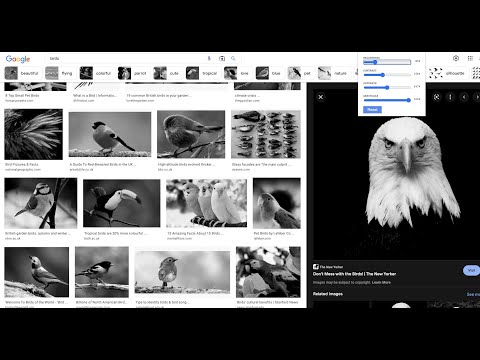
See every reference image on a page in grayscale, notan and squint, at once. Study tools for artists who draw and paint.
See every reference image on a page in values, at once. Built by an artist, for artists who draw and paint from reference photos. Instead of downloading photos one by one into an editor, open Live Photo Editor for Artists on any page (Google Images, Pinterest, Unsplash, Google Photos, museum collections) and every image changes together. Pick the reference that already works before you start. Three views, each remembering its own settings: • Grayscale: check the value structure (lights, mid-tones, darks) before you commit to a drawing. Adjust brightness and contrast to push it further. • Notan: see any reference as two pure values. Slide the threshold to find where the picture splits into light and dark. • Colour: test how a photo holds up when brightness, contrast and saturation are pushed. In every view: • Squint: blur the details away and judge the big shapes, just as you would by squinting at the subject. • Alt+Shift+G turns the effect on and off without opening the popup. • Keeps working as you scroll: new images are adjusted the moment they load. New in 2.0 • A new name and icon: Live Photo Editor Online is now Live Photo Editor for Artists. Same extension, same settings. • Clearer messages on pages Chrome doesn't let extensions change. • A short welcome guide for new users. A good reference is half the picture. If a photo doesn't work in grayscale, it won't work on paper or canvas. Private by design: nothing is uploaded or collected. Everything happens in your browser, on the tab you choose. More tools for artists: https://hasanavi.uk/
5 out of 54 ratings
Details
- Version2.0
- UpdatedNovember 17, 2026
- Offered byTarmil Consulting LTD
- Size63.18KiB
- LanguagesEnglish (United Kingdom)
- DeveloperIT Consultancy
27 Old Gloucester Street London WC1N 3AX GBEmail
hasanavi@gmail.com - Non-traderThis developer has not identified itself as a trader. For consumers in the European Union, please note that consumer rights do not apply to contracts between you and this developer.
Privacy

This developer declares that your data is
- Not being sold to third parties, outside of the approved use cases
- Not being used or transferred for purposes that are unrelated to the item's core functionality
- Not being used or transferred to determine creditworthiness or for lending purposes