

Lit Inspector

Overview
Inspect Lit web components on any page, production builds included: component tree, properties, updates and a timeline.
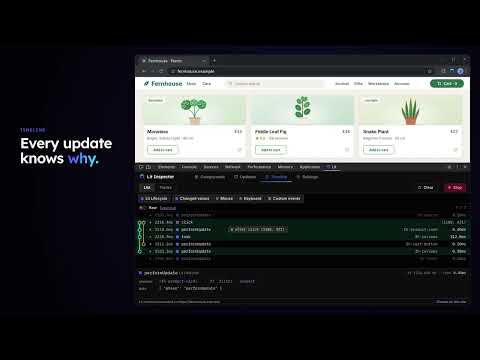
Lit Inspector adds a Lit tab to Chrome DevTools for inspecting the Lit web components on a page: sites you don't serve, production builds, and pages whose Content Security Policy blocks injected script tags. What it shows - Components: the tree of Lit elements on the page. Select one to see its reactive properties, state, attributes and controllers. Pick selects an element by clicking it in the page. - Updates: which components updated during a recording, how often, which properties changed, and how long each update took. - Timeline: recorded lifecycle events (performUpdate, willUpdate, update, updated) with their timings, filterable by element and layer, as a list or as tracks. - Settings: appearance, and an option that mirrors Lit updates into Chrome's Performance panel as their own track. How to use it 1. Open DevTools on the page and go to the Lit tab. 2. Click "Enable on this site". Chrome asks for access to that one site; allow it and the page reloads. 3. The Lit tab now shows the page's components. Click "Disable on this site" at the bottom of the tab to turn it off again. The extension asks for no site access at install and does nothing on a site until you enable it there. On production builds Lit's production build is supported: the component tree, the inspector and the lifecycle timeline work. Some features need Lit's development build or the Vite plugin and are not available from the extension: render events (Lit emits them only in development), HMR history, and exporting a snapshot. Where a component is defined and rendered comes from the page's sourcemaps, and on a Vite dev server a click opens it in your editor. For those, use the Vite plugin @oddsquad/vite-plugin-lit in development. Limits Top-level frames only (components inside iframes are not shown), http and https pages only, Chrome 114 or later. Privacy Lit Inspector collects no data. Its network requests fetch an enabled site's own scripts, sourcemaps and Custom Elements Manifests, from that site, to show where components are defined and what their documentation says, and a Custom Elements Manifest on another site that you add or allow, after the browser asks you for access to it. On a site served by a Vite dev server, it also asks that server, and only that server, to open the files you click in your editor. It stores the sites you enabled and your panel settings in your browser. Privacy policy: https://lit-devtools.oddsquad.dev/reference/extension-privacy/ Lit Inspector is an independent, unofficial tool. It is not affiliated with, endorsed by, or produced by Google or the Lit project. Source code and issues: https://lit-devtools.oddsquad.dev
0 out of 5No ratings
Details
- Version0.27.0
- UpdatedOctober 31, 2026
- Offered byoddcelot
- Size676KiB
- LanguagesEnglish
- Developer
Email
hey@oddcelot.dev - Non-traderThis developer has not identified itself as a trader. For consumers in the European Union, please note that consumer rights do not apply to contracts between you and this developer.
Privacy

Lit Inspector has disclosed the following information regarding the collection and usage of your data. More detailed information can be found in the developer's privacy policy.
Lit Inspector handles the following:
This developer declares that your data is
- Not being sold to third parties, outside of the approved use cases
- Not being used or transferred for purposes that are unrelated to the item's core functionality
- Not being used or transferred to determine creditworthiness or for lending purposes
Support
For help with questions, suggestions, or problems, visit the developer's support site