


Overview
Listen to any article or selection in the voice you choose, with a read-along transcript. Bring your own TTS key.
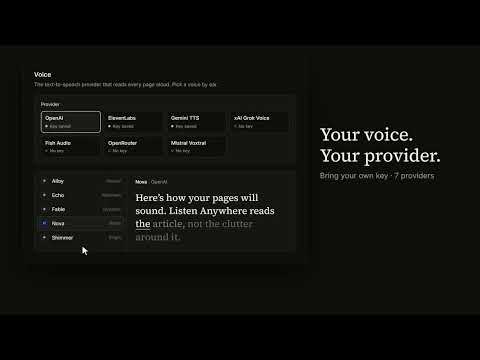
Listen Anywhere reads web pages and selected text aloud in the voice you choose, and shows the words as they are spoke. Open an article, click the toolbar icon (or right-click, or press Alt+R), and press Listen. The page is captured, optionally rewritten for the ear by an LLM, and voiced by your chosen SOTA text-to-speech provider. Audio starts within a few seconds and keeps playing when the popup closes. Read along: The popup shows the part being read as a transcript. The spoken word is underlined, timed to the audio: by default from the pauses in the speech (done on your device), or exactly, word by word, form a speech-to-text service you choose (optional). Listen your way: - Your current page, just a highlighted selection, or follow "Next" links through multi-page articles/documentation. - Play/pause, skip parts, speed 0.75-2.5x, keyboard: Space, <- -> - Keep it in Chrome's side panel while you brows, or drag the popup bigger for a larger transcript. - Download the whole thing as one audio file. - Audition voices in the Settings: every voice reads the same sentence. Your keys, your providers: Bring your own API key from your choice of many supported text-to-speech provider choices. Seven major voice providers are supported, including Open Router. Keys stay on your device and go only to the provider handling each request. No account, no server, no analytics. Optionally, have your text optimized for Text to Speech first by an LLM to improve delivery, tone, emotion etc. (dropping clutter, spelling out charts/tables/symbols). And a speech to text service can time the read-along word by word for perfect sync with the on screen transcript and audio. Both features use your keys; Settings lists the supported services.
0 out of 5No ratings
Details
- Version0.2.0
- UpdatedOctober 26, 2026
- Size194KiB
- LanguagesEnglish (United States)
- DeveloperJoshua FriedmanWebsite
1216 E Cumberland Ave UNIT 309 Tampa, FL 33602-4243 USEmail
admin@agentmemorylabs.comPhone
+1 813-477-2784 - TraderThis developer has identified itself as a trader per the definition from the European Union and committed to only offer products or services that comply with EU laws.
Privacy

Listen Anywhere: Read Aloud & Text to Speech has disclosed the following information regarding the collection and usage of your data. More detailed information can be found in the developer's privacy policy.
Listen Anywhere: Read Aloud & Text to Speech handles the following:
This developer declares that your data is
- Not being sold to third parties, outside of the approved use cases
- Not being used or transferred for purposes that are unrelated to the item's core functionality
- Not being used or transferred to determine creditworthiness or for lending purposes