


Overview
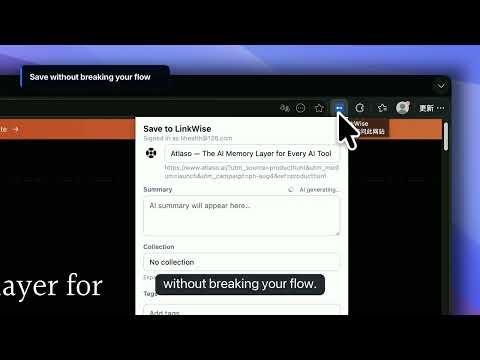
Save the current page to LinkWise with one click and AI keywords.
LinkWise is an AI-powered bookmark knowledge base. Save articles, YouTube videos, and useful sites in one click—then turn them into searchable, citable knowledge you can export to Obsidian. Not another folder of links you never open again. Capture what you're reading from your browser. LinkWise adds an AI summary and keyword tags you can confirm, files the save into the right library (Websites, Articles, or Videos), and opens your personal library at linkwise.link when you're ready to read, search, ask, or export. HOW IT WORKS 1. Sign in at linkwise.link (free account). 2. Connect the extension once from https://linkwise.link/extension 3. Click the LinkWise icon → review title, AI summary, tags, and folder → Save. 4. Open your library to read full articles or timestamped public captions, ask with citations, explore connections, and export Markdown for Obsidian. KEY FEATURES • One-click save popup with progressive AI fill (summary, tags, folder suggestions) • Library roots for Websites, Articles, and Videos—folder suggestions follow the page type • Open library keeps you signed in when the site cookie is missing • Articles saved for reading: full text, AI summary, optional translation, and notes • YouTube public captions as searchable, timestamped transcripts • Keyword search on Free; Pro adds semantic search, cited Ask, explained connections, and more • Duplicate detection when a URL is already saved • Export articles and videos as portable Markdown or an Obsidian-ready ZIP CURRENT BOUNDARIES • Videos without public YouTube captions stay saved but do not get AI audio transcription • Safari is not currently supported as a public store extension • Obsidian export is manual Markdown/ZIP; automatic sync is not yet available PERMISSIONS (why we need them) • Active tab — read the current page URL and title only when you click Save (we do not track browsing history). • Storage — keep your sign-in token locally after you connect on linkwise.link/extension. • Host access (linkwise.link) — send the page you chose to save to your private library via our API. GETTING STARTED Visit https://linkwise.link/extension for the one-time account connection step after install. Product notes: https://linkwise.link/blog · Release notes: https://linkwise.link/changelog PRIVACY We only process the URL/title of pages you explicitly save. See https://linkwise.link/privacy Questions: https://linkwise.link/support GETTING STARTED Visit https://linkwise.link/extension for the one-time account connection step after install. PRIVACY We only process the URL/title of pages you explicitly save. See https://linkwise.link/privacy Questions or feedback: contact via the website.
0 out of 5No ratings
Details
- Version0.1.17
- UpdatedSeptember 16, 2026
- Size29.14KiB
- LanguagesEnglish
- DeveloperWebsite
Email
jeoli2024@gmail.com - Non-traderThis developer has not identified itself as a trader. For consumers in the European Union, please note that consumer rights do not apply to contracts between you and this developer.
Privacy

LinkWise has disclosed the following information regarding the collection and usage of your data. More detailed information can be found in the developer's privacy policy.
LinkWise handles the following:
This developer declares that your data is
- Not being sold to third parties, outside of the approved use cases
- Not being used or transferred for purposes that are unrelated to the item's core functionality
- Not being used or transferred to determine creditworthiness or for lending purposes
Support
For help with questions, suggestions, or problems, visit the developer's support site