


Overview
Extract a ZIP from a link straight into a folder without saving the ZIP. Every file checked. Windows, with a small free helper app.
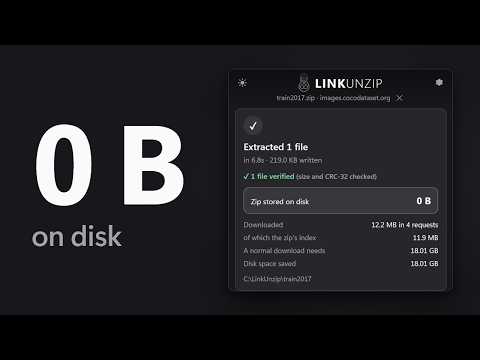
Extract a ZIP straight from a link into a folder. The ZIP itself is never saved, so your disk only needs room for the files, not for the files plus the ZIP. WHAT YOU GET • See the cost before anything is written. LinkUnzip reads only the zip's index first, and its Cost Analysis shows what a normal download-then-extract would need, what LinkUnzip needs, and the free space on your drive. • Take only what you need. Tick files or folders in the File List, or search by name. Files you leave out are not downloaded, and the Cost Analysis follows what you tick. • Every file is checked. Each file is written under a temporary name, checked (CRC-32 and size) and only then given its real name. The done screen says "All N files verified". • Several connections at once (4 by default, 1 to 16 in Settings). • Works with GitHub's "Download ZIP". Servers that can only send a file from start to end are read in one pass, still without saving the ZIP. • Stopped halfway? Resume skips the files that are already finished and verified. • Large archives: ZIP64 is supported, memory use stays flat and there is no 2 GB limit. • Files land in a normal folder. "Open folder" is one click, and a notification tells you when it is done. • Light and dark theme, following Windows or your choice. • No account, no ads, no uploads, no tracking. REAL EXAMPLES (measured on the developer's PC) • Blender 4.2 for Windows, a 365.8 MB zip with 5,518 files: 925.6 MB written, 365.2 MB downloaded (including the zip's 1.0 MB index), 0 B of zip on disk, all 5,518 files verified. A normal download-then-extract needs 1.26 GB. About 15 to 22 seconds on the developer's connection. • One photo out of the COCO train2017 dataset, an 18.01 GB zip with 118,287 files, in 4 to 7 seconds: 12.2 MB downloaded, the zip's 11.9 MB index and the 219 KB photo. • A GitHub "Download ZIP" archive with 1,562 files: 35.1 MB written from 13.1 MB read in one pass, in about 7 to 8 seconds. HOW IT WORKS 1. Right-click a link to a .zip and choose "Extract with LinkUnzip". Or click the LinkUnzip icon and paste a link: it also lists the .zip links on the page you are on. 2. LinkUnzip reads the zip's index and shows the Cost Analysis and the File List. Pick a folder with Browse..., and untick what you don't need. 3. Click Start Extraction. Files appear in the folder as they arrive, each one checked. Click "Open folder" when it is done. Changed your mind? "Download Normal ZIP (Fallback)" hands the link back to your browser. REQUIREMENTS • Windows 10 or 11 (64-bit), with Chrome, Edge or Brave. • The free LinkUnzip helper for Windows. A browser extension cannot write a folder full of files or stream gigabytes to disk on its own, so a small helper program does the downloading and unpacking. The setup page that opens after you add the extension installs it in two clicks: just for you, no administrator rights. It only runs while you use LinkUnzip. PRIVACY • No account, no analytics, no servers of ours. Nothing you extract or browse is sent to the developer. • The extension talks only to the helper on your PC. The helper connects only to the server of the link you chose. • Private links: if a download needs your login, LinkUnzip asks for permission for that one site and says what it will do first. Only then does it pass your browser's cookies for that site to the helper on your PC, which sends them only to that site. • Privacy policy: https://linkunzip.app/privacy LIMITS, HONESTLY • Windows only for now. • It needs the helper program; the extension alone cannot extract. • The extracted files still need their disk space. What LinkUnzip saves you is the room the ZIP would take. • If the network drops, the file being written restarts (finished files are kept). In one-pass mode (GitHub "Download ZIP" and similar), a dropped connection starts the pass again and skips files already done. • Not supported: RAR and 7z, creating archives, password-protected zips (planned), rare compression methods (Deflate64, bzip2, LZMA), downloads that exist only inside a web page (blob: links), and links that need a form POST or a one-time token. OPEN SOURCE AND SUPPORT • Source code, issues and questions: https://github.com/CincaAlex/LinkUnzip • Website: https://linkunzip.app
0 out of 5No ratings
Details
- Version1.0.0
- UpdatedOctober 10, 2026
- Size118KiB
- LanguagesEnglish
- DeveloperWebsite
Email
cincaalex17@gmail.com - Non-traderThis developer has not identified itself as a trader. For consumers in the European Union, please note that consumer rights do not apply to contracts between you and this developer.
Privacy

LinkUnzip: extract ZIP files straight from links has disclosed the following information regarding the collection and usage of your data. More detailed information can be found in the developer's privacy policy.
LinkUnzip: extract ZIP files straight from links handles the following:
This developer declares that your data is
- Not being sold to third parties, outside of the approved use cases
- Not being used or transferred for purposes that are unrelated to the item's core functionality
- Not being used or transferred to determine creditworthiness or for lending purposes
Support
For help with questions, suggestions, or problems, visit the developer's support site