

LinkStyler - Web Text Formatter

Overview
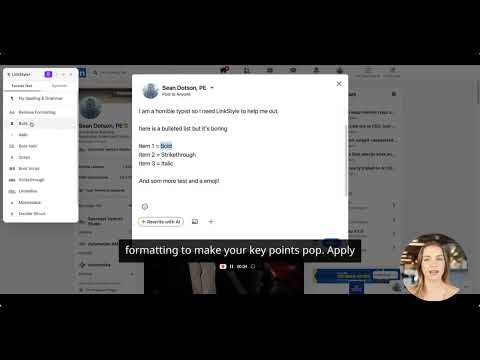
Right-click to apply bold, italic and more formatting, insert symbols and fix spelling/grammar on any website.
LinkStyler lets you format text anywhere on the web — LinkedIn, Twitter, Facebook, emails, and more — using Unicode characters that work in any text field. FORMATTING OPTIONS: Remove Formatting — strip all Unicode styling back to plain text Bold, Italic, Bold Italic Script, Bold Script Strikethrough, Underline Monospace, Double Struck (Outline) UPPERCASE, lowercase ADDITIONAL FEATURES: Fix Spelling & Grammar — AI-powered correction using Llama Symbols panel — bullets, arrows, checkmarks, superscripts, and more HOW TO USE: Select any text on a webpage Right-click and choose from the LinkStyler menu The formatted text replaces your selection instantly Or use the extension popup to type/paste text, pick a style, and copy the result.
0 out of 5No ratings
Details
- Version1.2.3
- UpdatedApril 21, 2026
- FeaturesOffers in-app purchases
- Offered byAutomationAMA
- Size37.88KiB
- LanguagesEnglish (United States)
- DeveloperCSDFL Holdings LLC
6229 Mesa Glen Bradenton, FL 34203 USEmail
sean@automationama.comPhone
+1 941-586-2277 - TraderThis developer has identified itself as a trader per the definition from the European Union and committed to only offer products or services that comply with EU laws.
Privacy

This developer declares that your data is
- Not being sold to third parties, outside of the approved use cases
- Not being used or transferred for purposes that are unrelated to the item's core functionality
- Not being used or transferred to determine creditworthiness or for lending purposes