


Overview
Tailor your resume to LinkedIn job postings with ATS scoring and one-click PDF export.
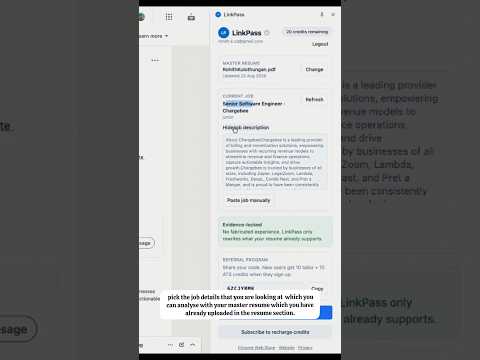
Stop sending the same resume to every LinkedIn job. LinkPass is a Chrome extension that helps you tailor your resume to each job posting on LinkedIn — in minutes, not hours. WHAT IT DOES When you open a job on LinkedIn, LinkPass opens in a side panel and reads the job title, company, and description. Upload your master resume once, then: • Check your ATS match score — see how well your resume fits the role before you apply • Review a requirement-to-evidence matrix — see which job requirements your resume supports, partially covers, or misses • Tailor your resume with AI — get a version rewritten for that specific job • Review changes side by side — approve what changed before you export • Download an ATS-friendly PDF — clean, single-column layout built for parsers like Workday, Taleo, and Greenhouse • Re-download past applications — open the History tab to find and download any of your last 20 tailored resumes (job title, company, and date) Everything stays on LinkedIn. No copying job descriptions into another tab. No manual reformatting. WHY INSTALL LINKPASS • Save time — tailor a resume in one click instead of rewriting it yourself • Apply smarter — know your ATS score and requirement gaps before you hit submit • Stay organized — recruiters call weeks later? Pull up the exact PDF you submitted for that role • Stand out — send resumes that match the job’s keywords and requirements • Stay honest — LinkPass is evidence-locked: it only uses information already on your resume; it never invents employers, skills, or experience • Built for LinkedIn — job detection, side panel, and PDF export designed for how you already job hunt HOW TO GET STARTED 1. Install LinkPass and create a free account 2. Upload your master resume (PDF or DOCX) 3. Open any LinkedIn job posting 4. Score your match, tailor your resume, review the changes 5. Download the PDF and apply 6. Use History anytime to re-download a past tailored resume FREE TO START New users get 6 free credits to try ATS scoring and resume tailoring. Have a referral code? Get bonus tailor and ATS credits when you sign up. Need more? Choose a Daily, Weekly, or Monthly Pass for unlimited tailoring and scoring — one-time purchase, no subscription to cancel. Perfect for students, career changers, and anyone applying to multiple roles on LinkedIn who wants faster, more targeted applications without the guesswork.
5 out of 51 rating
Details
- Version1.0.4
- UpdatedAugust 31, 2026
- FeaturesOffers in-app purchases
- Size575KiB
- LanguagesEnglish
- DeveloperWebsite
Email
rohithkannan.2595@gmail.com - Non-traderThis developer has not identified itself as a trader. For consumers in the European Union, please note that consumer rights do not apply to contracts between you and this developer.
Privacy

LinkPass has disclosed the following information regarding the collection and usage of your data. More detailed information can be found in the developer's privacy policy.
LinkPass handles the following:
This developer declares that your data is
- Not being sold to third parties, outside of the approved use cases
- Not being used or transferred for purposes that are unrelated to the item's core functionality
- Not being used or transferred to determine creditworthiness or for lending purposes
Support
For help with questions, suggestions, or problems, please open this page on your desktop browser