

LinkManager

Overview
Save, organize and paste your favorite links with custom web browser extension.
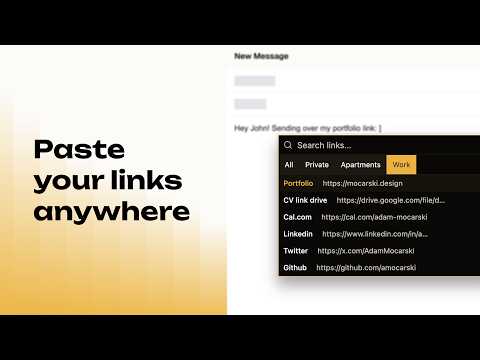
Stop digging through bookmarks, Notes, or your clipboard history every time you need to share your resume, portfolio, pricing sheet, or that one Loom video. LinkManager lets you save the links you reuse every day and paste them into any text field on any website with a two-keystroke shortcut. HOW IT WORKS ━━━━━━━━━━━━━━━━━━━━━━━━━━━━ 1. Create a free account at linkmanager.app (email/password or Google). 2. Install the extension from the Chrome Web Store. LinkManager opens a practice page (linkmanager.app/demo) with real forms so you can try it right away. 3. Click the LinkManager icon in your toolbar and sign in with the account you just created. 4. Save your most-used links in the web dashboard. Give each one a short, memorable name (for example: "resume", "portfolio", "calendly", "pricing"). 5. On any website - click into any text field and type ]] (two right-square brackets). A searchable popover opens at your cursor. 6. Type a few letters to filter, press Enter (or click) to select, and the link is inserted into the field. Done. You never leave the page. WHO IT'S FOR ━━━━━━━━━━━━━━━━━━━━━━━━━━━━ • Job seekers and career changers - stop re-pasting your resume and LinkedIn into every application. • Freelancers and content creators - share your portfolio, booking calendar, and social links in seconds. • Real estate agents - drop listing links and virtual tours into Facebook groups and client chats instantly. • Sales and business development reps - keep pricing sheets, case studies, and demo links one shortcut away. • Anyone who pastes the same handful of URLs over and over. FEATURES ━━━━━━━━━━━━━━━━━━━━━━━━━━━━ • Two-keystroke trigger "]]" in standard inputs, textareas, and most rich-text editors - password fields are ignored. • Inline search popover at the caret - filter as you type, select with Enter or click, close with Escape. • Sign in from the extension popup (email/password or Google) - your saved links sync automatically. • Realtime sync - links you add or edit in the dashboard appear in the extension without reloading. • Folders to group links by project, client, or context (Standard plan). • Practice forms at linkmanager.app/demo to test the extension after install. • Works on Chrome, Brave, Edge, Arc, Dia, and other Chromium-based browsers. • Save any text, not just URLs - email addresses, phone numbers, canned responses, code snippets, anything under 2083 characters. PRICING ━━━━━━━━━━━━━━━━━━━━━━━━━━━━ • Free - up to 3 saved links, dashboard, search, paste-anywhere. No credit card. • Standard - up to 50 saved links and 5 folders for $1.49/week. SUPPORT ━━━━━━━━━━━━━━━━━━━━━━━━━━━━ Questions, bugs, or feature requests? Visit https://linkmanager.featurebase.app/en
0 out of 5No ratings
Details
- Version1.0.0
- UpdatedJuly 9, 2026
- Offered byadmocarski
- Size588KiB
- LanguagesEnglish (United States)
- Developer
Email
hello@linkmanager.app - Non-traderThis developer has not identified itself as a trader. For consumers in the European Union, please note that consumer rights do not apply to contracts between you and this developer.
Privacy

LinkManager has disclosed the following information regarding the collection and usage of your data. More detailed information can be found in the developer's privacy policy.
LinkManager handles the following:
This developer declares that your data is
- Not being sold to third parties, outside of the approved use cases
- Not being used or transferred for purposes that are unrelated to the item's core functionality
- Not being used or transferred to determine creditworthiness or for lending purposes
Support
For help with questions, suggestions, or problems, visit the developer's support site