

LinkedIn → CSV Exporter
2 ratings
)
Overview
Export LinkedIn People Search results to CSV with one click
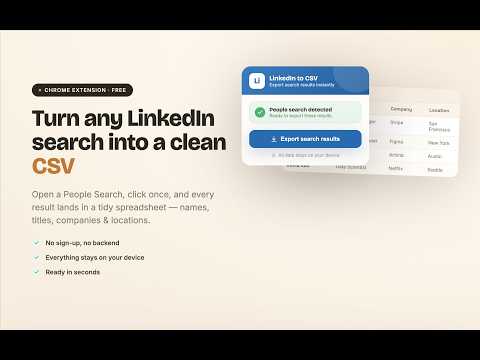
LinkedIn → CSV Exporter Export LinkedIn people search results to CSV. Create clean lead lists for recruiting, sourcing, research, and outreach directly from LinkedIn search pages. No login. No backend. Runs entirely in your browser. -------------------------------- WHAT THIS EXTENSION DOES This extension lets you download a list of people from LinkedIn search results into a CSV file. The exported CSV includes: Name Job title Company Location LinkedIn profile link The CSV file works with Excel and Google Sheets. -------------------------------- HOW TO USE 1. Install the LinkedIn → CSV Exporter Chrome extension 2. After installing, click the puzzle icon in Chrome and pin the extension 3. Go to LinkedIn.com and log in 4. Use the top search bar on LinkedIn to search for people Example: Software Engineer India 5. Make sure you see a list of people profiles in the results (URL looks like: https://www.linkedin.com/search/results/people/) 6. Click the LinkedIn → CSV Exporter extension icon 7. Select how many result pages you want to export 8. Click Export Search Results and download your CSV file -------------------------------- FREE VS PRO Free: Export 1 LinkedIn search result page per export Pro (one-time purchase): Export up to 20 LinkedIn search result pages Pay once. Use forever No subscriptions -------------------------------- WHO THIS IS FOR Recruiters building candidate lists Sales and sourcing teams collecting leads Founders doing manual outreach Researchers collecting LinkedIn people data If you can see people in LinkedIn search results, you can export them. -------------------------------- IMPORTANT LIMITATIONS Works only on LinkedIn search pages that show people Requires an active LinkedIn login Does NOT work on: Sales Navigator Recruiter Does NOT extract: Emails Phone numbers Does NOT send messages or connection requests This tool exports only data that is already visible on LinkedIn. -------------------------------- PRIVACY & SECURITY Runs fully in your browser No backend servers No account or signup required No data is uploaded or stored remotely Your data stays on your computer. -------------------------------- USAGE NOTE This extension exports only publicly visible information from LinkedIn search results. Use responsibly and in accordance with LinkedIn’s terms. -------------------------------- LinkedIn CSV Export Export LinkedIn search results LinkedIn people search to CSV LinkedIn lead list export LinkedIn search to Excel Version History Version 2.0.0(2026-07-05) • Revamped the UI for better user experience. Version 1.3.3(2026-07-04) • Improved post export experience Version 1.3.2 (2026-05-10) • Introduced remote configuration support for faster updates and improved flexibility Version 1.3.1 (2026-05-04) • Added time-limited Pro discount to improve upgrade experience Version 1.3.0 (2026-04-22) • Improved accuracy of name extraction when mutual connections are displayed in search results Version 1.2.9 • Enhanced compatibility with recent LinkedIn updates for more reliable exports Version 1.2.8 • General reliability improvements • Improved handling of edge cases in search results Version 1.2.7 • Improved handling of searches returning no profiles • Added optional issue reporting with user consent to help improve compatibility • Cleaner and more accurate export states • Improved overall stability and user flow after zero-result scenarios Version 1.2.6 • Clearer Free vs Pro limits • Simplified page selection experience • Faster and more consistent export flow • Improved readiness detection for LinkedIn search results • Clear confirmation after export completes Version 1.2.4 (2025-01-19) • Improved diagnostics for better handling of edge-case searches Version 1.2.3 (2025-01-14) • Introduced value-first upgrade flow after free usage • Cleaner upgrade experience with improved UI clarity Version 1.2.2 (2026-01-11) • Improved unsupported-page experience with clearer guidance • Simplified action flow with a single primary action Version 1.2.1 (2026-01-05) • Improved stability during navigation • Added clearer download readiness indicator • Improved internal tracking reliability Version 1.2.0 (2026-01-01) • Improved detection of LinkedIn search results • Enhanced compatibility with LinkedIn updates • General stability improvements Version 1.0.2 • Initial stable release with multi-page export, deduplication, and CSV download support
5 out of 52 ratings
Details
- Version2.0.1
- UpdatedJuly 7, 2026
- FeaturesOffers in-app purchases
- Offered byNikhil Sharma
- Size896KiB
- LanguagesEnglish
- Developer
Email
nikhildata1265@gmail.com - Non-traderThis developer has not identified itself as a trader. For consumers in the European Union, please note that consumer rights do not apply to contracts between you and this developer.
Privacy

LinkedIn → CSV Exporter has disclosed the following information regarding the collection and usage of your data. More detailed information can be found in the developer's privacy policy.
LinkedIn → CSV Exporter handles the following:
This developer declares that your data is
- Not being sold to third parties, outside of the approved use cases
- Not being used or transferred for purposes that are unrelated to the item's core functionality
- Not being used or transferred to determine creditworthiness or for lending purposes