


개요
Easily add LinkedIn profiles to Airtable with just one click
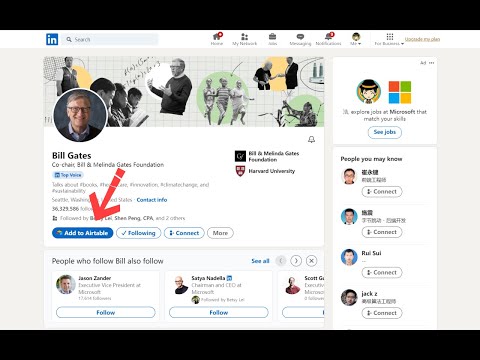
Our browser extension simplifies adding LinkedIn profile data by allowing users to effortlessly store it in Airtable. With just one click on the LinkedIn profile page, customers can quickly and easily organize their information, streamlining their workflow. Our extension is perfect for anyone who regularly uses LinkedIn to collect professional information. Whether you're a recruiter, salesperson, or researcher, our tool saves you time and effort by automatically capturing essential profile data and sending it directly to Airtable. To use our extension, simply navigate to any LinkedIn profile page and click the "Add to Airtable" button. The extension will automatically pull the individual's name, avatar, job title, location, and other relevant information and add it to your Airtable base. With our browser extension, you can effortlessly add LinkedIn profiles to your Airtable base and manage your professional contacts with ease. Effortlessly Add LinkedIn Profiles to Airtable with our Browser Extension in 4 Simple Steps: 1. Install the browser extension from the Chrome Web Store. 2. Grant the extension access to your Airtable account by signing in. 3. Select the Airtable base and table where you want to store the profile information. 4. Navigate to a LinkedIn profile page. and click the "Add to Airtable" button on the top of the page. the extension will automatically extract the individual's name, job title, company, location, and other relevant information from the LinkedIn profile. If you have any questions, please feel free to contact us anytime via email at support@linkedintoairtable.com.
5점 만점에 5점평점 1개
세부정보
개인정보 보호

LinkedIn to Airtable에서 데이터 수집 및 사용과 관련하여 다음 정보를 공개했습니다. 더 자세한 정보는 개발자의 privacy policy을 참고하세요.
LinkedIn to Airtable 항목은 다음을 처리합니다.
개발자가 사용자 데이터에 관해 다음과 같이 선언했습니다
- 승인된 사용 사례를 제외하고 서드 파티에 판매하지 않음
- 항목의 핵심 기능과 관련 없는 목적으로 사용하거나 전송하지 않음
- 신용도 판단 또는 대출 목적으로 사용하거나 전송하지 않음
지원
질문, 제안 또는 문제와 관련하여 도움이 필요하면 데스크톱 브라우저에서 이 페이지를 여세요.