


概述
Easily add LinkedIn profiles to Airtable with just one click
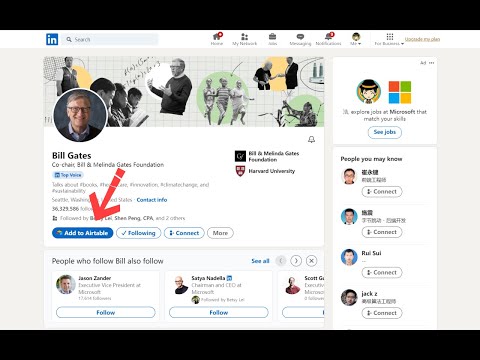
Our browser extension simplifies adding LinkedIn profile data by allowing users to effortlessly store it in Airtable. With just one click on the LinkedIn profile page, customers can quickly and easily organize their information, streamlining their workflow. Our extension is perfect for anyone who regularly uses LinkedIn to collect professional information. Whether you're a recruiter, salesperson, or researcher, our tool saves you time and effort by automatically capturing essential profile data and sending it directly to Airtable. To use our extension, simply navigate to any LinkedIn profile page and click the "Add to Airtable" button. The extension will automatically pull the individual's name, avatar, job title, location, and other relevant information and add it to your Airtable base. With our browser extension, you can effortlessly add LinkedIn profiles to your Airtable base and manage your professional contacts with ease. Effortlessly Add LinkedIn Profiles to Airtable with our Browser Extension in 4 Simple Steps: 1. Install the browser extension from the Chrome Web Store. 2. Grant the extension access to your Airtable account by signing in. 3. Select the Airtable base and table where you want to store the profile information. 4. Navigate to a LinkedIn profile page. and click the "Add to Airtable" button on the top of the page. the extension will automatically extract the individual's name, job title, company, location, and other relevant information from the LinkedIn profile. If you have any questions, please feel free to contact us anytime via email at support@linkedintoairtable.com.
5 星(5 星制)1 个评分
详情
隐私权

“LinkedIn to Airtable”已就收集和使用用户数据披露了以下信息。 如需了解详情,请查看开发者的privacy policy。
LinkedIn to Airtable会处理以下数据:
该开发者已声明,您的数据:
- 不会因未获批准的用途出售给第三方
- 不会为实现与产品核心功能无关的目的而使用或转移
- 不会为确定信用度或放贷目的而使用或转移
支持
若有任何疑问、建议或问题,请在桌面浏览器中打开此页面