Item logo image for LinkedIn Save to PDF (Ingenarte)

LinkedIn Save to PDF (Ingenarte)

5.0(

1 rating

)
Item media 6 (screenshot) for LinkedIn Save to PDF (Ingenarte)
Item video thumbnail
Item media 2 (screenshot) for LinkedIn Save to PDF (Ingenarte)
Item media 3 (screenshot) for LinkedIn Save to PDF (Ingenarte)
Item media 4 (screenshot) for LinkedIn Save to PDF (Ingenarte)
Item media 5 (screenshot) for LinkedIn Save to PDF (Ingenarte)
Item media 6 (screenshot) for LinkedIn Save to PDF (Ingenarte)
Item video thumbnail
Item media 2 (screenshot) for LinkedIn Save to PDF (Ingenarte)
Item media 3 (screenshot) for LinkedIn Save to PDF (Ingenarte)
Item media 4 (screenshot) for LinkedIn Save to PDF (Ingenarte)
Item media 5 (screenshot) for LinkedIn Save to PDF (Ingenarte)
Item media 6 (screenshot) for LinkedIn Save to PDF (Ingenarte)

Overview

Export a clean, print-ready view of your LinkedIn profile as PDF

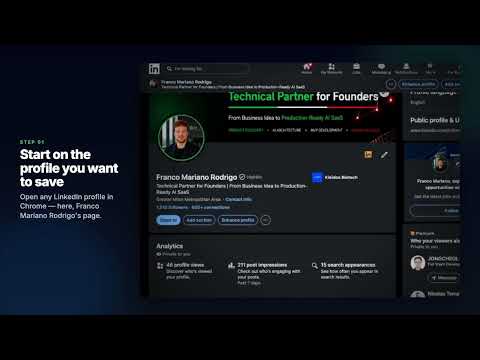
Need a clean PDF of a LinkedIn profile? This extension builds a print-ready document in your browser, even when LinkedIn’s own Save to PDF button is missing. WHY INSTALL • One click for a concise 1-page summary • Full Profile export when you need the complete record (experience, education, skills, and more) • Choose the sections you want: photo, contact, about, experience, education, projects, courses, certifications, skills, languages, honors, publications, and received recommendations • Files save with a clear name, such as linkedin_jane_doe_basicexport_22_08_2026.pdf • Everything stays on your computer. Nothing is uploaded to a remote server HOW TO USE 1. Open a LinkedIn profile (linkedin.com/in/...) 2. Click LinkedIn Save to PDF 3. Choose Export 1-page PDF or Export Full Profile PDF 4. In Chrome’s print dialog, select Save as PDF Full Profile export asks for confirmation first. It then opens that same person’s detail pages in temporary tabs, one at a time, so content hidden behind “see more” or extra pages can appear in the PDF. PRIVACY The extension works locally after you click Export. Your settings stay in Chrome. Temporary print data is removed when the PDF view opens. It only runs on LinkedIn profile pages and does not contact other websites. This extension is unofficial and is not affiliated with or endorsed by LinkedIn.

Details

  • Version
    1.3.0
  • Updated
    August 22, 2026
  • Offered by
    Ingenarte
  • Size
    150KiB
  • Languages
    English
  • Developer
    Email
    contacto.ingenarte@gmail.com
  • Non-trader
    This developer has not identified itself as a trader. For consumers in the European Union, please note that consumer rights do not apply to contracts between you and this developer.

Privacy

Manage extensions and learn how they're being used in your organization
The developer has disclosed that it will not collect or use your data. To learn more, see the developer’s privacy policy.

This developer declares that your data is

  • Not being sold to third parties, outside of the approved use cases
  • Not being used or transferred for purposes that are unrelated to the item's core functionality
  • Not being used or transferred to determine creditworthiness or for lending purposes

Support

For help with questions, suggestions, or problems, visit the developer's support site

Related

LinkedIn Profile to Resume by Resumef

0.0

Extract LinkedIn profile data to PDF in minutes

LinkedIn Job Downloader

0.0

Download LinkedIn job descriptions as styled HTML files with one click

Profile Scraper for LinkedIn™

4.9

Extract and export LinkedIn profiles data from search results. Save time by automating profile data collection.

ResumeBoostAI - LinkedIn Resume Builder

3.7

Export a LinkedIn profile to Resume.

Web to PDF

4.8

Use Web to PDF converter to save a web page as a pdf and download it instantly. Perfect for offline reading and sharing.

LinkedIn to PDF Resume Builder - AI, ATS & Cover Letter

5.0

One-click LinkedIn to PDF resume builder with AI writing, ATS score, cover letter generator & 5 templates. Private by default.

Profile Scraper & Exporter for LinkedIn

3.7

Extract detailed LinkedIn profile info instantly. One-click operation, multi-format exports. Boosts productivity for recruitment.

LeadRocks for LinkedIn: Profiles Scanner

2.9

LeadRocks for Chrome is a tool to find emails, phone numbers, and to export LinkedIn profiles data

LinkedIn Saved Post Hero

4.6

Save and organize your LinkedIn saved posts with ease

LinkedIn to Resume, by CVGist

3.6

One-click to turn your LinkedIn profile into an amazing resume. Fast, easy, and free.

CATS Extension

4.0

Easily add candidates and contacts from popular websites directly into the CATS applicant tracking system.

LinkedIn Profile Exporter

4.3

Extracts profiles from LinkedIn search results pages.

LinkedIn Profile to Resume by Resumef

0.0

Extract LinkedIn profile data to PDF in minutes

LinkedIn Job Downloader

0.0

Download LinkedIn job descriptions as styled HTML files with one click

Profile Scraper for LinkedIn™

4.9

Extract and export LinkedIn profiles data from search results. Save time by automating profile data collection.

ResumeBoostAI - LinkedIn Resume Builder

3.7

Export a LinkedIn profile to Resume.

Web to PDF

4.8

Use Web to PDF converter to save a web page as a pdf and download it instantly. Perfect for offline reading and sharing.

LinkedIn to PDF Resume Builder - AI, ATS & Cover Letter

5.0

One-click LinkedIn to PDF resume builder with AI writing, ATS score, cover letter generator & 5 templates. Private by default.

Profile Scraper & Exporter for LinkedIn

3.7

Extract detailed LinkedIn profile info instantly. One-click operation, multi-format exports. Boosts productivity for recruitment.

LeadRocks for LinkedIn: Profiles Scanner

2.9

LeadRocks for Chrome is a tool to find emails, phone numbers, and to export LinkedIn profiles data

Google apps