Item media 5 (screenshot) for LinkedIn Post Organizer
Item video thumbnail
Item media 2 (screenshot) for LinkedIn Post Organizer
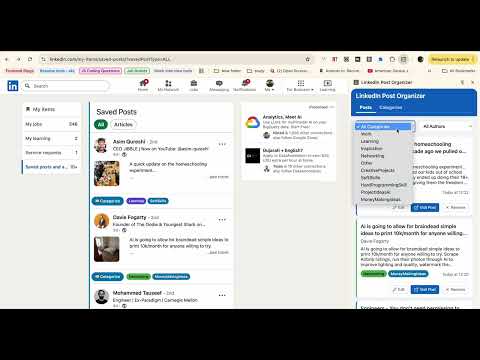
Item media 3 (screenshot) for LinkedIn Post Organizer
Item media 4 (screenshot) for LinkedIn Post Organizer
Item media 5 (screenshot) for LinkedIn Post Organizer
Item video thumbnail
Item media 2 (screenshot) for LinkedIn Post Organizer
Item media 3 (screenshot) for LinkedIn Post Organizer
Item media 4 (screenshot) for LinkedIn Post Organizer
Item media 5 (screenshot) for LinkedIn Post Organizer

Overview

Categorize & organize saved LinkedIn posts. User data stored locally & synced via Google account; no external collection.

# LinkedIn Post Organizer - Chrome Extension **What it does:** The LinkedIn Post Organizer is a powerful Chrome extension designed to bring order to your saved LinkedIn posts. LinkedIn's native "save" feature is great, but it lacks any way to organize your growing collection of valuable content. This extension fills that gap by allowing you to categorize your saved posts with custom labels. You can create, edit, and delete categories, assign them to posts, and even see visual indicators of categories directly within your LinkedIn feed. A dedicated popup interface provides a central hub for managing all your categorized posts and categories. **Why you should install it:** - **Stop losing valuable insights:** No more endless scrolling through hundreds of saved posts. Quickly find exactly what you need by filtering and searching through your custom categories. - **Boost your productivity:** Transform your chaotic saved posts into a structured, easily navigable knowledge base. Spend less time searching and more time learning and applying. - **Enhance your learning and research:** Group related articles, industry news, career advice, or skill-building content by topic. This helps you build a more coherent understanding and reference system. - **Seamless integration:** The extension is designed to feel like a native part of LinkedIn, with category dropdowns appearing directly on your saved posts and visual badges in your feed. - **Cross-device synchronization:** Your custom categories and organized posts are saved using Chrome storage sync, meaning your organization persists across all your devices where you're logged into Chrome. Whether you're a professional curating industry insights, a job seeker organizing opportunities, a content creator gathering inspiration, or a learner building a knowledge repository, the LinkedIn Post Organizer is your essential tool for a more organized and productive LinkedIn experience.

Details

  • Version
    0.0.0.2
  • Updated
    August 26, 2025
  • Size
    1004KiB
  • Languages
    English (United States)
  • Developer
    Website
    Email
    jatin.g.panjwani@gmail.com
  • Non-trader
    This developer has not identified itself as a trader. For consumers in the European Union, please note that consumer rights do not apply to contracts between you and this developer.

Privacy

The developer has disclosed that it will not collect or use your data. To learn more, see the developer’s privacy policy.

This developer declares that your data is

  • Not being sold to third parties, outside of the approved use cases
  • Not being used or transferred for purposes that are unrelated to the item's core functionality
  • Not being used or transferred to determine creditworthiness or for lending purposes

Related

Cringe Guard: filter out cringe content on your LinkedIn feed using AI

5.0

AI-powered Chrome extension that filters cringe, clickbait & low-value posts from your LinkedIn feed in real-time.

Linkedin Post Scraper : Extract linkedin profile posts scraper

5.0

Scrape and export LinkedIn posts with ease.Collect post content,engagement matrics,and export for outreach, and lead generation.

Super Post Saver – Smart Bookmark Tool for LinkedIn™ Posts

4.9

Save LinkedInâ„¢ posts into folders. Organize your inspiration with Super Save.

Draftly for LinkedIn

4.8

Smart LinkedIn Chrome Extension for Better Comments & Clearer Analytics

Linked Notes

0.0

Edit, save, seach and download notes related to LinkedIn profiles.

Scoops

5.0

Save, search, and organize your LinkedIn saved posts.

LinkedReply: AI LinkedIn Comment Generator

5.0

Generate authentic LinkedIn comments instantly using AI. Save time, boost your engagement, and stay genuinely you.

LinkedIn Text Formatter

3.0

A Chrome plugin to format LinkedIn posts with bold, italic, underline styles, makes your posts stand out and readable.

Search & Organize your LinkedIn Saved Posts

0.0

Search & Organize your LinkedIn Saved Posts

Supergrow.ai Extension

4.4

Swipe Files & AI powered LinkedIn comments

WhenX: Mark Linkedin Profiles with notes

4.4

Candidate notes for Linkedin profiles. Synchronized with Google Search. Shared with your team.

CollectIn: LinkedIn Saved Posts Collections

5.0

Organize LinkedIn saved posts into custom collections, just like you do in Instagram

Cringe Guard: filter out cringe content on your LinkedIn feed using AI

5.0

AI-powered Chrome extension that filters cringe, clickbait & low-value posts from your LinkedIn feed in real-time.

Linkedin Post Scraper : Extract linkedin profile posts scraper

5.0

Scrape and export LinkedIn posts with ease.Collect post content,engagement matrics,and export for outreach, and lead generation.

Super Post Saver – Smart Bookmark Tool for LinkedIn™ Posts

4.9

Save LinkedInâ„¢ posts into folders. Organize your inspiration with Super Save.

Draftly for LinkedIn

4.8

Smart LinkedIn Chrome Extension for Better Comments & Clearer Analytics

Linked Notes

0.0

Edit, save, seach and download notes related to LinkedIn profiles.

Scoops

5.0

Save, search, and organize your LinkedIn saved posts.

LinkedReply: AI LinkedIn Comment Generator

5.0

Generate authentic LinkedIn comments instantly using AI. Save time, boost your engagement, and stay genuinely you.

LinkedIn Text Formatter

3.0

A Chrome plugin to format LinkedIn posts with bold, italic, underline styles, makes your posts stand out and readable.

Google apps