

LinkedIn Follow-Up Reminders & Outreach Sequences

Overview
Set LinkedIn follow-up reminders and manual outreach sequences. Know when to reply or reconnect; you send every message yourself.
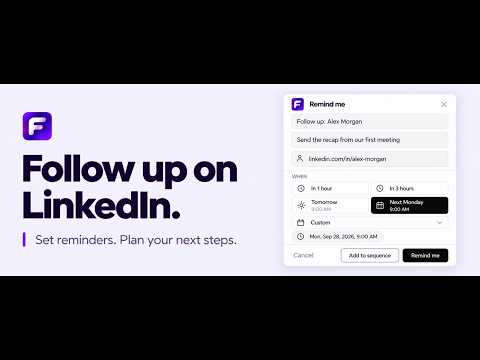
OVERVIEW Follow Up Reminder — built for people who want to stay consistent with LinkedIn follow-ups without automating the conversation. Keep your follow-ups organized without turning your outreach into a hands-off campaign. Set reminders for the people, conversations, and posts you want to revisit. Build manual sequences when a follow-up needs more than one step. When something is due, you get a Chrome notification and decide what to do next. You stay responsible for every connection request, like, comment, and message. Everything is stored in your current browser profile. HOW IT WORKS 1. Open a LinkedIn profile, message thread, or post. 2. Choose Remind me for one follow-up or Add to sequence for a multi-step plan. 3. Pick the reminder time or define the steps and delays in your sequence. 4. Complete the task yourself, then mark it done. A sequence schedules its next step from that moment. KEY FEATURES • Follow up tracker: See reminders grouped into Overdue, Today, Upcoming, and Done, with the oldest overdue items first. • Outreach sequence: Plan connection requests, post engagement, comments, and messages with a delay between each step. • Message follow up: Save message drafts with {{firstName}}, {{lastName}}, and {{company}}, then copy the prepared message when you are ready to use it. • Manual outreach: Start from recruiter outreach, a warm introduction, or re-engaging a cold contact, or create your own steps. • Follow up schedule: Choose a preset or an exact date and time for an individual reminder. • Record outcomes such as a reply, positive reply, appointment, or your own custom outcome. • Review sequence performance for 30 days, 90 days, or all time and export summary or detail CSV files. • Use the interface in 17 languages, including right-to-left Arabic. • Export or import a JSON backup whenever you want a portable copy of your data. COMMON FOLLOW-UP USE CASES Use a reminder when a conversation or contact needs another action later. Typical examples include: • Following up after a connection request • Remembering to reply to an ongoing conversation • Reconnecting with a contact after a period of time • Returning to a post you want to like or comment on • Keeping recruiter outreach organized • Continuing a warm introduction • Re-engaging a contact through a multi-step outreach sequence For a single action, create one reminder. For several planned actions with delays between them, use a sequence. SEQUENCE PERFORMANCE Track the message steps you complete and the outcomes you record yourself. Sequence performance can include replies, positive replies, appointments, and custom outcomes. Review performance across the last 30 days, 90 days, or all time. You can also export summary and detailed CSV files when you want to review your follow-up activity outside the extension. Performance is based on the actions and outcomes you record. It does not inspect conversations to determine whether someone replied. WHY USE THIS EXTENSION? This extension is for people who do their own LinkedIn outreach but do not want promising contacts and conversations to disappear from their working memory. It gives you a lightweight system for remembering the next action while leaving the actual relationship-building in your hands. It does not send messages, click buttons, or detect replies for you. You perform each action yourself and mark the step complete when you are done. PERMISSIONS & PRIVACY Your data stays in this Chrome browser profile. There is no account and no sync. The extension uses Chrome storage for your data, alarms for due reminders, and notifications for alerts. LinkedIn access is used so the reminder and sequence controls can appear on supported LinkedIn pages. A local backup copy is kept before writes. You can also export a JSON backup from Options. The optional feedback card only opens a feedback form when you choose to use it. Your reminder text is not submitted with that feedback. FAQ Can I set LinkedIn reminders for individual contacts? Yes. Open a supported profile or message thread, choose Remind me, and select a preset or exact date and time. Can I create an outreach sequence for one person? Yes. A sequence can contain steps such as a connection request, post engagement, a comment, or a message. Only the current step creates a pending reminder. How does message follow up work? A message step can contain a prepared draft. When the step is due, open the contact panel, copy the prepared message, use it yourself, and mark the step done. What happens after I finish a sequence step? Marking the current step done advances the sequence. The next step is scheduled using its delay from the moment you completed the previous one. Can I stop or restart a sequence? Yes. You can remove a person, stop the remaining steps while keeping the history, or start the sequence again after it has been completed. Is my follow up tracker data synced to an account? No. There is no account or cloud sync. Your reminders, sequences, and recorded outcomes are stored in the current Chrome browser profile. You can export a JSON backup from Options.
5 out of 52 ratings
Details
- Version4.5.0
- UpdatedOctober 16, 2026
- Size630KiB
- Languages18 languages
- Developer
- Non-traderThis developer has not identified itself as a trader. For consumers in the European Union, please note that consumer rights do not apply to contracts between you and this developer.
Privacy

LinkedIn Follow-Up Reminders & Outreach Sequences has disclosed the following information regarding the collection and usage of your data. More detailed information can be found in the developer's privacy policy.
LinkedIn Follow-Up Reminders & Outreach Sequences handles the following:
This developer declares that your data is
- Not being sold to third parties, outside of the approved use cases
- Not being used or transferred for purposes that are unrelated to the item's core functionality
- Not being used or transferred to determine creditworthiness or for lending purposes
Support
For help with questions, suggestions, or problems, visit the developer's support site