

LinkedIn Custom Feeds: Keyword Filter & Highlighter

Overview
Professionals who need to get sales on LinkedIn, conduct advertising research, and eliminate distractions. Turn your chaotic feed…
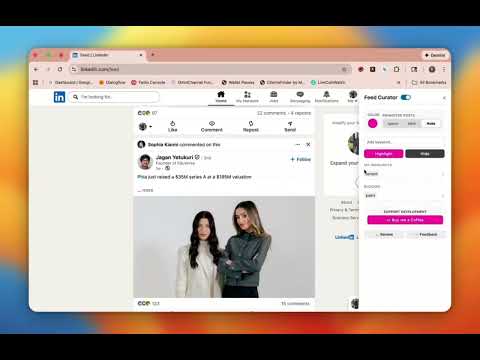
Professionals who need to get sales on LinkedIn, conduct advertising research, and eliminate distractions. Turn your chaotic feed into a precision instrument for Lead Generation, Ad Analysis, and Market Research. 🚀 NEW: DOMINATE LINKEDIN ADVERTISING Stop guessing what works. Feed Curator is the only tool that lets you isolate ads in your feed instantly. Ad Research Mode: Highlight every "Promoted" post in neon to build your advertising swipe file. See what your competitors are spending money on and use it as reference for your next campaign. Ad Nuke Mode: Tired of being sold to? "Nuke" ads completely to focus purely on organic connections. 🔥 FOR SALES: SPOT BUYING SIGNALS INSTANTLY The secret to getting sales on LinkedIn isn't posting more—it's listening better. Signal Detection: Define your "Money Words" (e.g., "hiring," "looking for," "recommend," "help"). Visual Alerts: We scan posts in real-time and highlight matches so you never miss a warm lead while speed-scrolling. First-Mover Advantage: Be the first to comment on a prospect's problem before your competitors even wake up. 🚫 FOR FOCUS: ELIMINATE THE NOISE Your time is money. Stop wasting it on irrelevant content. Keyword Blocklist: Hide political rants, engagement bait, or topics that don't serve your business. Clean Your Feed: Remove posts from industries or keywords that clog your prospecting workflow. WHY FEED CURATOR? 1. The Ultimate Ad Swipe File Tool When you search for advertising on LinkedIn, you aren't just looking for tips—you want examples. Our "Mark Ads" feature makes promoted posts pop off the screen, turning your daily scroll into a masterclass in B2B marketing. 2. A "Cheat Code" for Social Selling Most people browse passively. Feed Curator users browse with intent. By highlighting keywords related to pain points in your niche, you can transform a 10-minute scroll into 5 new sales meetings. 3. Privacy-First & Lightweight No Login Required: We don't want your data. No API Risk: Works entirely on your browser—100% safe for your LinkedIn account. Zero Lag: Designed to be as fast as you are. PERFECT FOR: Sales Professionals: Who need to find leads and get sales on LinkedIn without expensive Navigator subscriptions. Media Buyers & Marketers: Who need to study advertising on LinkedIn to build better creatives. Founders & CEOs: Who need to monitor brand mentions and industry trends. Recruiters: Who need to spot "Open to work" signals instantly. Take control of your feed today. Install Feed Curator and stop letting the algorithm decide what you see. .--------------------------------------------------------------------------------------- Feed Curator is 100% free to use. This extension is supported by optional user donations via Buy Me a Coffee to keep development active.
0 out of 5No ratings
Details
- Version3.0.0
- UpdatedFebruary 13, 2026
- Offered byTaylor Chapman
- Size37.98KiB
- LanguagesEnglish
- Developer
Email
Taylor@tsmpro.co - Non-traderThis developer has not identified itself as a trader. For consumers in the European Union, please note that consumer rights do not apply to contracts between you and this developer.
Privacy

This developer declares that your data is
- Not being sold to third parties, outside of the approved use cases
- Not being used or transferred for purposes that are unrelated to the item's core functionality
- Not being used or transferred to determine creditworthiness or for lending purposes
Support
For help with questions, suggestions, or problems, please open this page on your desktop browser