

LinkedIn Bookmark Exporter - Markdown, CSV & JSON
1 rating
)
Overview
Export all your LinkedIn saved/bookmarked posts to Markdown, CSV, or JSON
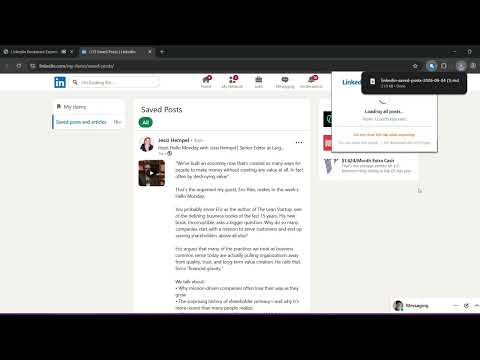
LinkedIn doesn't let you export your saved posts. There's no button for it, no API, no bulk download. LinkedIn Bookmark Exporter fixes that. Go to your Saved Posts page, click Export, and get every post - full text, author, date, link, hashtags as a file you can actually use. WHAT GETS EXPORTED Every saved post comes out with: - Full post text (the actual writing, not a snippet or a link) - Author name, headline, and profile URL - Direct link back to the original post - Date posted - Like and comment counts - Hashtags and @mentions, pulled out automatically - Post type — text, article, image, or video If a post is collapsed behind "...see more," the extension expands it first so you get the whole thing, not a truncated half-sentence. THREE FORMATS, PICK WHAT YOU NEED Markdown - built for Notion, Obsidian, Bear, and Logseq. Paste it in and it renders as proper headings, links, and formatting. No cleanup required. CSV - opens in Excel, Google Sheets, or Numbers. One row per post, every field in its own column. JSON - for Airtable, Make.com, Zapier, or your own scripts. Clean, structured, ready to pipe into anything. WHO THIS IS FOR Anyone who treats LinkedIn saved posts like a graveyard. Founders pulling together a swipe file of good copywriting. Researchers archiving industry commentary before it disappears. People building a personal knowledge base in Notion or Obsidian who want their LinkedIn reading list to actually live there instead of trapped behind a login. Sales and marketing teams keeping a record of competitor or customer posts for reference. HOW IT WORKS 1. Install the extension 2. Go to linkedin.com/my-items/saved-posts 3. Click the extension icon, choose Markdown, CSV, or JSON 4. Click Export The extension scrolls through your entire saved posts library on its own - ten posts or a thousand, it doesn't matter - then downloads the finished file straight to your computer. PRIVACY Everything happens locally, inside your browser. There's no server on our end receiving or storing your data. The extension reads the page you're already looking at, the same way you would, and writes the output file directly to your device. We never see your posts, your account, or anything else. No LinkedIn login is requested by the extension. It uses the session you're already signed into - no passwords, no OAuth, no extra permissions beyond the one page it needs to read. LinkedIn Bookmark Exporter is an independent tool and is not affiliated with, endorsed by, or sponsored by LinkedIn Corporation.
5 out of 51 rating
Details
- Version1.0.0
- UpdatedJune 25, 2026
- Offered byGrabKit
- Size63.65KiB
- LanguagesEnglish (United States)
- Developer
Email
support.grabkit@gmail.com - Non-traderThis developer has not identified itself as a trader. For consumers in the European Union, please note that consumer rights do not apply to contracts between you and this developer.
Privacy

LinkedIn Bookmark Exporter - Markdown, CSV & JSON has disclosed the following information regarding the collection and usage of your data. More detailed information can be found in the developer's privacy policy.
LinkedIn Bookmark Exporter - Markdown, CSV & JSON handles the following:
This developer declares that your data is
- Not being sold to third parties, outside of the approved use cases
- Not being used or transferred for purposes that are unrelated to the item's core functionality
- Not being used or transferred to determine creditworthiness or for lending purposes