

LinkBox Extension
2 ratings
)
Overview
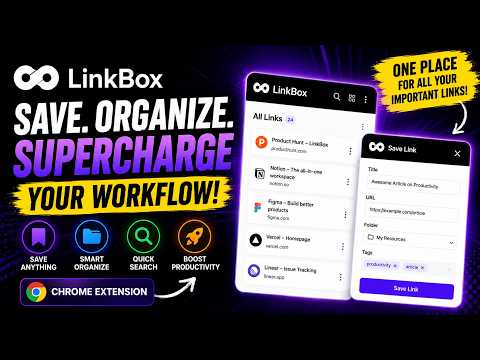
Save links to your LinkBox archive instantly.
You find something worth saving. You bookmark it. Three months later, you can't find it. LinkBox fixes that. Save without switching tabs Press a keyboard shortcut or click the extension icon. The link is saved instantly with its title and source. No forms to fill out, no friction. Find it when you need it Every saved link is searchable by title, URL, tag, or the notes you added when you saved it. Type a word and it shows up — no scrolling through a giant list. Keep things organized Group links into collections for different projects or topics. Add tags to find related links across collections. Mark links as "Read later", "Inspiration", or "Buy later" so you remember why you saved them. Works with your LinkBox account This extension connects to your LinkBox dashboard at linkbox-xi.vercel.app. Your links sync instantly and are available from any browser where you're signed in. What it does: - Save any page in one click or with a keyboard shortcut (⌘+Shift+S on Mac) - Add a quick note or tag before saving - Save to a specific collection or let it go to your Inbox - Right-click any link on a page to save it directly - View and search all saved links from the LinkBox dashboard What it doesn't do: - It does not read your browsing history - It does not collect data from pages you visit - It only activates when you click it or use the shortcut To get started: - Install this extension - Sign in at getlinkbox.com with your Google account - The extension connects automatically — no manual setup needed
5 out of 52 ratings
Details
- Version1.0.4
- UpdatedMay 22, 2026
- Offered bygraphicmunir910
- Size33.02KiB
- LanguagesEnglish
- DeveloperMANIRUZZAMAN
Email
graphicmunir910@gmail.comPhone
+880 1890-146910 - TraderThis developer has identified itself as a trader per the definition from the European Union and committed to only offer products or services that comply with EU laws.
Privacy

LinkBox Extension has disclosed the following information regarding the collection and usage of your data. More detailed information can be found in the developer's privacy policy.
LinkBox Extension handles the following:
This developer declares that your data is
- Not being sold to third parties, outside of the approved use cases
- Not being used or transferred for purposes that are unrelated to the item's core functionality
- Not being used or transferred to determine creditworthiness or for lending purposes
Support
For help with questions, suggestions, or problems, visit the developer's support site