

Link Previewer
5 个评分
)
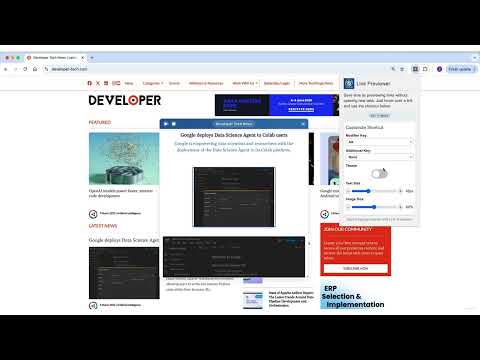
概述
Hover & Alt for a sneak peek! Preview links without clicking.
🔍 Link Previewer: Instant Webpage Peek | Browse Smarter 🚀 Quick webpage preview tool for efficient browsing. See content before clicking - save time and boost productivity! Key Features: Instant Link Preview: Hover + Alt to peek at any webpage 🔍 Custom Shortcuts: Personalize your preview activation key 🔑 Universal: Preview links on news sites, blogs, online shops, and more 🌍 Flexible Viewing: Resize and reposition the preview window 🖥️ Fast & Responsive: Optimized for smooth browsing experience 🔥 Privacy-Centric: No data collection or tracking 🔒 Readout Functionality: Listen to the content of the previewed page 🔊 Customizable Content: Adjust text and main article image size 🎨 Dark Mode: Switch between light and dark themes 🌗 Perfect for: 🔬 Researchers, 🛒 Online Shoppers, 📰 News Readers, and 💼 Professionals How to Use: Hover over a link Press Alt (or your custom key) View webpage content instantly 🆕 Latest Update (v1.1.0): ✨ Fresh new blue UI with modern design ✨ Dark Mode Added ✨ Customizable shortcuts 🚀 Performance improvements 🔊 New Readout Feature 🎥 Customizable Content Display 🐛 Fixed issue with Google links Upgrade your Chrome browsing! Install Link Previewer and start smart-peeking today. 🚀
5 星(5 星制)5 个评分
详情
- 版本1.1.0
- 上次更新日期2025年3月9日
- 提供方omer.rah2
- 大小861KiB
- 语言English
- 开发者
邮箱
omer.appsbw@gmail.com - 非交易者该开发者尚未将自己标识为交易者。欧盟地区消费者须知:消费者权利可能不适用于您与该开发者达成的合约。
隐私权

该开发者已声明,您的数据:
- 不会因未获批准的用途出售给第三方
- 不会为实现与产品核心功能无关的目的而使用或转移
- 不会为确定信用度或放贷目的而使用或转移