

Link Box: Open and Copy Multiple Links
1 rating
)
Overview
Hold Shift and drag a box over links to open them in new tabs or copy their URLs. Grab a page of search results in one go.
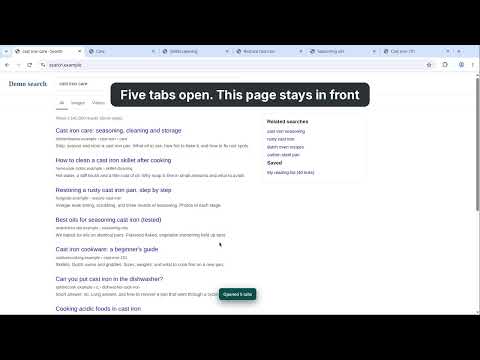
Hold Shift and drag a box over a group of links. Link Box opens them in new tabs or copies their addresses, so ten search results or a whole reading list take one drag. How it works 1. Hold Shift and drag a box over the links. You can start the drag anywhere, even on top of a link. A link counts when the box covers part of it, even a small part. Each one lights up, and a counter next to the pointer shows how many you have. 2. Let go. A small panel opens beside the box. 3. Click "Open them" to open each link in a new tab, or "Copy addresses" to put them on your clipboard, one address per line. A link that appears twice is opened and copied once. 4. Changed your mind? Press Esc to cancel. Nothing opens. Drag toward the top or bottom edge of the window and the page scrolls, so the box can reach links that were off screen. This also works inside scrolling panels on a page. Big groups "Open them" opens up to 50 tabs at a time, and you can set a lower limit. If the box holds more, the panel says "Open takes the first 50; Copy takes all", and the first 50 open in page order. "Copy addresses" always copies every link in the box. Keys and clicks - A plain Shift+click on a link still works as usual. Only a Shift+drag draws a box. - Shift+drag normally selects text. If you need that, switch the key to Alt in Settings. - On a Mac, use Shift, or Option, which is the Alt choice. Cmd isn't offered because Cmd+click already opens a link in a new tab on a Mac. Option+drag can also select the text of a link on a Mac, so Shift is the safer pick there. The Ctrl choice is for Windows, Linux and ChromeOS. Settings (click the toolbar icon) - Most tabs to open at once, from 1 to 50 - Keep this page in front, or switch to the first new tab - Highlight the links inside the box. Turn it off for a plain box. - Only take links from the same website - Skip links that jump to a spot on the same page - Reverse the order, so the bottom link opens and copies first - Open right away when you let go, with no panel - "Reset to defaults" puts every setting back the way it came Link Box works on regular web pages. Chrome does not let extensions run on chrome:// pages or in the Chrome Web Store. Permissions - "Read and change your data on all websites": Chrome shows this because the Link Box script loads on every page, so a Shift+drag works anywhere. It reads only the addresses of links inside your box, and only while you drag. The only change it makes to a page is the highlight and the box you see. - Clipboard: used when you click "Copy addresses". - Storage: keeps your settings. If Chrome Sync is on, Chrome keeps them with your Google account. Privacy Link Box has no account, no servers and no analytics. It sends nothing anywhere.
5 out of 51 rating
Details
- Version1.1.6
- UpdatedNovember 19, 2026
- Offered byjustperk27
- Size20.05KiB
- LanguagesEnglish (United States)
- Developer
Email
justperk27@gmail.com - Non-traderThis developer has not identified itself as a trader. For consumers in the European Union, please note that consumer rights do not apply to contracts between you and this developer.
Privacy

Link Box: Open and Copy Multiple Links has disclosed the following information regarding the collection and usage of your data. More detailed information can be found in the developer's privacy policy.
Link Box: Open and Copy Multiple Links handles the following:
This developer declares that your data is
- Not being sold to third parties, outside of the approved use cases
- Not being used or transferred for purposes that are unrelated to the item's core functionality
- Not being used or transferred to determine creditworthiness or for lending purposes