


Overview
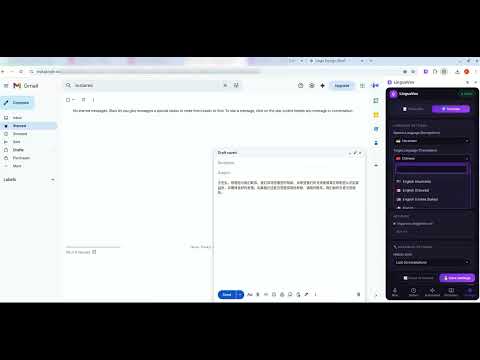
AI voice transcription & translation for any website. Hold the hotkey, speak, release. 21+ languages. Powered by OpenAI Whisper.
LinguaVox turns your voice into text on any website — in any language. Hold Ctrl+Space (Windows/Linux) or ⌥⇧Q (Mac), speak, release. Your words appear instantly in the active text field — email, messaging apps, documents, social media, and more. ────────────────────────────────────── HOW IT WORKS ────────────────────────────────────── 1. Press and hold Ctrl+Space (or ⌥⇧Q on Mac) 2. Speak naturally 3. Release — text is transcribed and inserted automatically No copy-paste. No switching apps. Works anywhere you can type. ────────────────────────────────────── FEATURES ────────────────────────────────────── 🎙️ Voice Transcription OpenAI Whisper accurately transcribes speech in 21+ languages including English, Ukrainian, Russian, Spanish, French, German, Japanese, Chinese, Arabic, and more. 🌐 Real-time Translation Speak in one language, insert text in another. Powered by GPT-4o mini. ✨ AI Enhancement Six writing modes polish your transcription before it's inserted: • Smart Polish — removes filler words, fixes grammar • Business Style — professional tone • Grammar Fix — minimal corrections only • Creative Style — vivid, engaging language • Casual Style — friendly, conversational • Academic Style — formal academic writing 🖱️ Right-click Translation Select any text on any page → right-click → "Translate with LinguaVox" — instant translation overlay without leaving the page. 🔒 Privacy-first • Microphone access is requested only during active recording • Audio is sent via a secure proxy server to OpenAI Whisper and immediately discarded — not stored anywhere • No audio or transcription history is retained on the server • Sign in with Google — your identity is never passed to OpenAI 🌍 Works everywhere Any website in Chrome with a text field — works without configuration or integration. ────────────────────────────────────── LANGUAGES ────────────────────────────────────── Afrikaans, Arabic, Chinese (Simplified & Traditional), Czech, Danish, Dutch, English, Finnish, French, German, Greek, Hindi, Italian, Japanese, Korean, Norwegian, Polish, Portuguese, Romanian, Russian, Spanish, Swedish, Turkish, Ukrainian, and more. ────────────────────────────────────── REQUIREMENTS ────────────────────────────────────── • Chrome 114+ • Microphone permission (requested on first use) • Free Google account for sign-in • Free tier: 20 transcriptions per day
0 out of 5No ratings
Details
- Version2.9.0
- UpdatedMay 20, 2026
- Size210KiB
- Languages25 languages
- DeveloperWebsite
Email
kossanstin@gmail.com - Non-traderThis developer has not identified itself as a trader. For consumers in the European Union, please note that consumer rights do not apply to contracts between you and this developer.
Privacy

LinguaVox has disclosed the following information regarding the collection and usage of your data. More detailed information can be found in the developer's privacy policy.
LinguaVox handles the following:
This developer declares that your data is
- Not being sold to third parties, outside of the approved use cases
- Not being used or transferred for purposes that are unrelated to the item's core functionality
- Not being used or transferred to determine creditworthiness or for lending purposes
Support
For help with questions, suggestions, or problems, please open this page on your desktop browser