

Lingfun 翻譯:日文韓文反白翻譯・JLPT/TOPIK 程度底線
1 rating
)
Overview
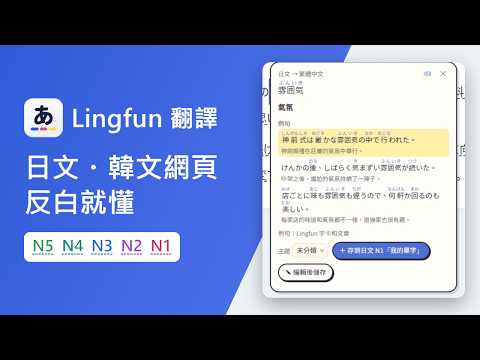
反白日文、韓文就翻成繁體中文:漢字標假名、附真實例句;網頁單字照 JLPT N5~N1、TOPIK 程度畫底線,一鍵存字卡。圖片上的字也能框選辨識。
看日文、韓文網頁時,不用再複製貼上到翻譯網站。 Lingfun 翻譯在你正在看的網頁上直接幫你:反白就翻成繁體中文、單字照你的程度畫底線、圖片上的字框起來也能查。免費,不用申請 API 金鑰,不用登入就能翻譯。 裝好會自動打開一頁互動教學:在頁面上真的反白、看底線、選程度、框選圖片各做一次,做到就打勾,幾分鐘就會用。 ━━ 跟一般翻譯插件不一樣的地方 ━━ ✔ 網頁上的日文照 JLPT N5~N1、韓文照 TOPIK 初級~高級畫上不同顏色的底線:一眼看出哪些字是你這個程度要會的 ✔ 日文文法句型(N5~N1,預設先開 N2、N1,可在工具列勾選)塗上淡淡的底色,滑鼠移上去看句型的意思 ✔ 翻譯附真實例句(Tatoeba 和 Lingfun 網站的句子),不是只有一個字義 ✔ 一鍵存到 Lingfun 網站的「我的單字」,照遺忘曲線排時間複習(間隔複習);存過的字在任何網頁都會畫波浪線提醒你 ✔ 日文、韓文一個插件就夠,介面和翻譯都是繁體中文 ✔ 新加入西班牙文:在工具列小視窗點 🇪🇸,網頁上的西文照 A1~C1 畫底線(Lingfun 照字幕詞頻估計的程度,非官方分級) 【反白翻譯】 ・反白後點旁邊的「譯」、按 Alt+T,或用右鍵選單。 ・日文:漢字上方自動標平假名,整句也可以;動詞、形容詞的語尾會一段一段解釋文法。 ・韓文:附羅馬拼音。 ・按 🔊 念出來。 【網頁上的單字自動畫底線】 ・在工具列的小視窗勾你要學的程度(例如只畫 N3~N1),其他的字不打擾你。 ・還有生活・流行語、美食・旅遊、追星、音樂等字典,也可以安裝醫療、商業專業字典,或匯入自己的單字表。 ・滑鼠移上去就看到意思;複合字整個畫起來,按 📝 看拆開的每個部分是什麼意思。 【截圖框選:圖片、漫畫、影片畫面上的字】 ・按 Alt+S 把字框起來,在你的電腦裡辨識文字,圖片不會上傳。 ・支援日文(含直書)、韓文、英文;認錯的字可以直接改再翻譯。 【存成字卡】 ・用 Google 登入後,一鍵把單字、意思和例句存到 Lingfun 網站(https://language-accelerator-web.vercel.app)的「我的單字」。 ・網站把這些字做成字卡,照遺忘曲線排複習:翻面後按「忘了」「費力想起」「輕鬆想起」等,每個按鈕寫著下次幾分鐘、幾小時或幾天後再出現;單字列表分新卡、學習中、複習中、該複習,複習排程也可以自己調整。 ・存過的字以後在任何網頁出現,都會畫上橘色波浪底線提醒你。 【外觀】 ・馬卡龍、和風、簡約、像素四種風格,淺色、深色都有。 【適合誰】 ・準備日檢 JLPT、韓檢 TOPIK 的人 ・追日劇、韓劇、日本和韓國偶像,常看日文、韓文網站和社群的人 ・去日本、韓國旅遊前查美食、景點資料的人 【幫忙擴充字典(可以不開)】 ・預設關。打開後,網頁上插件畫不到底線、字典也沒有的單字,匿名送給我們,整理後加進字典。 ・只送單字、讀音和詞性,不送句子、網址、網站名稱和帳號;信箱、聊天(含 Facebook 和社群網站的私訊頁)、雲端文件和公司內部網站上完全不收(疊在一般頁面上的私訊小視窗認不出來)。隨時可以在設定頁關掉,還沒送出的字會刪掉。 【回報誤標】 ・底線畫錯或沒畫好、解釋不對、想看複合字怎麼拆時,在提示卡按旗子,選「劃記疏失」「修正解釋」或「新增複合字說明」;字典沒有的字,在翻譯泡泡按旗子「希望加入字典」。匿名送出那一個字、它所在的那一句、提示卡的解釋和網站網域(不含網址路徑、帳號),幫我們修正。不按就不送。 沒有廣告,不追蹤你瀏覽的網站。 ──────── English Lingfun Translate helps Traditional Chinese speakers read Japanese and Korean on any web page. • Select text to translate it into Traditional Chinese, with furigana for kanji, romanization for Korean, and real example sentences. • Words on the page are underlined by level: JLPT N5–N1 for Japanese, TOPIK beginner–advanced for Korean. Japanese grammar patterns (N5–N1; N2 and N1 on by default, adjustable in the toolbar popup) are lightly shaded. • Snip text in images, manga and video frames (Japanese incl. vertical, Korean, English). Recognition runs on your computer; images are not uploaded. • Save words with one click to "My Words" on the Lingfun website (Google sign-in), where they become flashcards with spaced-repetition review. Free, no API key needed. The interface is in Traditional Chinese. • New: Spanish. Click 🇪🇸 in the toolbar popup to underline Spanish words by level A1–C1 (Lingfun's own estimate from subtitle word frequency, not an official scale).
5 out of 51 rating
Details
- Version0.44.13
- UpdatedNovember 26, 2026
- Offered byLingfun
- Size32.36MiB
- Languages中文(台灣)
- Developer
Email
lingfun0050@gmail.com - Non-traderThis developer has not identified itself as a trader. For consumers in the European Union, please note that consumer rights do not apply to contracts between you and this developer.
Privacy

Lingfun 翻譯:日文韓文反白翻譯・JLPT/TOPIK 程度底線 has disclosed the following information regarding the collection and usage of your data. More detailed information can be found in the developer's privacy policy.
Lingfun 翻譯:日文韓文反白翻譯・JLPT/TOPIK 程度底線 handles the following:
This developer declares that your data is
- Not being sold to third parties, outside of the approved use cases
- Not being used or transferred for purposes that are unrelated to the item's core functionality
- Not being used or transferred to determine creditworthiness or for lending purposes