


Overview
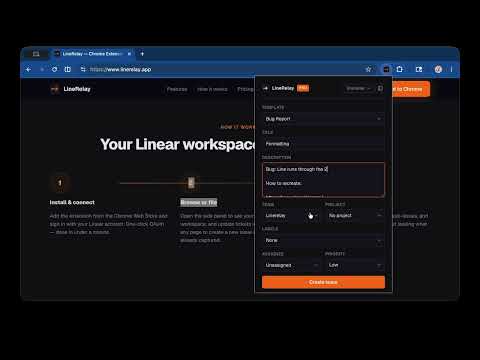
File Linear issues from any tab in seconds — page title, URL, and selected text captured automatically.
LineRelay creates Linear issues directly from any browser tab — page title, URL, and selected text are captured automatically. Requires a free Linear account. Sign in with OAuth when you first open the extension. HOW IT WORKS 1. Open the extension popup on any page (or Cmd+Shift+L (Mac) / Ctrl+Shift+L (Windows) 2. Connect your Linear account (one-time OAuth sign-in) 3. Your page title and URL are pre-filled — add details and file the issue 4. Use the persistent side panel to triage and work you issues FEATURES • Auto-captures page title, URL, and selected text • Right-click any page to file a bug or issue instantly • Side panel mode to keep the form open alongside your work • Team, project, and priority selectors • Pro: labels, assignees, templates, domain rules, active cycle Setup takes about a minute. Sign in with your Linear account via OAuth — no API keys to find, copy, or rotate. Your teams and projects load automatically from your workspace. Works on every website. Supports team and project selection, priority levels, and pre-filled descriptions from selected text. Privacy: Your OAuth token is stored only in Chrome's local storage on your device. LineRelay does not collect, log, or send your data to any server. The only external calls made are directly to Linear's API when you create an issue. Detailed feature list: SIDE PANEL FOR BROWSING & MANAGING ISSUES Open the side panel to browse your Linear workspace while you work: • View My Issues, Team Issues, or Active Cycle • Search issues by keyword • Filter by status (Backlog, Active, Done) • Click any issue to view full details ISSUE DETAIL VIEW • Read and edit the title and description (with bold, italic, code, bullet lists, and links) • Update status, priority, assignee, and labels inline • View and add comments • Create sub-issues • View issue relations • Attach the current page URL to an existing issue MULTIPLE WORKSPACES Sign in to multiple Linear workspaces and switch between them from the toolbar. PRO FEATURES Upgrade to Pro to unlock labels, assignees, issue templates, and domain rules (auto-set team/project per website). PERMISSIONS USED • storage — saves your OAuth token locally • identity — runs the OAuth sign-in flow with Linear • activeTab — reads the current tab's title and URL to pre-fill the issue form • contextMenus — adds a right-click menu to create issues from selected text • sidePanel — enables the persistent side panel for browsing issues
0 out of 5No ratings
Details
- Version1.1.1
- UpdatedMay 22, 2026
- Size158KiB
- LanguagesEnglish (United States)
- DeveloperMichael I KuhrWebsite
757 W Lewis and Clark Pkwy #2031 Clarksville, IN 47129 USEmail
hello@linerelay.appPhone
+1 812-287-9339 - TraderThis developer has identified itself as a trader per the definition from the European Union and committed to only offer products or services that comply with EU laws.
Privacy

This developer declares that your data is
- Not being sold to third parties, outside of the approved use cases
- Not being used or transferred for purposes that are unrelated to the item's core functionality
- Not being used or transferred to determine creditworthiness or for lending purposes
Support
For help with questions, suggestions, or problems, visit the developer's support site