

LightLang: next-generation quick translator
1 件の評価
)
概要
Fast word and phrase translator for web browsing.
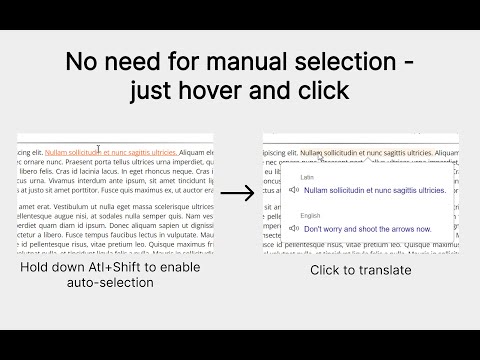
LightLang is a translator for web pages that supports automatic highlighting of text fragments such as words, sentences, paragraphs and other parts of text. Thanks to this feature, translation can appear much faster compared to manually selecting text. Simply press Alt+Shift and move the cursor over the part of text you want to translate — it will be automatically underlined. After that, just click once to get the translation. This makes translation during web browsing faster and more convenient, especially when reading foreign websites, articles or documentation. 🎯 Translate directly on web pages LightLang allows you to quickly translate any part of text while browsing the web. You can translate individual words, phrases or entire sentences without manually selecting them. This is especially useful when reading articles, news, forums, technical documentation and other materials in foreign languages. ⚡ Fewer steps to translate In many translators you first need to manually select text before translating it. LightLang reduces this friction: the relevant text fragment is automatically underlined when you hover over it. This makes translation easier and more convenient, especially when translating frequently. 📚 What else LightLang can do: • Support for 107 languages • Text-to-speech and transliteration / transcription² • Capture mode — translate several words in sequence (Ctrl + Alt + Shift) • Instant switching between auto-selection levels (Alt + Shift + mouse wheel) • Add words, phrases and sentences to a repeat list • Automatic detection and translation of letters for languages with unfamiliar alphabets³ • Nested translations — click any word, letter or even a full sentence inside an opened translation to open its translation on top of the current one _____________________________________________________________________________________________________________________________________ ¹ Translation loading speed depends on the Google Translate service and is not controlled by the extension. The perceived speed improvement comes from automating the text selection process. ² Depends on Google Translate — in some cases transliteration is displayed, in others phonetic transcription. ³ Also based on Google Translate. It is recommended to verify with learning materials.
5 点満点で 51 件の評価
詳細
- バージョン1.7.14
- 更新:2026年3月15日
- 提供元ndgfm
- サイズ420KiB
- 言語English
- デベロッパー
メール
ndgfm0@gmail.com - 非取引業者このデベロッパーは取引業者として申告していません。EU 加盟国の消費者とこのデベロッパーとの間に締結された契約には、消費者の権利が適用されません。
プライバシー

このデベロッパーは、お客様のデータについて以下を宣言しています
- 承認されている以外の用途で第三者に販売しないこと
- アイテムの中心機能と関係のない目的で使用または転送しないこと
- 信用力を判断する目的または融資目的で使用または転送しないこと