

LightLang: next-generation quick translator
1 ocena
)
Pregled
The fastest translator for words and phrases. Learn languages right while surfing the web.
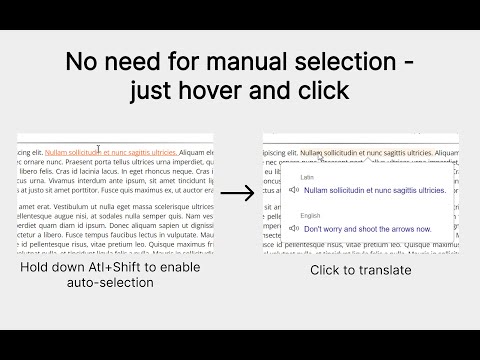
LightLang is a next-generation translator that supports automatic selection of text elements such as words, sentences, paragraphs, etc. Thanks to this feature, the average translation time is reduced to 100 ms¹, whereas with manual selection it takes 1500–3000 ms. Just press Alt+Shift and hover over the desired text unit — it will be automatically underlined, and then you just need to click to translate. This takes the translator to a new level, making it suitable not only for daily translations but also for language learning. 🎯 Learn languages simply by visiting websites With high-speed translation, you can not only translate but start reading in the original language within minutes, matching sentence and phrase translations with individual words. It becomes true language practice: over time, you’ll learn to read without translation. New words and expressions no longer need to be memorized — they are learned more easily thanks to natural context. Without courses, lessons, or flashcards. 🧠 From background mode to rapid immersion LightLang is great for both slow, passive learning and rapid immersion. If you want to learn a language faster, regular practice on real texts — articles, news, and other web content — will help. And if you don’t have time to study, simply translating repeated words while browsing will help you memorize them naturally and expand your vocabulary. 😌 Laziness is no longer a problem In many translators, you have to manually select parts of the text — this becomes a barrier even for simple translation. But LightLang automatically underlines the necessary fragment — just hover the cursor. The act of translating becomes easier and below the laziness threshold, and this changes everything — you no longer skip frequently encountered words, and the chance of giving up learning is much lower. 📚 What else LightLang can do: • Support for 107 languages • Voice output, transliteration/transcription² • Auto-highlighting with capture — translate several words in a row (Ctrl + Alt + Shift) • Instant switching between auto-highlighting levels (Alt + Shift + mouse wheel) • Adding words, phrases, and sentences to the repeat list • Auto-highlighting and letter translation for languages with unfamiliar alphabets³ • Nested translations — within an open translation you can click on any word, letter, or even a whole sentence to open its translation over the current one _____________________________________________________________________________________________________________________________________ ¹ Translation loading speed depends on Google Translate service and is not controlled by the extension. Speed-up is achieved by automating the selection process. ² Depends on Google Translate — in some cases transliteration is shown, in others transcription. ³ Also based on Google Translate. It is recommended to verify with learning materials.
5 od 51 ocena
Podrobnosti
- Različica1.7.9
- Posodobljeno22. december 2025
- Ponudnikndgfm
- Velikost428KiB
- JezikiŠt. jezikov: 10
- Razvijalec
E-pošta
ndgfm0@gmail.com - Nisem posrednikTa izdajatelj se ni opredelil kot posrednik. Potrošniki v Evropski uniji morate upoštevati, da potrošniške pravice za pogodbe, sklenjene med vami in tem razvijalcem, ne veljajo.
Zasebnost

Ta razvijalec glede vaših podatkov izjavlja naslednje:
- Zunaj okvirov dovoljenih primerov uporabe se ne prodajajo tretjim osebam.
- Ne uporabljajo ali prenašajo se za namene, ki niso povezani s temeljno funkcijo izdelka.
- Ne uporabljajo ali prenašajo se zaradi ugotavljanja kreditne sposobnosti ali zaradi namenov posojanja denarja.