Item logo image for Liferay Components

Liferay Components

5.0(

3 ratings

)
Item media 4 (screenshot) for Liferay Components
Item video thumbnail
Item media 2 (screenshot) for Liferay Components
Item media 3 (screenshot) for Liferay Components
Item media 4 (screenshot) for Liferay Components
Item video thumbnail
Item media 2 (screenshot) for Liferay Components
Item media 3 (screenshot) for Liferay Components
Item media 4 (screenshot) for Liferay Components

Overview

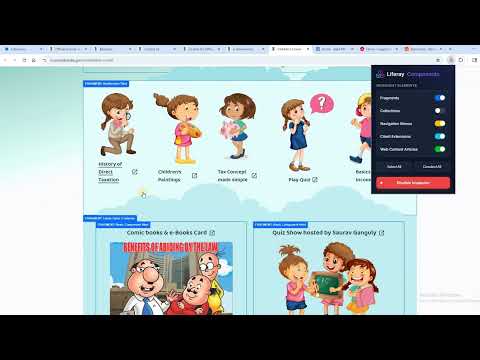
Highlight selected Liferay components with their names and colors.

The Liferay Components is a powerful Chrome extension that helps Liferay developers quickly identify, highlight, and copy component names directly from any Liferay page. It simplifies debugging and development by making complex page structures easy to understand.

Details

  • Version
    1.0.0
  • Updated
    May 7, 2026
  • Offered by
    jilpeshk
  • Size
    29.41KiB
  • Languages
    English
  • Developer
    Email
    jilpeshk@gmail.com
  • Non-trader
    This developer has not identified itself as a trader. For consumers in the European Union, please note that consumer rights do not apply to contracts between you and this developer.

Privacy

Manage extensions and learn how they're being used in your organization
The developer has disclosed that it will not collect or use your data. To learn more, see the developer’s privacy policy.

This developer declares that your data is

  • Not being sold to third parties, outside of the approved use cases
  • Not being used or transferred for purposes that are unrelated to the item's core functionality
  • Not being used or transferred to determine creditworthiness or for lending purposes

Related

Easy Select

5.0

Get readable & maintainable css selector from elements

HTML/CSS Extractor

5.0

Extract HTML & CSS from any element with live preview, smart selector simplification, and syntax-highlighted editor

CSS Selector Tester

5.0

Highlight the elements matching a given CSS selector.

React Component Names

5.0

Hold Alt/Option + hover to see React component names (Dev Mode)

Color Finder Plus

0.0

Pick Hex and RGB colors from webpages with a magnified picker and box-based color extraction.

Tailwind CSS Color Picker

0.0

Quickly get color codes from the Tailwind CSS palette.

data-test highlighter

0.0

Finds elements by attribute name/value and highlights them on the page.

Accessible find in page

4.0

An accessibility-focused search tool with customizable colors, optional blinking, and bordered highlights.

Coframe Devtool

5.0

Select elements on any webpage and create Coframe metrics

Auto Highlight & Tag

5.0

Automatic highlight and tag selected items in a Patent eDossier list based on specified colours.

ColorPick Lens

5.0

A color picker extension that displays colors in a grid layout with hex and RGB values

Element Selector

0.0

Select and highlight elements on a webpage

Easy Select

5.0

Get readable & maintainable css selector from elements

HTML/CSS Extractor

5.0

Extract HTML & CSS from any element with live preview, smart selector simplification, and syntax-highlighted editor

CSS Selector Tester

5.0

Highlight the elements matching a given CSS selector.

React Component Names

5.0

Hold Alt/Option + hover to see React component names (Dev Mode)

Color Finder Plus

0.0

Pick Hex and RGB colors from webpages with a magnified picker and box-based color extraction.

Tailwind CSS Color Picker

0.0

Quickly get color codes from the Tailwind CSS palette.

data-test highlighter

0.0

Finds elements by attribute name/value and highlights them on the page.

Accessible find in page

4.0

An accessibility-focused search tool with customizable colors, optional blinking, and bordered highlights.

Google apps