


Overview
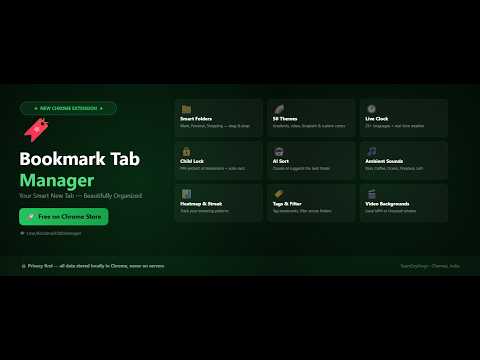
Organize your bookmarks beautifully. Custom folders, drag & drop, clock, weather, themes and more on every new tab.
🔖 Bookmark Tab Manager — Your Smart New Tab Transform every browser's new tab into a beautiful, organized bookmark manager. No more blank pages — open a new tab and instantly see your bookmarks, live clock, weather, and stunning themes. 🌍 Website: teamexykings.in ✅ FREE — Always (61 features) Bookmarks & Organization • One-click import (Chrome & Firefox) • Unlimited spaces, folders & bookmarks with drag & drop • Move folder between spaces, drag folder onto a space tab • Bulk select — delete, tag, and move to folder in one action • Duplicate bookmark detector across every space/folder • Undo delete (5-second toast) • Folder emoji picker — 200+ emojis, 100+ animated (2 animated/month free) • Custom space emoji (plain or animated) • Folder notes — attach a short description to any folder • Folder icon from favicon • Copy all links in a folder to clipboard • Collapse All / Expand All folders • Sort spaces by Name, Most Used, or Recently Added • Drag to reorder spaces • Lock Space Order — prevent accidental drag-reordering of space tabs • Stale bookmark badge (90+ days unvisited) • Visit counter, last visited date, date added • Save for Later — right-click into a Reading List space • Snooze a bookmark — remind me tomorrow / in 3 days / in a week • Bookmark import from URL — auto-fills title • Bookmark templates for new spaces (Work, Travel, Job Hunt, Student) • Shareable read-only space link • Export a single space as JSON or Markdown • Auto-File Rules — bookmarks matching a URL/title rule file themselves into the right folder automatically • Smart Media Folders — save a YouTube or Spotify playlist link and it's auto-filed into its own "🎥 YouTube Playlists" / "🎵 Spotify Playlists" folder, created for you automatically Search & Navigation • Instant bookmark search — press / • Quick Add current tab — press Q • Keyboard shortcuts — Ctrl+B, Ctrl+N, Ctrl+E, arrow-key navigation • Number-key space switching — press 1-9 to jump straight to a space • Custom keyboard shortcuts — reassign any of the above • Right-click context menu — 13 quick actions • Recently Visited — collapsible last 8 opened bookmarks • "On This Day" — reminder when a bookmark turns 1 year old • To-Do mini checklist widget — a simple task list on your new tab • Tab Count badge — see how many tabs are open in your current window • Daily Quote widget — a new quote each day on your new tab Reliability & Backup • Broken Link Checker — scan up to 50 bookmarks per click • Weekly automatic broken-link scan with notification • Bookmark Health Digest — combined weekly notification • Backup & Restore — JSON and Chrome-compatible HTML • Google Drive Backup — one-click push to your own Drive (JSON + HTML) • Backup Age Badge — see how long it's been since your last backup at a glance • Chrome Bookmarks Sync — get notified of native Chrome bookmark changes, optional mirror into Chrome's own bookmark manager Look & Feel • Dark & Light themes • Custom background — 2 image changes/week, up to 6MB (animated GIFs supported too) • 10 curated background gradients with guaranteed-readable text • Taste Pro backgrounds — try Custom Colors/Gradients, Video, or Unsplash 2x/month free • Slideshow position-dot indicator — jump straight to any photo/clip in a running Slideshow Background • Tags & filter — up to 2 tags per bookmark, click to filter • Privacy Mode — blur all folders for screen sharing • Clock — 25+ languages, live weather, seconds toggle • Space tab color coding — a small colored dot on each space tab so they're tellable apart at a glance • Subtle motion polish (optional) — soft fade on space switch, small pop when a bookmark is added • Milestone celebration — a one-time confetti moment when your bookmark count crosses a round number • Click sound pack (optional) — a subtle tick on adding a bookmark or switching spaces • Respects your OS's "Reduce Motion" setting — automatically dims all motion on top of the toggles above Account & Extras • Smart onboarding — template, import, or start fresh • License expiry reminder + one-click renew/switch plan • What's New indicator on updates • Suggest a Feature — send ideas straight to the developer • Open in Incognito — 100 opens/month ⭐ PRO — ₹299/month, ₹2,499/year, ₹4,999/lifetime (29 features) • 50 gradient themes, custom color picker, gradient direction, solid color mode • Video background — local MP4 up to 30s, optional sound • Unsplash backgrounds — auto-changing photos by category • Photo Slideshow background — up to 10 of your own photos with a Ken-Burns zoom, adjustable speed, duration, and transition • Slideshow Videos — mix in up to 5 short video clips (30s each) alongside your slideshow photos, with an on-upload trim tool for longer clips • Weather-reactive background — a subtle rain/snow overlay when it's actually raining/snowing at your location • Per-Space Slideshow — a separate slideshow photo/clip set for an individual Space, distinct from your global one • Save 5 background presets • Per-folder styling — background, border, and font color per folder • Full color control — text, accent, and 5 font families • Animated particles — 10 shapes, adjustable speed/density • Per-space background • Space Lock — a separate PIN for one sensitive space • Child Lock & Master PIN — auto-lock after 1–60 min, with email-based PIN recovery • AI Auto-Categorize — AI suggests the best folder for a bookmark • Ambient sounds — Rain, Coffee shop, Ocean, Fireplace, Forest, LoFi • Usage heatmap & daily streak tracker • Weekly report — top 5 most-visited bookmarks and trends • Most-Clicked Sites — see which domains you click into most, grouped across all your bookmarks from that site • Auto-File Rules cap raised to 50 (free stays at 20), managed from a dedicated scrollable popup • Dual timezone clock — two city clocks from 16+ cities • Export as Markdown — for Notion, Obsidian, or any note app • Unlimited Incognito opens — no monthly cap • Pomodoro Timer + Scratchpad • Bookmark Visit Goal — weekly visit target with a progress badge • Text Stroke/Outline for titles • Custom title font — a separate font just for the header title/subtitle/clock • Folder card shape presets — Sharp/Rounded/Pill quick-picks for card corners • Multi-device activation — Monthly: 3 devices, Yearly: 5, Lifetime: 10 New Pro features are added regularly — check Settings → What's New in the extension for the full up-to-date list. 🔒 Privacy First All your bookmarks and settings stay local in your browser. Nothing is sent to any server except the minimum needed for Pro license validation, weather, and AI Auto-Categorize. No account required for free features. 💬 Community & Support WhatsApp: chat.whatsapp.com/BpZgK3DRcIqA2R9RDn7qBX Telegram: t.me/BookmarkTabManager 🔗 Links Website: teamexykings.in GitHub: github.com/yashwanthramsomireddy/bookmark-tab-manager Privacy Policy: yashwanthramsomireddy.github.io/bookmark-tab-manager/privacy-policy.html Built with ❤️ by Yashwanth Ram Somireddy — TeamExyKings
0 out of 5No ratings
Details
- Version3.2.8
- UpdatedOctober 19, 2026
- FeaturesOffers in-app purchases
- Size403KiB
- LanguagesEnglish (United States)
- DeveloperYashwanth Ram SomireddyWebsite
292, South 3rd Main Road, Kapaleeshwarar Nagar, Neelankarai Chennai, Tamil Nadu 600115 INEmail
yashwanthramsomireddy@gmail.com - Non-traderThis developer has not identified itself as a trader. For consumers in the European Union, please note that consumer rights do not apply to contracts between you and this developer.
Privacy

Bookmark Tab Manager has disclosed the following information regarding the collection and usage of your data. More detailed information can be found in the developer's privacy policy.
Bookmark Tab Manager handles the following:
This developer declares that your data is
- Not being sold to third parties, outside of the approved use cases
- Not being used or transferred for purposes that are unrelated to the item's core functionality
- Not being used or transferred to determine creditworthiness or for lending purposes
Support
For help with questions, suggestions, or problems, visit the developer's support site