

PolySub — AI Video Subtitle Translator

Overview
Dual subtitles with Instant and managed AI translation, free themes, transcripts, and live transcription.
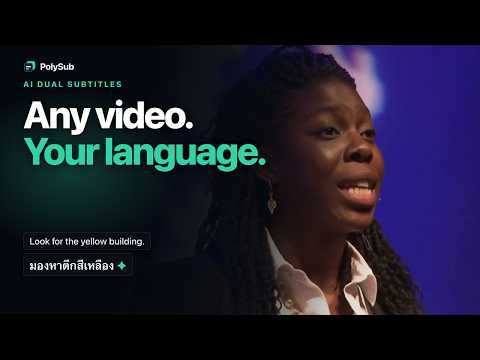
PolySub adds bilingual subtitles and translation tools directly to web videos. Open a web page with an HTML5 video, choose your language, and use PolySub to show the original captions together with a translated line. On pages without a supported video or captions, PolySub stays idle. What PolySub includes: - Dual original and translated subtitles over the video - Instant translation and managed PolySub AI translation - Subtitle size, position, display, and theme controls - Transcript view, search, export, and language-learning tools - Six free themes plus private transcript corrections - User-initiated Live Transcribe for videos without usable captions - Optional account sync for settings, vocabulary, and entitlements Privacy and control: - The extension does not send general product or feature-use analytics - Live Transcribe captures only the current tab audio after you start it - PolySub does not sell data or use it for advertising - You can disable PolySub on individual sites PolySub needs access to web pages because video players and caption tracks can appear on many different websites, including inside embedded frames. It uses that access only to detect the current video, read its captions, display the subtitle interface, and perform the subtitle or transcription action you request. It does not build or sell a browsing-history profile. Basic instant translation works without payment. Some managed AI and Live Transcribe features require an account and available trial or Pro entitlement. Paid checkout is not open in this version. Use only with content you are permitted to access. PolySub does not download video files or bypass subscriptions, access controls, or DRM.
0 out of 5No ratings
Details
- Version1.2.2
- UpdatedAugust 24, 2026
- Offered byprepsignals
- Size459KiB
- LanguagesEnglish
- DeveloperArthit Napradit
36/16 Petchkasem 81/6 Nongkhaem, กรุงเทพมหานคร 10160 THEmail
prepsignals@gmail.comPhone
+66 83 135 3426 - TraderThis developer has identified itself as a trader per the definition from the European Union and committed to only offer products or services that comply with EU laws.
Privacy

PolySub — AI Video Subtitle Translator has disclosed the following information regarding the collection and usage of your data. More detailed information can be found in the developer's privacy policy.
PolySub — AI Video Subtitle Translator handles the following:
This developer declares that your data is
- Not being sold to third parties, outside of the approved use cases
- Not being used or transferred for purposes that are unrelated to the item's core functionality
- Not being used or transferred to determine creditworthiness or for lending purposes
Support
For help with questions, suggestions, or problems, visit the developer's support site