

AgentOnWeb

Overview
Bring your local terminal and DSH workspace onto the website you are using.
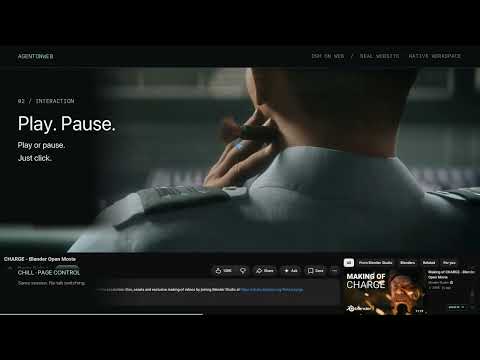
Your coding workspace, on the website you are using. Use Codex, Claude Code or Pi while watching a video or reading documentation. AgentOnWeb brings your local terminal onto the page, shows running agent sessions, and notifies you when a task finishes or needs approval. Click a session to return to its terminal. Approval decisions stay in your native CLI. AgentOnWeb also connects the native DeepSeek Harness (DSH) workspace, with its conversations, models, tools, approvals and plugins. Switch between Local terminal and DSH from the dock without stopping either. Chill: a translucent workspace with adjustable opacity. Focus: an opaque workspace for concentrated work. Watch: a compact dock that keeps the website interactive. Double-tap Option/Alt in Chill to switch interaction between the workspace and the website. Changing modes keeps your session running. Local terminal setup (macOS + Chrome): 1. Install Node.js 22.19+ and install/sign in to your preferred CLI. 2. Follow the one-command setup guide: https://github.com/HeftyKoo/AgentOnWeb/blob/main/docs/one-command-setup.md. The installer configures the local terminal service and Chrome pairing, detects installed CLIs, and asks which Codex/Claude Code/Pi notification integrations to enable while preserving existing settings. 3. Open AgentOnWeb on a normal website, enter your project directory, and run codex, claude or pi. 4. Review AgentOnWeb hooks in Codex or Claude Code's /hooks and trust them when requested, then start a new session. For Pi 1.1+, start a new session or run /reload to load the AgentOnWeb extension. DSH setup: 1. Install the latest DSH: npm install -g @deepseek-ai/dsh@latest. Configure your model-provider credentials in DSH. Provider charges may apply. 2. Run: dsh plugin --profile web add @agentonweb/dsh-surface@0.4.0 3. Start DSH with dsh web. 4. Open AgentOnWeb on a normal website, expand the dock, click +, choose DeepSeek Harness, and approve Allow connection in DSH. New in extension 0.4.2: drag the floating AgentOnWeb icon with a mouse, trackpad or touch so it does not cover website controls. Its position is remembered across pages and reloads and adapts to window resizing. Dragging does not open the menu; clicking and keyboard activation still work. Controls and notifications stay within the window. Direct mouse/trackpad terminal text selection and right-click copying inside TUIs require the separately installed terminal host 0.4.2 or newer. Terminal host 0.4.3 is available separately. Finish active shell work, then run aow update from a separate macOS Terminal; updating only the extension does not update the host. GitHub and full setup: https://github.com/HeftyKoo/AgentOnWeb DSH English demo: https://www.youtube.com/watch?v=s083RpD38HU DSH Chinese demo: https://www.youtube.com/watch?v=DV8s9z-w4GE Support: https://heftykoo.github.io/AgentOnWeb/support.html Privacy: https://heftykoo.github.io/AgentOnWeb/privacy.html Codex, Claude Code, Pi and DSH are installed separately and use your own accounts or provider credentials. The extension does not include a model-service subscription. Protected browser pages cannot host the workspace. Demo background: CHARGE, copyright Blender Foundation / Blender Studio (2022), https://studio.blender.org/films/charge/ — CC BY 4.0, https://creativecommons.org/licenses/by/4.0/. Excerpted within real product recordings; original audio muted.
0 out of 5No ratings
Details
- Version0.4.2
- UpdatedOctober 29, 2026
- Offered byHeftyKoo
- Size41.27KiB
- LanguagesEnglish (United States)
- Developer
Email
yeyuqiudeng@gmail.com - Non-traderThis developer has not identified itself as a trader. For consumers in the European Union, please note that consumer rights do not apply to contracts between you and this developer.
Privacy

AgentOnWeb has disclosed the following information regarding the collection and usage of your data. More detailed information can be found in the developer's privacy policy.
AgentOnWeb handles the following:
This developer declares that your data is
- Not being sold to third parties, outside of the approved use cases
- Not being used or transferred for purposes that are unrelated to the item's core functionality
- Not being used or transferred to determine creditworthiness or for lending purposes
Support
For help with questions, suggestions, or problems, visit the developer's support site