

VideoMirror
210 ratings
)
Overview
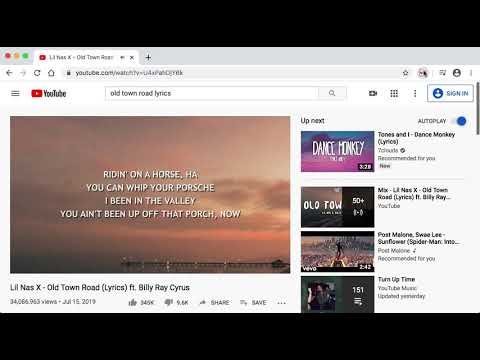
Video mirror (left-to-right) on any page (including Zoom, YouTube, Vimeo, Twitch, Google Meet, etc.)
*NEW* Looking to mirror your webcam instead? Try CamFlip: https://chrome.google.com/webstore/detail/camflip/jgnejnfdbomaelibbccppknilnnhklnk - *NEW* Mirror automatically on sites you choose - Supports Zoom for Web - Supports YouTube - Supports Google Meet - Supports livestreams (Twitch.tv) - Supports fullscreen mode on most sites Usage: on a page with video, click the VideoMirror icon. All videos on the page should mirror. Click again to undo. Recent updates: - v3.2.0 (latest): Mirror automatically on sites you choose, from the options page or the right-click menu - v3.0.2: Fixes for analytics - v3.0.1: Updates to analytics - v3.0.0: Upgrade to Manifest v3, make flipping more consistent and clearer - v2.2.0: Fix fullscreen issues - v2.1.0: Actually fixed Google Meet issue - v2.0.1: Fixed Google Meet issue - v2.0.0: Made icon more clear when it is enabled/disabled and fixed 🤞 Zoom for web - v1.3.1: Add partial support for embedded vimeo players - v1.3.0: Add support for Zoom - v1.2.1: Remove uninstallation survey - v1.2.0: Flipping is more consistent during page changes (e.g. when entering/exiting full screen) - v1.1.0: Animation appears when mirroring videos
4.3 out of 5210 ratings
Details
- Version3.2.0
- UpdatedAugust 30, 2026
- Offered bySteven Kemp
- Size43.52KiB
- LanguagesEnglish
- Developer
Email
support@kemp.app - Non-traderThis developer has not identified itself as a trader. For consumers in the European Union, please note that consumer rights do not apply to contracts between you and this developer.
Privacy

This developer declares that your data is
- Not being sold to third parties, outside of the approved use cases
- Not being used or transferred for purposes that are unrelated to the item's core functionality
- Not being used or transferred to determine creditworthiness or for lending purposes