

YT to PDF
1 rating
)
Overview
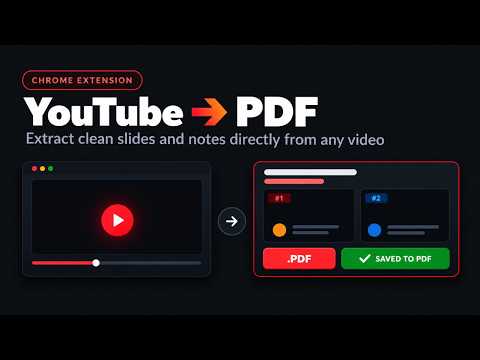
Extract presentation slides from YouTube videos and export them to PowerPoint (PPTX), PDF, or images with one click.
Extract clean, high-resolution PDF and PowerPoint (PPTX) slide decks from YouTube videos with a single click. No more pausing videos every few seconds to manually capture screenshots. YT to PDF automatically detects slide transitions, filters out presenter webcams and cursor movements, and packages your slides into an organized, export-ready presentation. ━━━━━━━━━━━━━━━━━━━━━━━━━━━━━━━━━━━━━ ✨ KEY FEATURES ━━━━━━━━━━━━━━━━━━━━━━━━━━━━━━━━━━━━━ ⚡ Automated Slide Scanner Fast-scans the entire video in seconds to automatically detect and capture slide transitions. Choose between scanning the entire video (from 0:00) or starting from your current playback position. 🎯 Smart Transition Detection Powered by perceptual difference hashing (dHash) and color variance analysis. Accurately detects genuine slide changes while ignoring webcam overlays, laser pointers, and mouse cursor jitter. 🧩 Flexible Capture Modes • Final Slides Only (Recommended): Automatically updates build-up slides in-place, giving you a clean deck with one final slide per topic. • All Steps: Captures each intermediate bullet point, diagram reveal, or code animation as a separate slide. 📸 1-Click Snapshot & Clipboard Copy • Snap Slide: Instantly capture the current frame to your deck using the on-player camera button or Alt+S. • Copy to Clipboard: Copy the current video frame straight to your system clipboard using the on-player clipboard button or Alt+C for quick pasting into notes or documents. 🗂️ In-Page Slide Deck Manager • Interactive slide drawer embedded directly on the YouTube watch page. • Click any slide thumbnail to jump the video straight to that exact timestamp. • Select or deselect specific slides to customize what gets exported. • Reorder slides via drag-and-drop or delete unwanted frames. • Built-in continuous lightbox viewer with pinch-to-zoom and wheel zoom (25% to 400%). 🚀 Multiple Export Options • PDF Document (.pdf) — High-resolution multi-page presentation document. • PowerPoint (.pptx) — Clean 16:9 widescreen presentation deck ready to edit. • Image Archive (.zip) — High-resolution image files packaged in sequential order. • Print Layout — Clean, printable document layout directly in your browser. 🔒 100% Private & Client-Side Runs entirely in your browser sandbox. No external servers, no cloud uploads, no account required, and zero data leaves your device. ━━━━━━━━━━━━━━━━━━━━━━━━━━━━━━━━━━━━━ 🚀 HOW TO USE ━━━━━━━━━━━━━━━━━━━━━━━━━━━━━━━━━━━━━ 1. Open any YouTube presentation or lecture video. 2. Use the controls embedded directly in the YouTube player: • 📸 Snap Slide (Alt + S) — Manually capture the active frame. • 📋 Copy Frame (Alt + C) — Copy the active frame directly to your clipboard. • ⚡ Auto-Scan — Automatically scan and extract all presentation slides. • 📑 Slide Deck (Alt + D) — Open the slide manager drawer. 3. Review, reorder, or filter your slides in the slide drawer. 4. Click your desired export format (PDF, PowerPoint, or ZIP) to download instantly. ━━━━━━━━━━━━━━━━━━━━━━━━━━━━━━━━━━━━━ ⌨️ KEYBOARD SHORTCUTS ━━━━━━━━━━━━━━━━━━━━━━━━━━━━━━━━━━━━━ • Alt + S — Snap current slide • Alt + C — Copy active video frame to clipboard • Alt + D — Toggle slide deck drawer • Alt + A — Open slide drawer & scan controls ━━━━━━━━━━━━━━━━━━━━━━━━━━━━━━━━━━━━━ 🔒 PERMISSIONS & PRIVACY ━━━━━━━━━━━━━━━━━━━━━━━━━━━━━━━━━━━━━ • Host Permission (youtube.com): Required to capture video frames and display player controls on YouTube pages. • Storage: Saves your active slide decks locally on your device so your progress is preserved across tabs and sessions. YT to PDF does not track browsing history, collect personal data, or communicate with external servers.
4 out of 51 rating
Details
- Version1.2.1
- UpdatedOctober 30, 2026
- Offered byashmitv444
- Size363KiB
- LanguagesEnglish
- Developer
Email
ashmitv444@gmail.com - Non-traderThis developer has not identified itself as a trader. For consumers in the European Union, please note that consumer rights do not apply to contracts between you and this developer.
Privacy

This developer declares that your data is
- Not being sold to third parties, outside of the approved use cases
- Not being used or transferred for purposes that are unrelated to the item's core functionality
- Not being used or transferred to determine creditworthiness or for lending purposes