

File Transfer – Send Large Files P2P

Overview
File Transfer – Send Large Files P2P: transfer large files from PC to PC or to a phone directly. Any size, encrypted, no cloud.
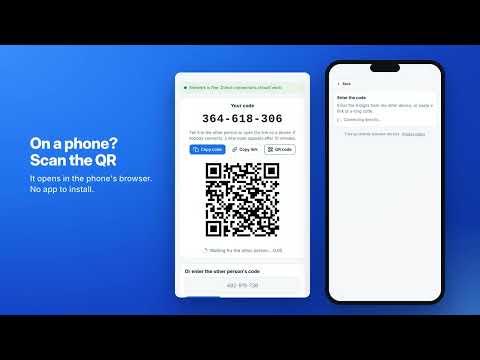
📁 File Transfer – Send Large Files P2P is a simple file transfer tool that sends files of any size straight from one device to another. Everything goes directly between the two devices and is never uploaded to a cloud drive, so you can send large files without size limits, sign-ups or waiting for an upload to finish. 🚀 How to send large files in 3 steps 1. Open the file transfer panel: your 9-digit code like 482-915-736 is already on screen. 2. Tell the code to the other person, or let them scan the QR code with a phone. 3. Pick what to send – the p2p file transfer starts as soon as the devices connect. That's it. On a phone nothing needs to be installed: the code opens a web page in any mobile browser, so you can send files to phone or transfer files from iphone to pc in seconds. ⚡ Why this peer to peer file transfer is different ➤ Any size: send big files, hundreds of photos or long videos – there is no upload limit, only the space on the receiving disk. ➤ Direct: a direct file transfer over WebRTC, the same technology browsers use for video calls. ➤ Private: data is encrypted on the way and never stored on someone else's server. ➤ Fast on Wi-Fi: on the same network a large file transfer never leaves your home or office. ➤ Resumable: if the connection drops, sending continues from where it stopped. ➤ Checked: every 1 MB block is verified with SHA-256, so the received copy is identical to the original. 📱 Works between all your devices • transfer files from pc to pc: Windows, Mac, Linux or Chromebook • transfer files from pc to phone and back • transfer files from android to pc without a cable • transfer files from pc to iphone through Safari • transfer files between devices in both directions in one session 🎬 Made for large video files Wondering how to send large video files? Phone videos, screen recordings, camera footage and project archives often hit e-mail or messenger limits, and a cloud upload can take longer than the direct file transfer itself. With this file transfer extension you just pick the file: sharing large files takes as long as your network needs, nothing more. 🔐 Privacy you can check - No account, no sign-up, no e-mail. - The 9-digit code works once and expires after 10 minutes. - A wrong code is rejected and immediately replaced with a new one. - Verification words let you confirm that you are connected to the right device. - The extension has no access to the websites you visit. 🔄 Smart connection 1️⃣ A built-in network check shows whether direct connections work on your network. 2️⃣ If the connection drops, the two devices find each other again automatically, no new code needed. 3️⃣ If the short code cannot be used, you can exchange long codes instead. 4️⃣ The side panel stays open while you work in other tabs, so a large file transfer is not interrupted. 💼 Who uses File Transfer ▸ Moving to a new laptop: transfer data to new computer without a USB stick. ▸ Designers and video editors who share large files with clients. ▸ Students sending projects and recordings to classmates. ▸ Teams that need a quick file transfer between office computers. ▸ Anyone who needs to send a document from a computer to a phone in a hurry. 🧭 Tips for a fast file transfer ◆ Keep both devices on the same Wi-Fi for the highest speed. ◆ Run the network check if a peer to peer file transfer does not start. ◆ Keep the panel open until the progress bar reaches 100%. 🌍 The interface is available in 52 languages and works in Chrome and Chromium-based browsers on Windows, macOS, Linux and ChromeOS. ❓ FAQ 📌 Is there a file size limit? 💡 There is no fixed limit. The p2p file transfer streams data straight to the receiving disk, so you can send large files of many gigabytes. 📌 Do my files go through a server? 💡 No. The file transfer goes directly between the two devices. Public servers only help the devices find each other with short encrypted messages and never receive file data. 📌 Does the other person need the extension? 💡 No. They can open the link or scan the QR code in any browser, including on iPhone and Android. 📌 How do I transfer files from pc to pc on the same Wi-Fi? 💡 Open the extension on both computers, enter the code from one on the other, and choose what to send. The traffic stays on your local network. 📌 What happens if the connection is lost? 💡 Sending resumes automatically from the last verified block. 📌 Can I send several files at once? 💡 Yes. Add as many files as you like, and both sides can send files to each other in the same session. ✅ Install File Transfer – Send Large Files P2P and send files of any size in a few seconds.
0 out of 5No ratings
Details
- Version1.4.0
- UpdatedNovember 4, 2026
- Size620KiB
- Languages52 languages
- Developer
Email
rentabextension@gmail.com - Non-traderThis developer has not identified itself as a trader. For consumers in the European Union, please note that consumer rights do not apply to contracts between you and this developer.
Privacy

File Transfer – Send Large Files P2P has disclosed the following information regarding the collection and usage of your data. More detailed information can be found in the developer's privacy policy.
File Transfer – Send Large Files P2P handles the following:
This developer declares that your data is
- Not being sold to third parties, outside of the approved use cases
- Not being used or transferred for purposes that are unrelated to the item's core functionality
- Not being used or transferred to determine creditworthiness or for lending purposes