

AnkiPilot: AI Cards for Anki
2 ratings
)
Overview
AnkiPilot creates reviewable Anki cards using your own AI key or a local model.
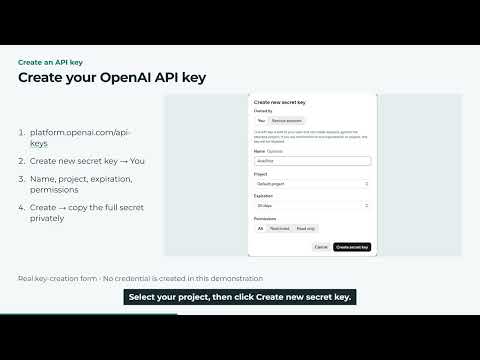
AnkiPilot is an AI flashcard maker that turns the questions you miss into Anki cards, at the moment you miss them. Highlight text on a page or open the study-card panel, write what you missed in your own words, and AnkiPilot drafts focused cards for you. You review every draft, accept the ones that are right, reject the rest with one click, and only accepted cards are added to your deck through AnkiConnect. The cards land in the deck you already review, so they join your normal spaced repetition instead of sitting in a separate app. SETUP (about 10 minutes, once) 1. Install Anki desktop from apps.ankiweb.net if you do not already have it. 2. In Anki, go to Tools, then Add-ons, then Get Add-ons, and enter the code 2055492159 to install AnkiConnect. Restart Anki, and keep Anki open while you use AnkiPilot. 3. Install AnkiPilot from this page and pin it to your toolbar. 4. Add AI access in AnkiPilot settings. Use your own API key for a supported AI service, or run a local model with Ollama on your own computer and use no key at all. A subscription to a chat service is not API credit: API use is billed by the provider, separately. 5. Pick your deck and card type, then make your first card. Watch the 8-minute setup tutorial: https://www.youtube.com/watch?v=zBAvUQA6uNE Covers installation, AnkiConnect, creating an OpenAI API key, saving your first card, and troubleshooting Ollama. On UWorld and AMBOSS, a local model is required even with an OpenAI key. Step-by-step setup with a short recording for every step: https://aaronge-2020.github.io/AnkiPilot/guide/ Stuck? https://aaronge-2020.github.io/AnkiPilot/support/ HOW IT WORKS - Capture the miss: select text on any webpage or open the panel on a question page, and type the concept you missed in your own words. - Drafts, not auto-added cards: AnkiPilot generates card drafts with a short rationale for each one. Nothing enters your deck until you accept it. - Review and add: edit a draft if it needs it, accept the good ones, reject the rest. Accepted cards are added to Anki through AnkiConnect, and AnkiPilot keeps an Added Cards record so you can see exactly what went in. YOUR AI, YOUR KEY - Your own API key for a supported AI service. Your key is stored encrypted in browser storage, which may sync according to your browser settings, and is sent directly to the provider you selected. AnkiPilot runs no server and receives nothing. - Or a local model you run on your own computer with Ollama. Generation requests stay on your computer, and no key is needed. - Browser speech recognition and browser or Anki synchronization are separate features and may use remote services. BUILT FOR STEP 2 STUDYING - Cards carry a fixed Step 2 tag set (System, Topic, Discipline, Task, Yield), so cards from different questions land in your deck organized the same way every time. - Add basic cards or cloze cards. - On question-bank pages, AnkiPilot reads only the question ID and uses it to find matching notes in your own collection. You type what you missed in your own words, and cards on those pages are generated with a local model only. FREE AnkiPilot is free. There are no accounts, no sign-in, and no plans. An optional donation link in the popup goes to the developer's PayPal donation page and unlocks nothing. YOU STAY IN CONTROL Review every card before it is added to Anki. AI output can be wrong, so check each card against a source you trust. VERSION HISTORY Version 0.7.4 (November 2026): fixes local Ollama connections so users can test an installed model without manually configuring browser origins. This is a connection hotfix based on version 0.7.2. Version 0.7.2 (October 2026): first public release, with more robust card generation and grading, a study chat, and independent card review. Bring your own key or use a local model, review-before-adding through AnkiConnect, Step 2 tags, and question ID lookup of matching notes on question-bank pages. AnkiPilot is an independent tool. It is not affiliated with or endorsed by the makers of the apps and services it works with.
4 out of 52 ratings
Details
- Version0.7.4
- UpdatedNovember 2, 2026
- Size720KiB
- LanguagesEnglish
- Developer
Email
aaronge2020@gmail.com - Non-traderThis developer has not identified itself as a trader. For consumers in the European Union, please note that consumer rights do not apply to contracts between you and this developer.
Privacy

AnkiPilot: AI Cards for Anki has disclosed the following information regarding the collection and usage of your data. More detailed information can be found in the developer's privacy policy.
AnkiPilot: AI Cards for Anki handles the following:
This developer declares that your data is
- Not being sold to third parties, outside of the approved use cases
- Not being used or transferred for purposes that are unrelated to the item's core functionality
- Not being used or transferred to determine creditworthiness or for lending purposes
Support
For help with questions, suggestions, or problems, visit the developer's support site