

Copy All Open Tab URLs – TabShare
2 ratings
)
Overview
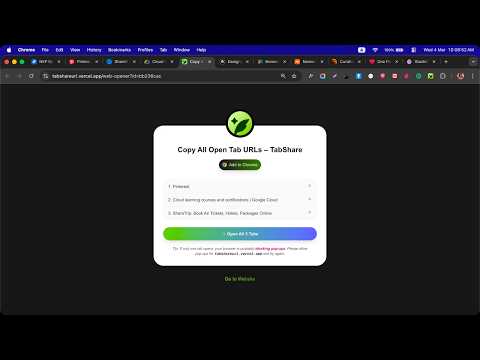
Copy and organize your open Chrome tabs. Auto-group by domain and copy selected tab URLs in seconds.
𝐓𝐚𝐛𝐒𝐡𝐚𝐫𝐞 lets you copy open tab URLs in Chrome quickly and efficiently. Select one tab or multiple tabs, group Chrome tabs automatically by domain, and copy grouped tab URLs in a clean format with one click. If you frequently copy multiple tabs for research, documentation, sharing links, or organizing browsing sessions, this tool saves time and eliminates manual copying. 🚀 𝐅𝐞𝐚𝐭𝐮𝐫𝐞𝐬 - Copy the active tab URL with one click - Select multiple tabs and copy only what you need - Automatically group tabs by domain - Copy URLs by group - Select specific tabs using checkboxes - Copy all selected links at once - 𝗔𝘂𝘁𝗼 𝗚𝗿𝗼𝘂𝗽 to organize your open tabs by domain. ⚡ 𝐈𝐝𝐞𝐚𝐥 𝐅𝐨𝐫 - Save time when sharing multiple links - Avoid manual copy-paste repetition - Research and study sessions - Sharing multiple links via email or chat - Organizing open Chrome tabs - QA and bug reporting with reference links - Managing grouped browsing sessions 🔹 𝐅𝐚𝐬𝐭 & 𝐋𝐢𝐠𝐡𝐭𝐰𝐞𝐢𝐠𝐡𝐭 This extension focuses only on copying and grouping open tabs in Chrome. No unnecessary features. No clutter. Whether you're sending links to Slack, email, Notion, Jira, or WhatsApp — TabShare gives you a structured list instantly.
5 out of 52 ratings
Details
- Version1.0.2
- UpdatedMay 6, 2026
- Offered byJoy
- Size95.06KiB
- LanguagesEnglish
- Developer
Email
sohanoor404@gmail.com - Non-traderThis developer has not identified itself as a trader. For consumers in the European Union, please note that consumer rights do not apply to contracts between you and this developer.
Privacy

This developer declares that your data is
- Not being sold to third parties, outside of the approved use cases
- Not being used or transferred for purposes that are unrelated to the item's core functionality
- Not being used or transferred to determine creditworthiness or for lending purposes
Support
For help with questions, suggestions, or problems, visit the developer's support site