

LexWeave Lookup

Overview
Read English anywhere: see what a word means here, translate passages sentence by sentence, ask why, and save it.
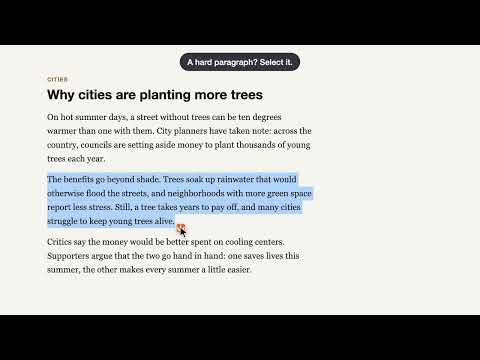
Before you install: LexWeave Lookup runs on your own Google Gemini key. Google gives many accounts a free tier, but not every account, and only Google decides. Check yours first, in about two minutes: open Google AI Studio (aistudio.google.com), get an API key, and look at your project's Billing Tier. "Free tier" means it is free. "Free tier unavailable" means you would add a card and prepay Google at least $5. If you don't want to, please don't install: without a working key, the extension can't do anything. Among the big U.S. AI companies, Google's Gemini is the only API with an ongoing free tier. LexWeave Lookup is for reading English that is not your first language — an article, a textbook PDF, a YouTube video. Look up a word and see what it means in this sentence. Translate a paragraph and read it sentence by sentence. Ask why a sentence is put the way it is. Save what you want to keep. LOOK UP • Select or double-click a word: a small card gives the meaning that fits the sentence you are reading — not a dictionary dump — with US or UK IPA, part of speech, synonyms, and an example you can hear. • Names are handled honestly: a person's or place's name gets no invented definition, just how to say it. READ A PASSAGE • A word you can't select, in a button or a link? Hold Control, point at it and let go. Hold Control from one word to another for the words between; press Control twice for the paragraph. It works in PDFs too. • Select a sentence or a paragraph: the card shows it with its translation, sentence by sentence. Point at a sentence to see its partner; tap to pin a pair. • Listen to the passage; where your system's voice allows, each word is marked as it is spoken. • Find Phrases pulls out the idioms and collocations in it — even when their words are split apart — and lights each one where it appears. • Switch on the word highlight (Chinese so far) to see which words of the translation each English word became. ASK • Right-click any part of the passage on the card and ask about its grammar, its usage, the culture behind it, or a question of your own. • Answers point at the exact words they are about, and each quote is checked against the text. Answers about culture are marked as coming from the AI's memory, to be read with care. SAVE • Save a word, a sentence pair, or an answer, with a note of your own, to the place you pick beside Save: your Obsidian notes (no plugin needed) or a list in the extension. WHERE IT WORKS • Any web page. • PDFs, in LexWeave's own PDF viewer: open a PDF tab or a file on your computer in it. Paragraphs that run across a page break come through whole. • Videos on YouTube, Khan Academy and PBS (off until you turn it on): the captions appear in LexWeave's caption bar; rest the pointer on a word to pause and look it up, and replay or step through the video sentence by sentence. • Missed why the audience laughed, or who a name is? Turn on subtext notes (off until you do): the caption bar marks the words that take something for granted — a quotation, a joke, a person, a custom — and the ⓘ after them explains it in your language. Explanations come in your language — over 30 to choose from. The card's own buttons and messages are in English, for practice. YOUR KEY, YOUR DATA You bring your own Google Gemini API key; a setup page walks you through getting one. Google gives many accounts a free tier, and whether yours gets it is Google's decision; without it, you pay Google directly for your own use, and no one else can use your key. You need a Google account and must be 18 or older. What you look up — and, with subtext notes on, a video's captions — goes straight from your browser to Google with your key — there is no middle server, and the developer never sees it. On Google's free tier, Google may use what you send to improve its products. Your history and saved items stay on your computer. No account, no tracking, no ads. New in 1.7.0 • Watching a Khan Academy lesson or a PBS video? The caption bar works there too, and goes full screen with the player's own button. • The caption bar covers something? Press Aa, then the move button, drag the bar where you want it and press Done. It stays there, on every site. • Missed why the audience laughed, or who a name is? Press Aa, then ⓘ Subtext (or turn it on in the options): the caption bar marks the words that take something for granted, and the ⓘ after them explains it in your language. It sends the video's captions to Gemini with your key, a quarter of an hour at a time. • A paragraph that a page break cuts in two? In a PDF, press Control twice on either half: you get the whole paragraph, without the page number or heading in between. • The setup page explains each step in your language as well as in English, in 31 languages; pick yours on its first screen. It also tells you plainly: don't give your key to anyone — LexWeave never sees it. New in 1.6.0 • Can't select a word, because it is in a button or a link, or the page lies over it? Hold Control, point at the word and let go. Nothing is clicked, and nothing is looked up until you let go. • Hold Control on one word and move to another to look up everything between; press Control twice for the whole paragraph. • The same in PDFs, where a drag is hard to start and stop on the right letter. New in 1.5.3 • Setting up says plainly that Google decides who gets its free tier, and walks you through billing if Google asks for it. • If Google refuses because a project has no free tier, needs a phone check or has used up its prepaid credit, the card says so and opens the right page, instead of telling you to check your key. • Pages that keep their text inside web components, such as MSN articles, now work: double-click a word or select a sentence. • After an update, pages you already had open keep working; you no longer need to reload them. New in 1.5.2 • Gemini keys are now sent to Google the way Google's documentation asks. • Now in Microsoft Edge too: the setup page and the hints name Edge and its own pages. • A name written in capitals, such as AMJEVITA, is read aloud as a word, not spelled letter by letter, on the card and when a passage is read. • When a card's button takes you to a setting, that setting is always on the screen. New in 1.5.1 • No Obsidian? When you press Save and the card says the Obsidian vault name isn't set, "Save in LexWeave instead" keeps the item in the extension's own list instead. • Explanations now come in the language you chose every time. For some languages, such as Mongolian, Burmese and Ukrainian, an answer sometimes came in another language. • Double-clicking a word in a passage now opens that word every time, even while the page is busy. • The settings page says what the Google Translate key is for: a backup when Gemini is busy. • The model list only offers models that answer reliably, and the monthly cost estimate is based on measured lookups. New in 1.5 • A setup page opens when you install and walks you, step by step, through getting a free Gemini key and your first lookup. • Save where you want: pick the place right beside Save — Quick notes, Reading notes, or one you add. Obsidian now works without any plugin, or keep a list inside the extension. • Word highlight (Chinese so far; off until you turn it on): point at an English word to see which words it became in the translation. • If a setting is missing, such as a key, the card says which one and takes you straight to it. • A clearer toolbar menu: each switch says On or Off, and what fits the page you are on comes first. • Text in your language on the card reads right to left for Arabic, Urdu and Persian. Screenshots show public material: Wikipedia, "Mississippi River" (CC BY-SA 4.0); OpenStax, Psychology 2e (CC BY 4.0); Learning Policy Institute, "Webinar: Untangling the Evidence on Preschool Effectiveness, A Preview" on YouTube (CC BY). Supported languages: Traditional Chinese (zh-TW) Japanese (ja) Korean (ko) Vietnamese (vi) Thai (th) Myanmar Burmese (my) Khmer (km) Lao (lo) Indonesian (id) Malay (ms) Filipino / Tagalog (fil) Simplified Chinese (zh-CN) Mongolian (mn) - experimental Hindi (hi) Bengali (bn) Punjabi (pa) Tamil (ta) Telugu (te) Urdu (ur) Nepali (ne) Arabic (ar) Amharic (am) Somali (so) Tigrinya (ti) Oromo (om) Spanish (es) French (fr) German (de) Portuguese (pt) Russian (ru) Ukrainian (uk) Persian / Farsi (fa)
0 out of 5No ratings
Details
- Version1.7.0
- UpdatedNovember 12, 2026
- Offered byLexWeave
- Size1.61MiB
- LanguagesEnglish
- DeveloperLex Weave
18602 Alderwood Mall Pkwy Lynnwood, WA 98037 USEmail
support@lexweave.org - Non-traderThis developer has not identified itself as a trader. For consumers in the European Union, please note that consumer rights do not apply to contracts between you and this developer.
Privacy

LexWeave Lookup has disclosed the following information regarding the collection and usage of your data. More detailed information can be found in the developer's privacy policy.
LexWeave Lookup handles the following:
This developer declares that your data is
- Not being sold to third parties, outside of the approved use cases
- Not being used or transferred for purposes that are unrelated to the item's core functionality
- Not being used or transferred to determine creditworthiness or for lending purposes