


總覽
XPath Finder, simple and useful, open-source project by LetCode with Koushik
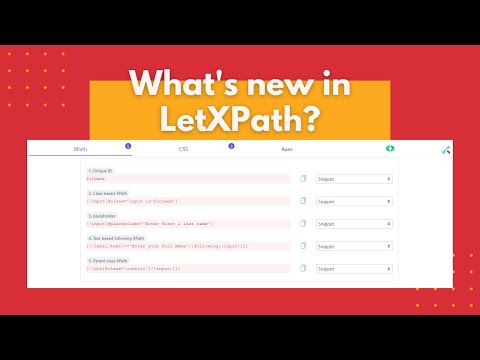
LetXPath: Your Ultimate XPath & CSS Selector Finder LetXPath is an open-source project designed to help you find XPath and CSS selectors with a single click, complete with code snippets tailored to the element type. How to Use LetXPath? 🤔 1. Install the Extension: After installation, restart your browser. 2. Navigate to the Desired Page: Open the page from which you want to extract XPath. 3. Open DevTools: Click on the inspect window or press `F12` (Function `F12`). 4. Access LetXPath: Open the LetXPath menu from the sidebar panel. 5. Get Your XPath: Click on the desired element to obtain its XPath. Features 💭 1. Single-Click XPath: Obtain the best XPath with just one click. 2. Smart XPath Generation: Generates XPaths based on direct elements or parent-child relationships. 3. Dynamic XPaths: Supports dynamic XPaths, including relationships like `following`, `following-sibling`, `preceding`, and `preceding-sibling`. 4. Axis-Based XPaths: Creates XPaths based on axes. 5. User-Enhanced Axes: Allows enhanced axes XPaths through user selection. Code Snippets 🎓 1. XPath with Driver Code: Provides driver code snippets. 2. Supported Frameworks: Currently supports Selenium (Java, Python, C#), Protractor JS, and Playwright (Node & Java). Why Choose LetXPath? 🤔 While there are many XPath tools available, LetXPath stands out by not only offering XPaths and snippets but also providing video tutorials on building the entire tool. It’s the only product that shows you how to create the tool itself. Get Started - Source Code: https://github.com/ortoniKC/LetXPath - Tutorial: https://bit.ly/2S3eksW Troubleshooting 😢 If it doesn’t work, restarting your browser should resolve most issues. Feel free to raise any bugs on GitHub. Is It Free? 😱 Yes, LetXPath is completely free and always will be. What’s in It for You? 🙋 Installing LetXPath brings you the joy of seamless XPath generation and the satisfaction of leaving a 5-star rating. Roadmap 😁 Our roadmap is extensive and full of features designed to save you time. Stay tuned for more updates! Thanks for reading this far! Install LetXPath now and start exploring—you might just fall in love with it. 😉
4.4 分 (滿分 5 分)98 個評分
詳細資料
隱私權

這位開發者就你的資料做出下列聲明:
- 除經核准的用途外,不會將你的資料販售給第三方
- 不會基於與商品核心功能無關的目的,使用或轉移資料
- 不會為了確認信用度或基於貸款目的,使用或轉移資料
支援
如有疑問或建議,請使用電腦版瀏覽器開啟這個頁面